Graphical Caregiver Interface (GCI)® Controls
Centrella® Smart+ Bed Instructions for Use (193587 REV 10) 59
Zero (New Patient)
3. Put all standard linens, blankets, pillows, and the patient pendant on the bed. A list of these items
posted near the bed may be helpful for future reference.
4. The scale is very sensitive. Make sure the bed is not touching anything that could affect the patient
weight (other beds or carts, headwall, miscellaneous drainage lines, etc.).
5. Make sure the patient is not on the bed.
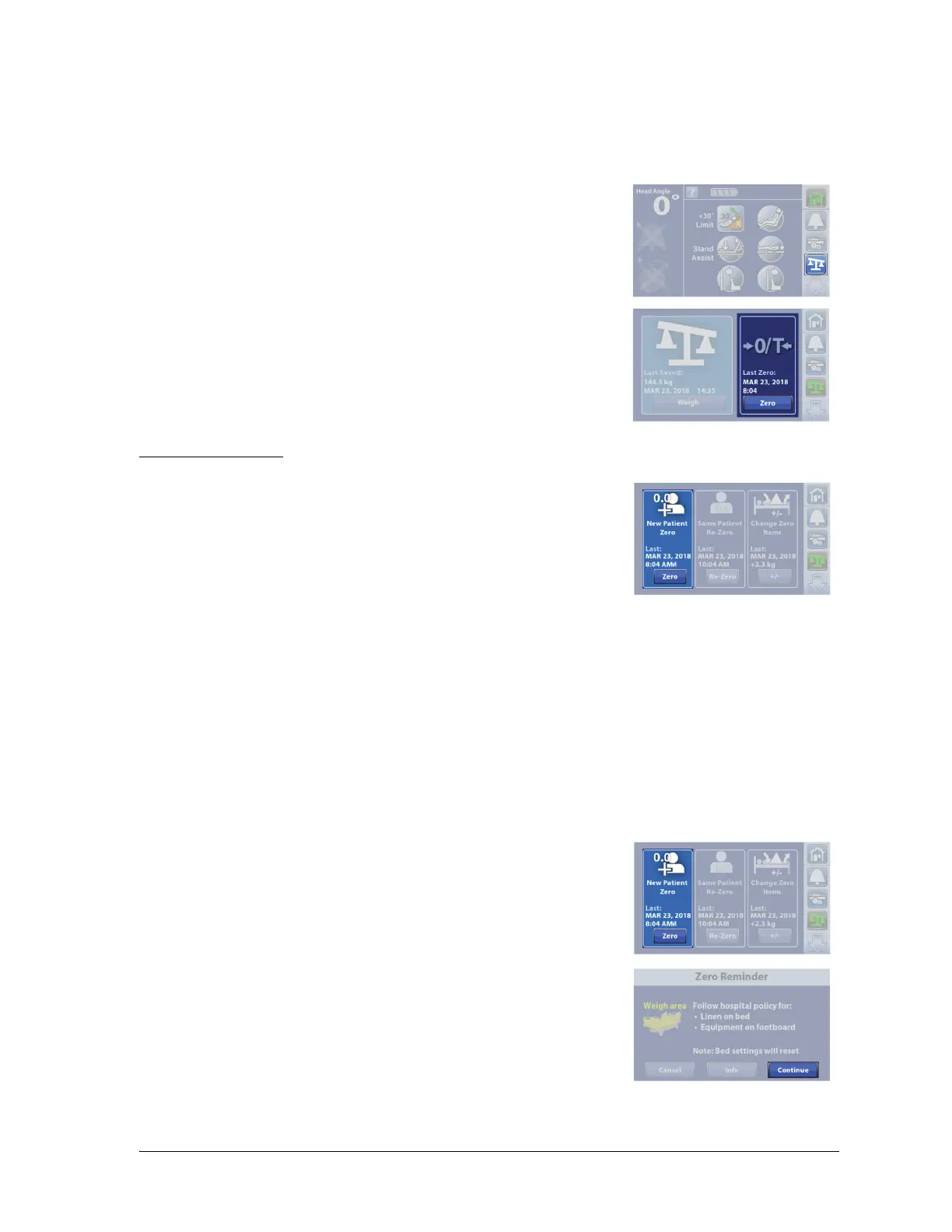
6. Press the Scale menu control.
7. Press Zero.
Use Zero every time a new patient is admitted to the bed.
The Zero control will—
• Clear the previous and current weight history
•Zero the scale
• Reset these features:
–Weight history
– Bed Exit Alert to off
– SafeView®+ Alerts option to the default protocol
– Audible indicator to the default protocol
– Alert setting to the default protocol
– Head <30° Limit to off
– Frame lockouts to off
– Comfort settings to Normal
1. Press Zero.
2. A reminder message shows. Follow the on-screen instructions, and
press Continue.
NOTES:
• Cancel will return the touchscreen to the previous screen.















 To Next Page