Mattress Information
Centrella® Smart+ Bed Instructions for Use Manual (193587 REV 10) 109
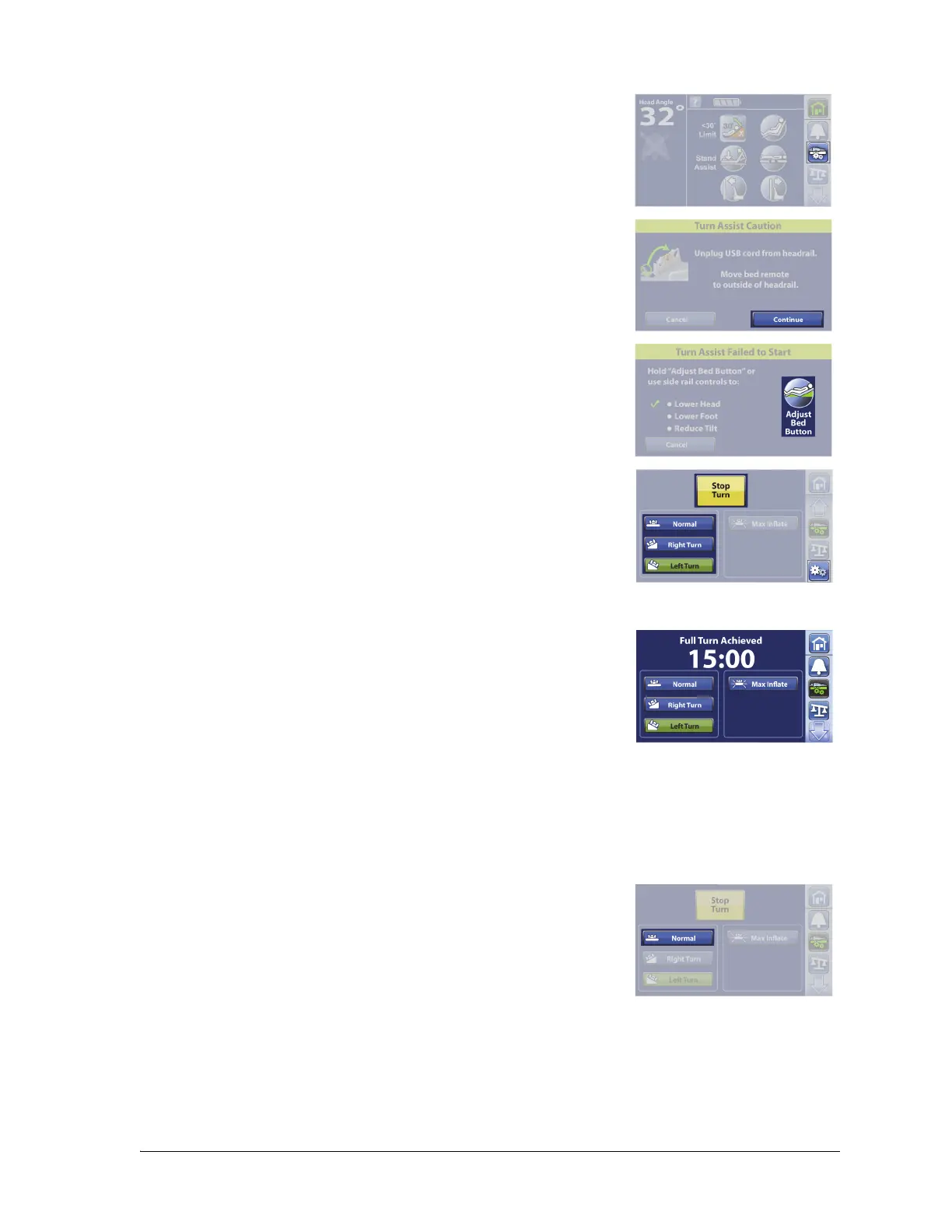
To Activate
1. Press the Mattress menu control.
2. If a personal electronic device is plugged into the USB port,
unplug the device from the siderail.
3. Press Continue.
4. If the bed is not in the correct position to do Turn Assist, this screen
will show. Press Adjust Bed Button to correct the bed’s position.
5. Press Right Turn or Left Turn. The control turns green when Turn
Assist is active.
• To stop Turn Assist, press Stop Turn.
• To hold the turn at less than the full angle, press Stop Turn
while the mattress is inflating. Press Resume to continue the
turn.
• To deactivate the turn, press Normal.
After 15 minutes in a turned position, a beep will sound and the
mattress will return to Normal mode.
Turn Assist will deactivate, the turn assist bladders will deflate, and the mattress will return to Normal
mode if—
• The siderail the patient is turning towards is lowered.
• The head section is raised above 25°.
To Deactivate Turn Assist before the Mode Times Out
• Press Normal.















 To Next Page