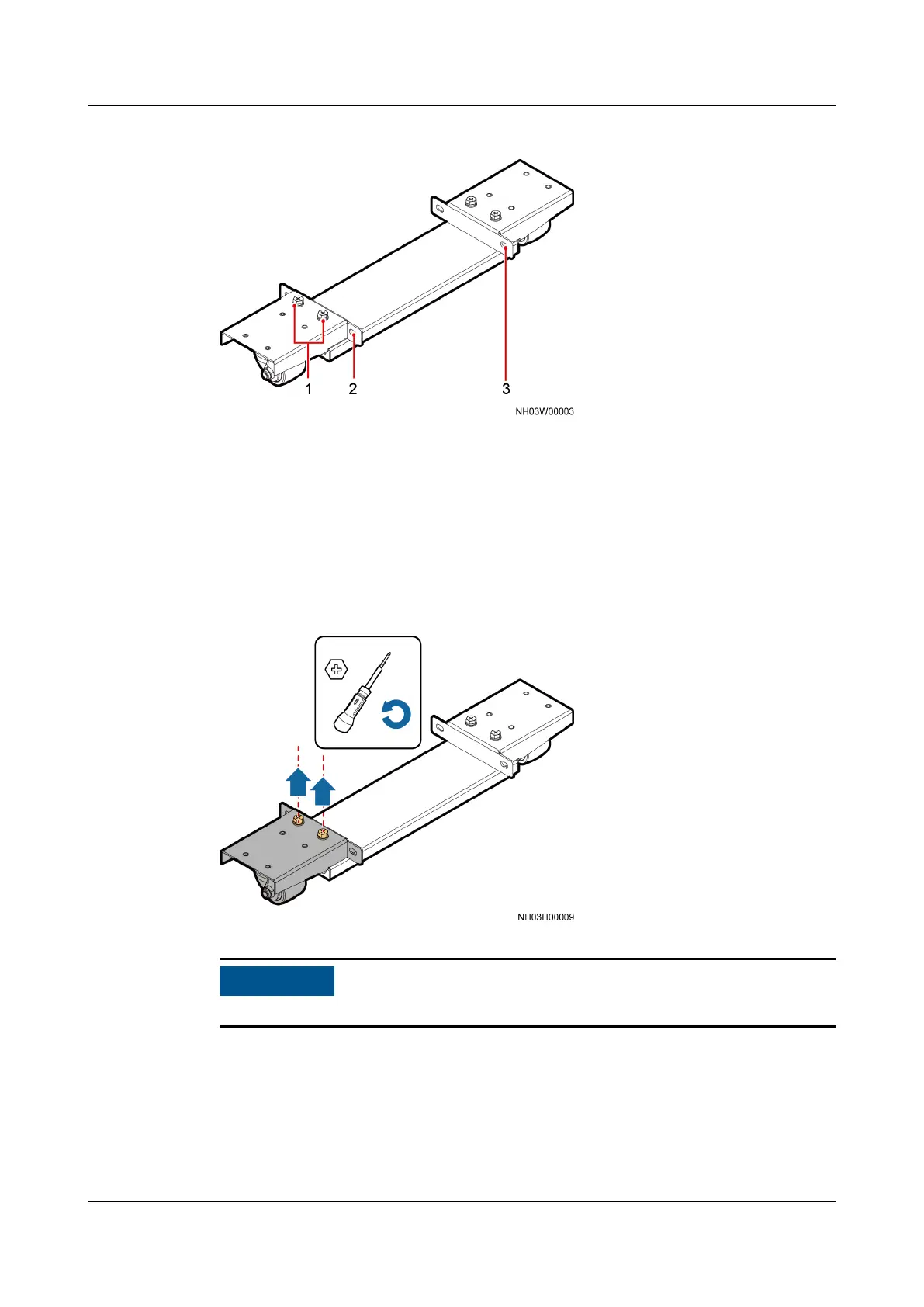
Figure 3-14 Cabinet transport tool
(1) Cover bolt (removed before
installation)
(2) Cover side hole (aligned
with the cabinet mounting
hole during installation)
(3) Cover side hole (aligned
with the cabinet mounting
hole during installation)
Procedure
Step 1 Remove the cover bolts from one end using a Phillips screwdriver and take down
the entire cover, as shown in Figure 3-15.
Figure 3-15 Removing cover bolts
Secure the transport tool to the cabinet through the hole near the cabinet door.
Step 2 Wrench an anchor bolt clockwise to elevate a cabinet, insert the end (without a
cover) of the transport tool into the bottom of the cabinet and secure the
transport tool to the cabinet, as shown in Figure 3-16.
NetCol5000-A025 In-row Air Cooled Smart Cooling
Product
User Manual (300 mm Width) 3 Installation Guide
Issue 15 (2020-12-10) Copyright © Huawei Technologies Co., Ltd. 46







 To Next Page