12-21
12. GPS OPERATION (ADVANCED)
GPS Memory
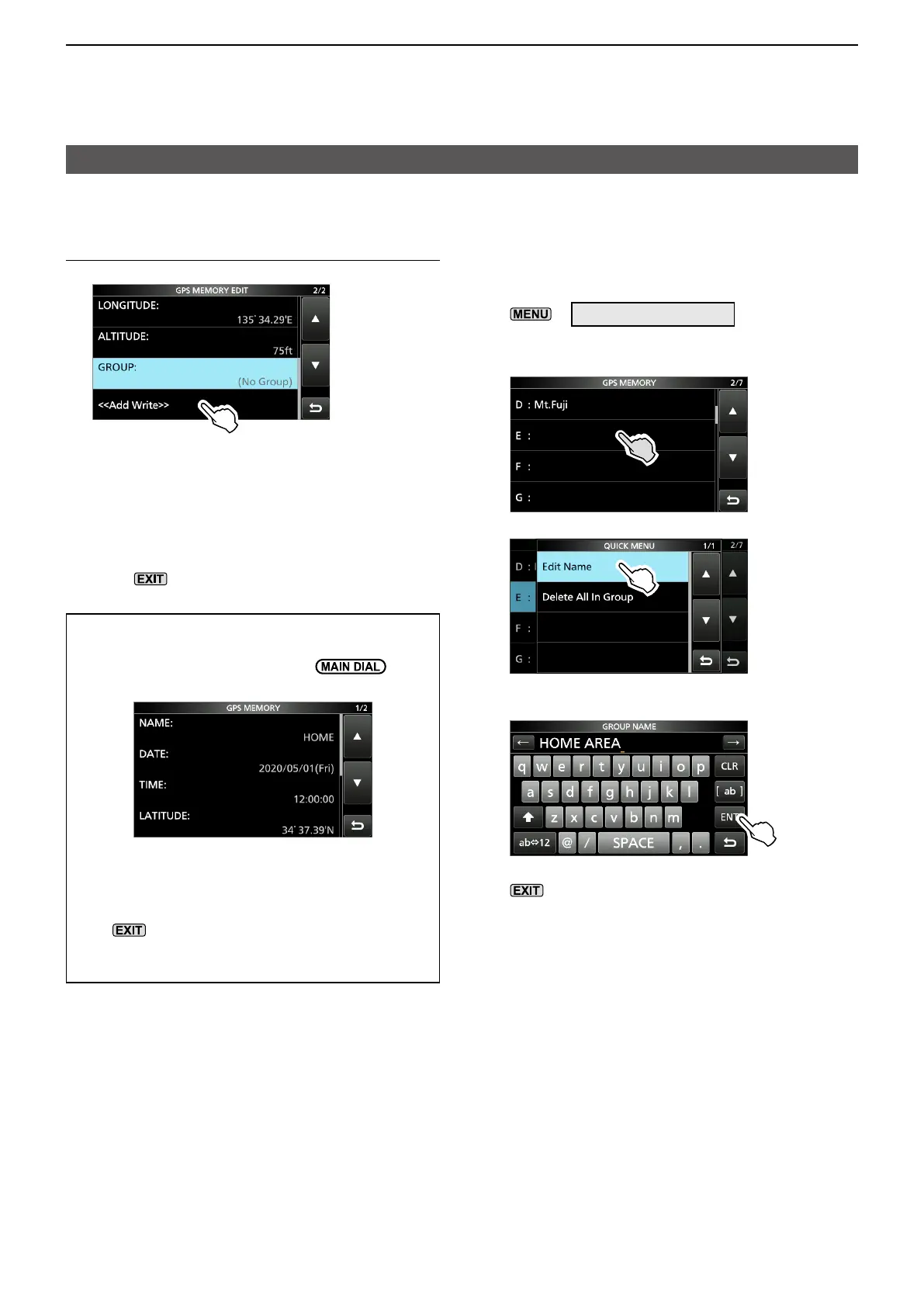
D Adding a GPS Memory
9� Writing the GPS Memory
1. Touch “<<Add Write>>.”
LIf you edit a previously added GPS Memory,
touch “<<Overwrite>>.”
2. Touch [YES].
• The data is added to the GPS memory, then
returns the selected GPS Memory group
screen.
3. To close the GPS Memory group screen,
push
several times.
TIP:
To view the entered content:
Touch the GPS Memory. Rotate
to
check the whole content.
To cancel the entered data:
While entering or editing the GPS Memory,
push
to display the confirmation dialog.
Touch [YES] to cancel entering, then returns to
the GPS Memory group screen.
DEntering the GPS Memory group name
You can enter a name for each GPS Memory
group.
1. Open the GPS MEMORY screen.
»
GPS > GPS MEMORY
2. Touch the group that the name to be entered
for 1 second.
3. Touch “Edit Name.”
4. Enter a group name of up to 16 characters.
5. After entering, touch [ENT].
6. To close the GPS MEMORY screen, push
several times.





 To Next Page