14-28
14. D-STAR OPERATION (ADVANCED)
Entering new information into the repeater list
DEditing repeater data
You can edit repeater data. This is useful when
already-entered data is incorrect, has changed,
or some data needs to be added to the list.
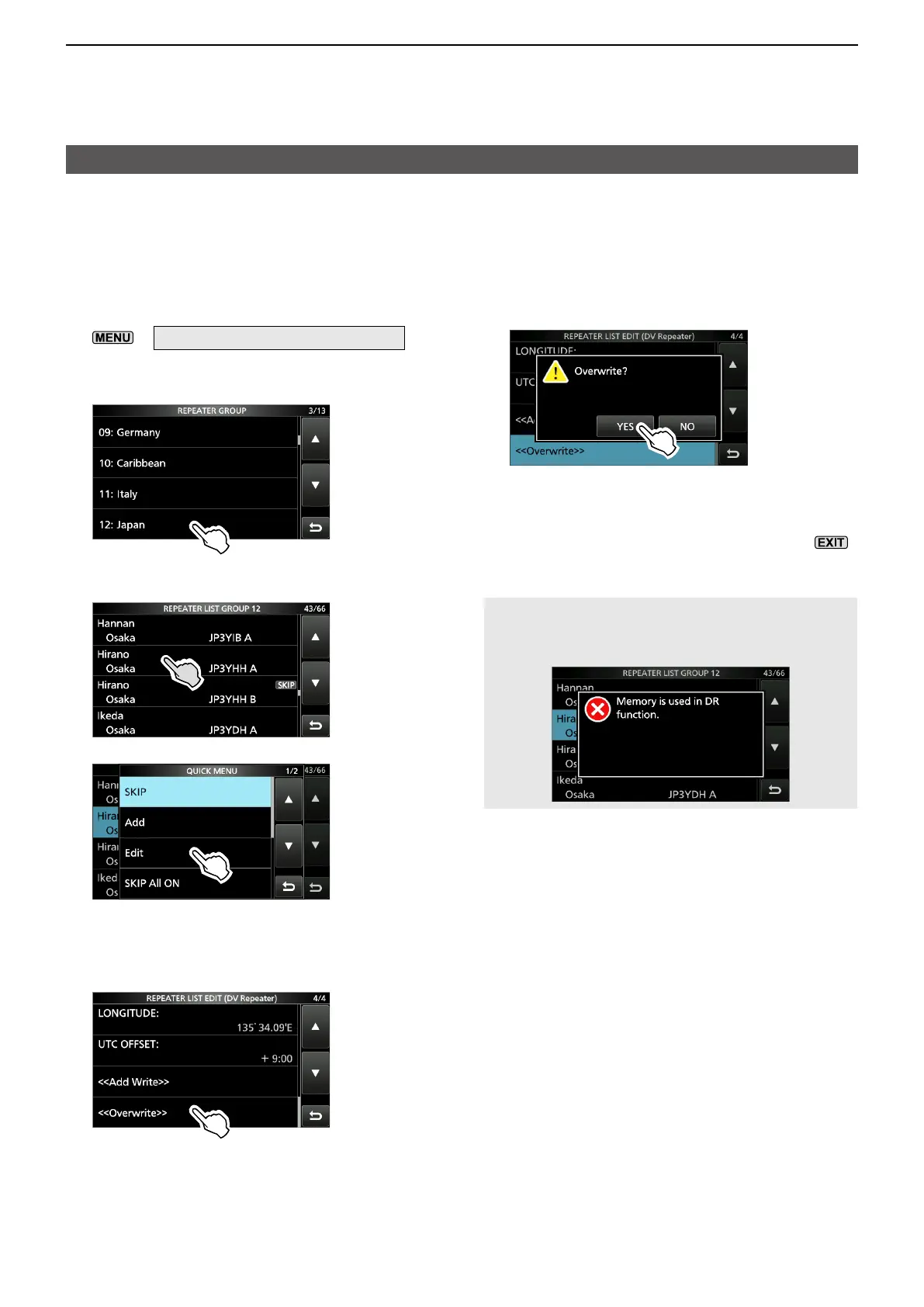
1. Open the REPEATER GROUP screen.
»
2 > DV MEMORY > Repeater List
2. Touch a repeater group where the repeater
you want to edit is listed. (Example: 12: Japan)
3. Touch a repeater that you want to edit for 1
second. (Example: Hirano)
4. Touch “Edit.”
• The REPEATER LIST EDIT screen is displayed.
5. Touch an item, then edit it.
LSee pages 14-25 ~ 14-27 for details.
6. After editing, touch “<<Overwrite>>.”
• The confirmation dialog is displayed.
7. Touch [YES].
• The edited contents are saved into the repeater
list, and returns to the selected repeater group
screen.
8. To close the Repeater List screen, push
several times.
NOTE: The currently selected repeater on the
DR screen cannot be edited. To edit the repeater,
select another repeater on the DR screen.





 To Next Page