15-20
15. ABOUT THE DV GATEWAY FUNCTION
Access Point mode operation
D Making a Gateway call through the Access Point transceiver
When using the DR function (Continued)
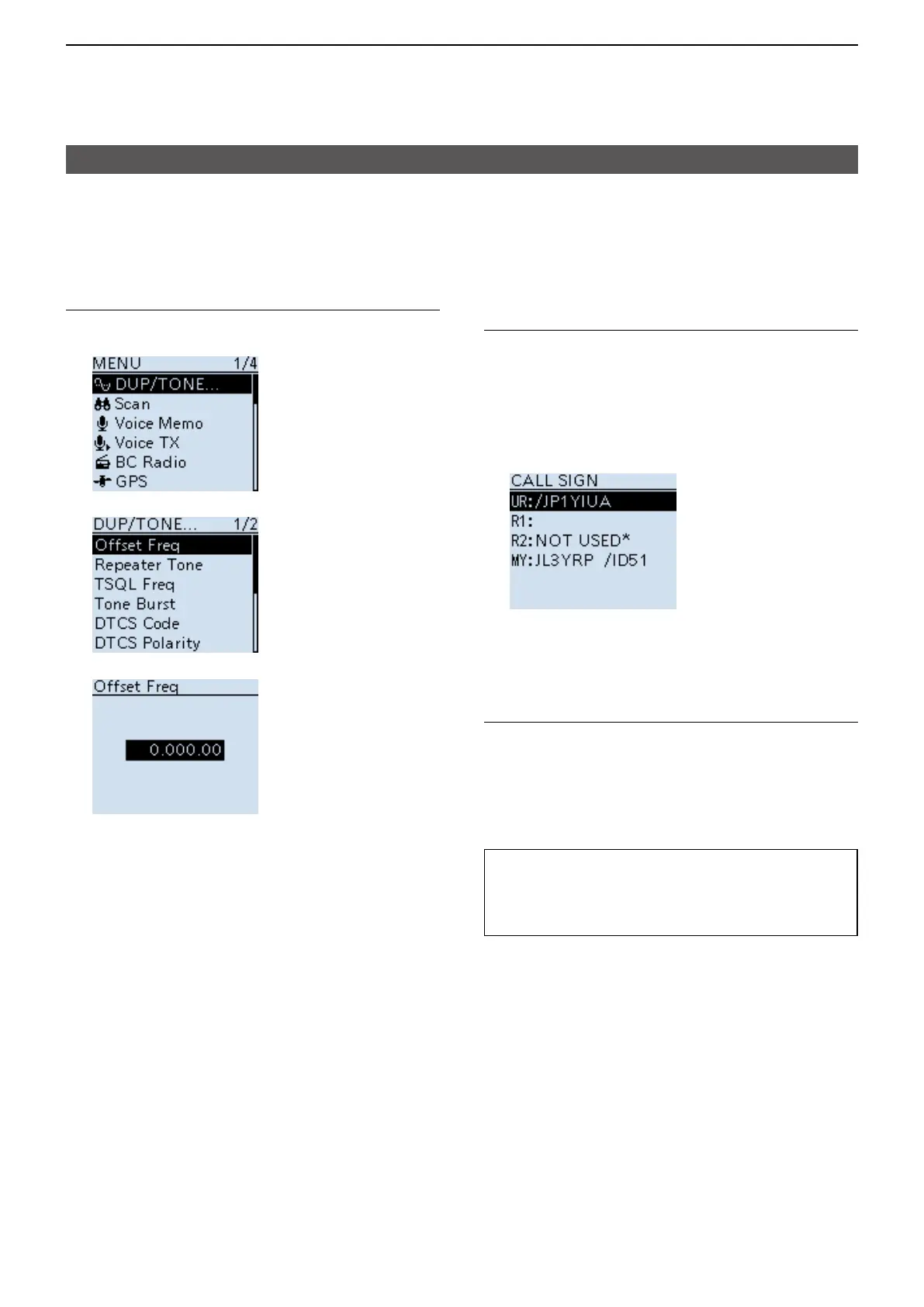
Step 5� Set the frequency offset
1. Push [MENU].
2. Select “DUP/TONE....”
3. Select “Offset Freq.”
4. Set to “0.000.00.”
5. Push [MENU].
• Returns to the standby screen.
Step 6� Set “UR” to the destination station
call sign
1. Hold down [CS] for 1 second to enter the
Operating Call Sign Select mode.
2. Select “UR.”
3. Set the destination repeater or destination
station’s call sign.
LIn the Access Point mode, you can select the
“CQCQCQ” but cannot make a call.
4. Push [MENU].
• Returns to the standby screen.
7� Hold down [PTT] to transmit
1. Hold down [PTT] to transmit.
2. Release [PTT] to receive.
LIf you do not receive a reply, see page 15-24 for
tips on how to solve the problem.
TIP: When the settings are saved into a
memory channel, you can quickly select
them. Read the Remote D-STAR transceiver’s
instruction manual for details.





 To Next Page