Section 1 Basic Printer Functions 1-10
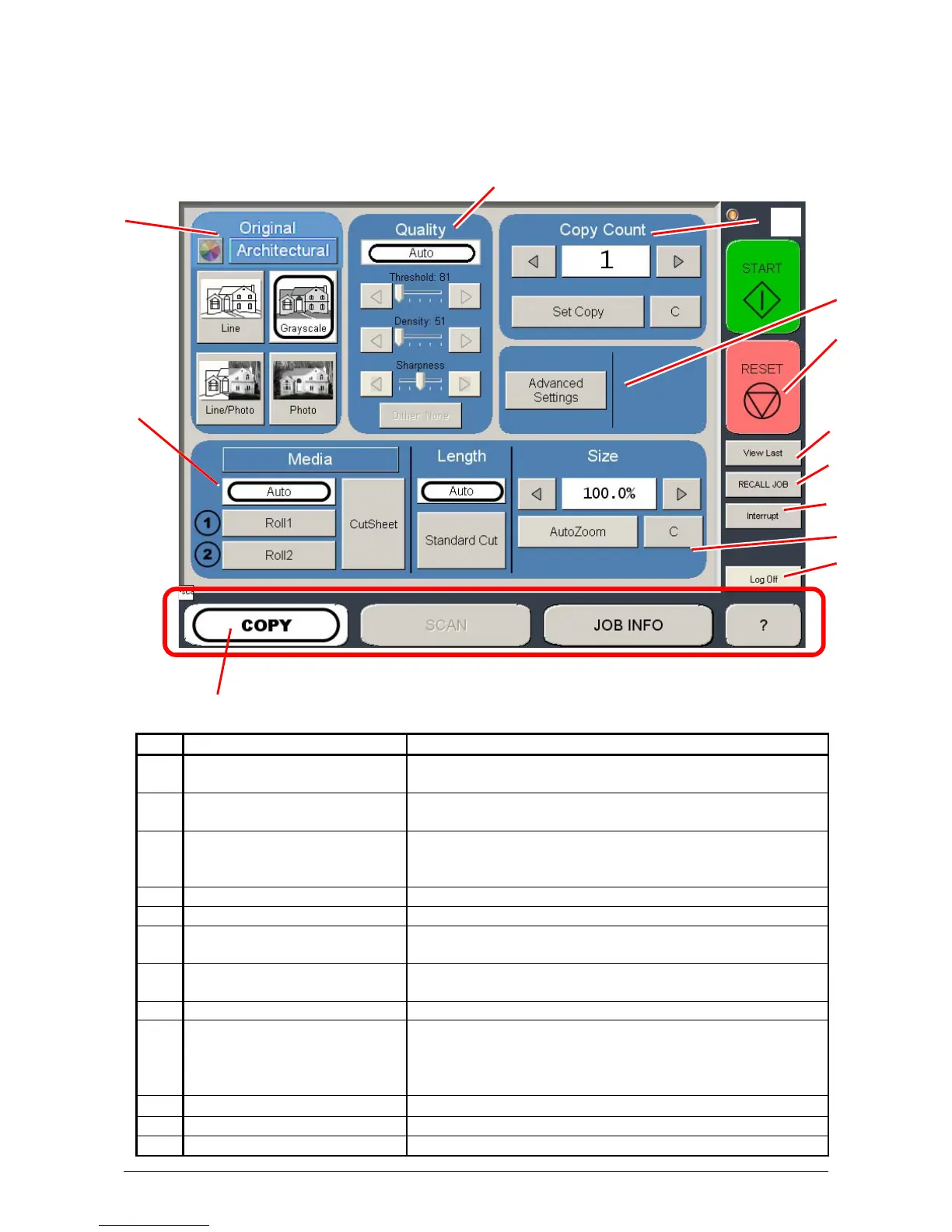
1. 5. 3 Operator Panel
Copy Mode
No. Name Function
1 Mode Selects the “Mode” of the system. (Copy Mode for this
screen shown)
2 Media Displays Media type and quantity installed. Includes Cut
Sheet Functions and Media Selection
3 Original Type User Selects the type of original to copy. Also select
Eng/Arch Modes here. (Color Copy is selected here if
enabled)
4 Quality Select Auto or Manual Image adjustments
5 Copy Count Select the quantity of prints and sets designation.
6 Advanced Settings Invert , mirror, stamps, folds, and edge adjustments
preformed / displayed in this button (sub screen)
7 Reset Clears the image buffer and resets the system to default
settings.
8 View Last The last scan / job can be viewed
9 Recall Job Images can be recalled from the last job for reprint.
Please note that a time limit may be set to recall or this
feature may be disabled by the administrator to prevent
any unauthorized copies.
10 Interrupt Pauses the network print jobs to print any copy jobs
11 Zoom Manual and automatic zoom ratios set.
12 Log Off Log off current user if Accounting enabled
3
2
4
5
10
11
7
1
8
9
12
6



 To Next Page