Section 4 Scan Mode - Monochrome 4-2
1. 0 Scan Mode - Monochrome
1.1 Main Screen
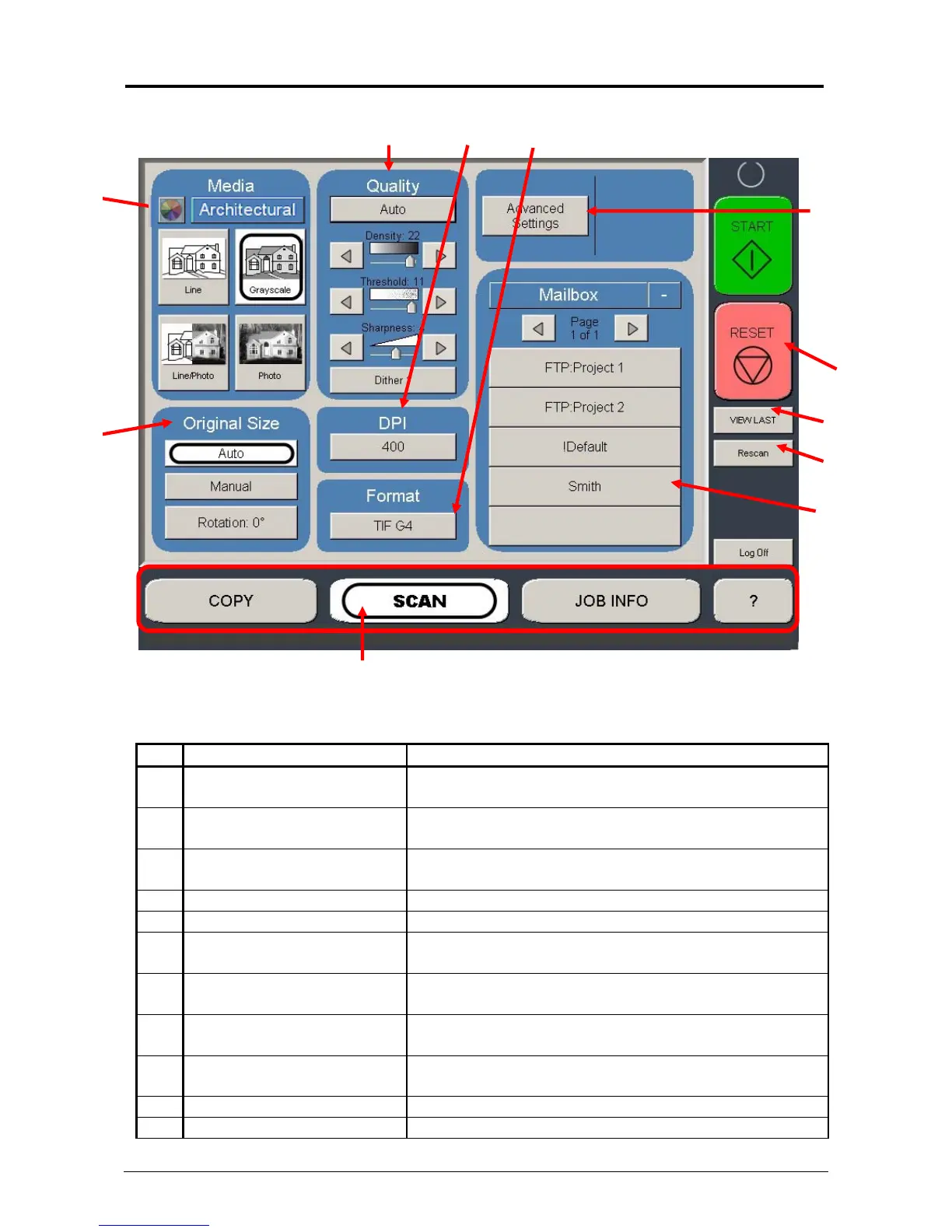
No. Name Function
1 Mode Selects the “Mode” of the system. (Scan Mode for
this screen shown)
2 Original Size Use automatic settings or manually set width, length
and rotation of the images.
3 Original Type User Selects the type of original to scan. Also select
either Eng/Arch Mode here.
4 Quality Select Auto or Manual image adjustments
5 DPI Scroll through final image resolution. (DPI)
6 Format Scroll through formats the scanned file will be saved
to.
7 Advanced Settings Invert, mirror, stamps, and edge adjustments
preformed / displayed in this button (sub screen)
8 Reset / Stop Resets the system to default settings. Stops a scan
in process
9 Mailbox Select where the image will be stored after the scan
(KIP printer, FTP, LAN PC etc).
10 View Last View the last scanned image
11 Rescan Rescans the last image (replaces)
1
2
3
4 6
7
8
5
10
9
11



 To Next Page