HANDLING SERVICE CENTER ATTACHMENTS AND OPTIONS
6-32
ACTION WHEN MACHINE DOES NOT MOVE BECAUSE OF FAILURE IN
PROXIMITY SWITCH 6
If it is impossible to swing or drive the machine, or operate the work equipment even when the service center is
stowed, there is probably a problem with the proximity switch. Check the proximity switch as follows.
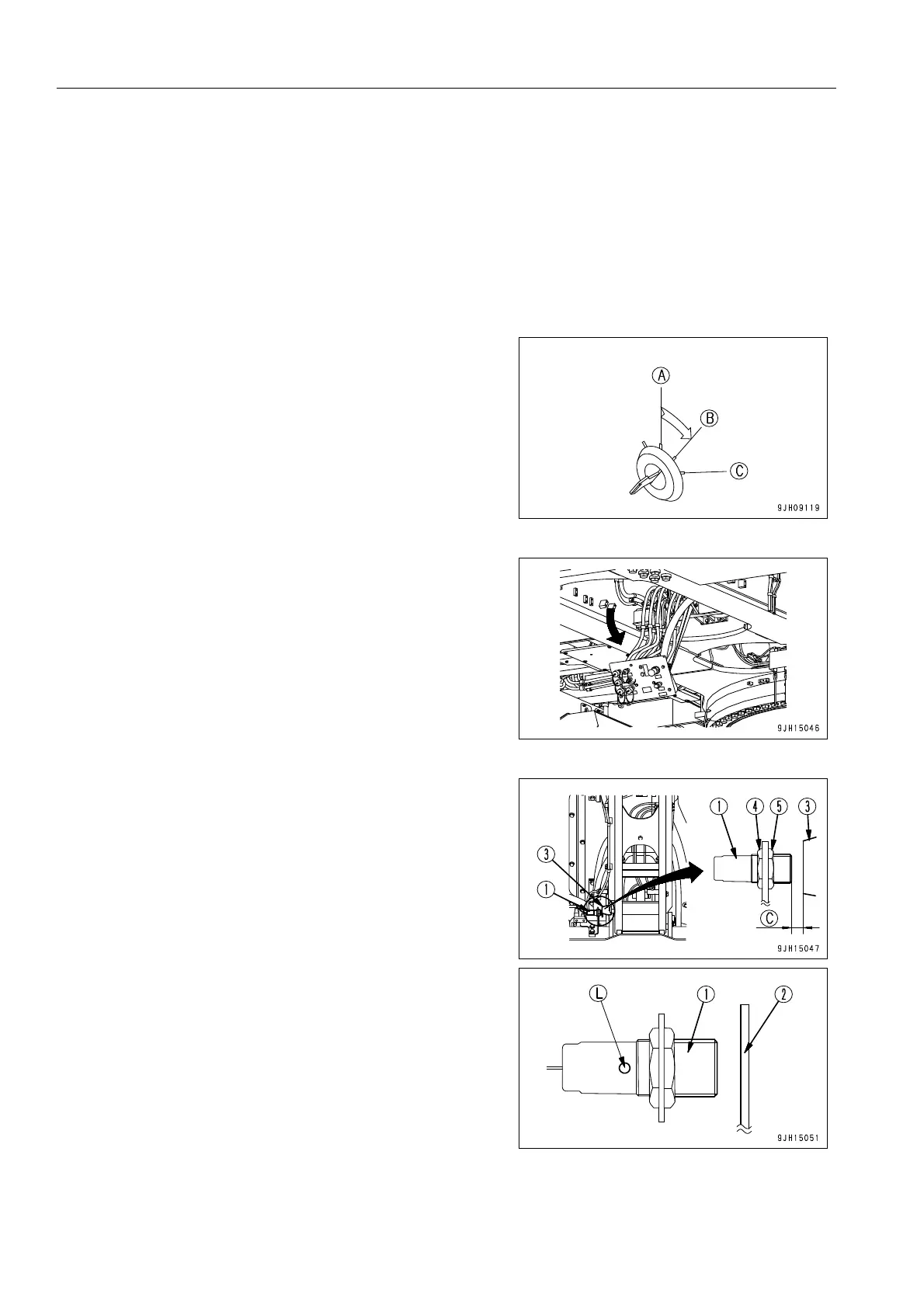
Check Proximity Switch 6
1. Stop the engine.
2. Turn the starting switch key to the ON (B) position.
3. Lower the service arm. For details, see “When Lowering
Service Arm (Setting to Position for Use) (6-17)“.
4. Cover the front of proximity switch (1) installed to the ser-
vice arm with steel plate (2) and check that actuation dis-
play lamp (L) lights up.
q If actuation display lamp (L) lights up
Proximity switch (1) is working properly, so adjust as
follows to make actuating display lamp (L) light up cor-
rectly.
q If actuation display lamp (L) does not light up
There is probably a problem with proximity switch (1),
so change the combination of the connectors. For
details, see “Action When Proximity Switch Has Failed
(6-33)“.











 To Next Page