MACHINE OPERATIONS AND CONTROLS OPERATION
3-200
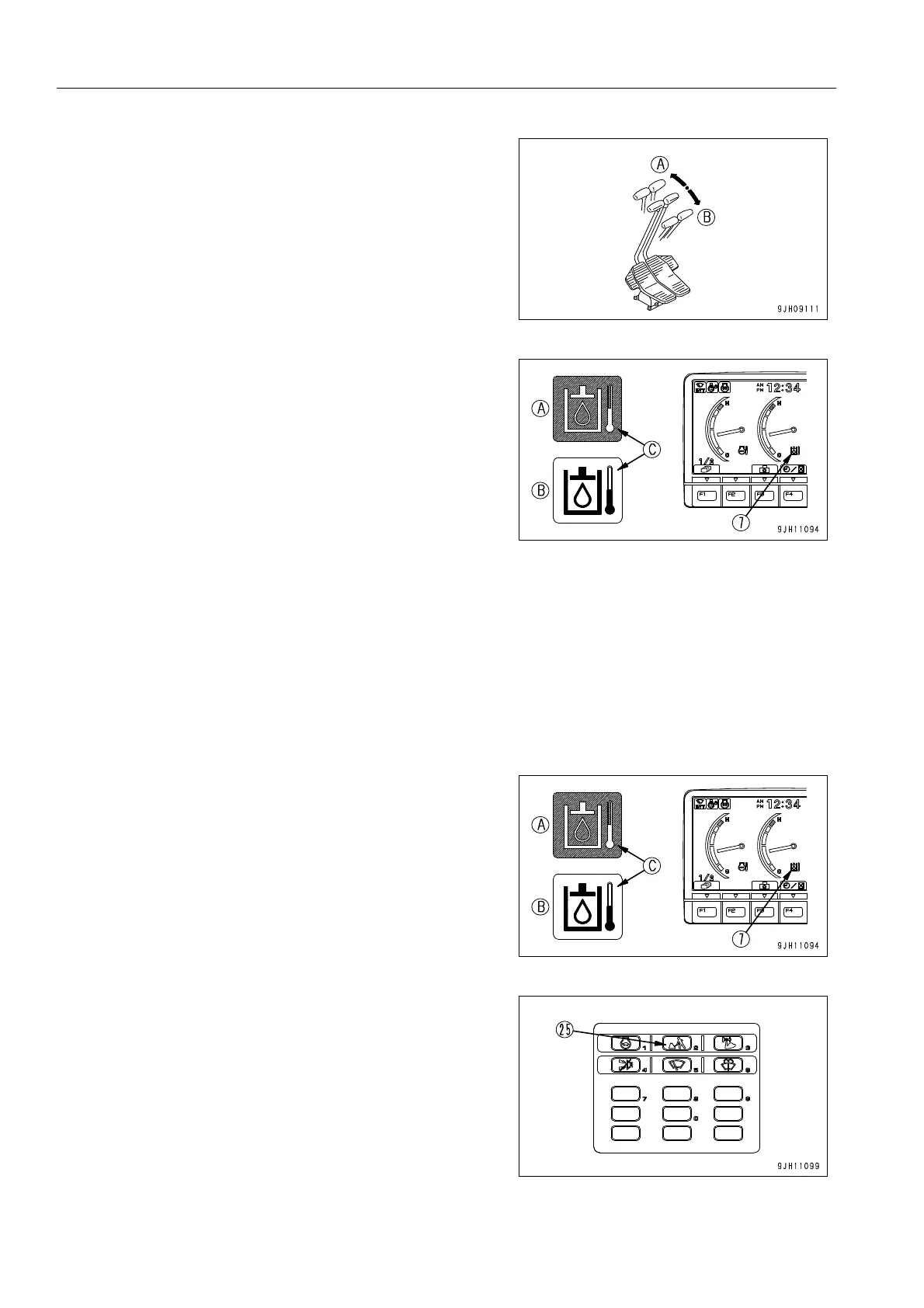
q Travel (Lo) operation FORWARD (A) ←→ REVERSE (B)
18. Check that hydraulic oil temperature monitor (7) is display-
ing the correct temperature.
If the hydraulic oil temperature monitor is not displaying the
correct temperature (it is displaying low temperature),
repeat Steps 6 to 10 until the display is the correct temper-
ature.
(A) Display when temperature is correct: Monitor back-
ground (C) is blue
(B) Display when temperature is low: Monitor background
(C) is white
If the hydraulic oil temperature monitor displays the correct temperature, the hydraulic equipment warm-up opera-
tion is completed.
After confirming that the hydraulic oil temperature monitor displays the correct temperature, carry out the following
procedure.
Operation After Completion Of Warm-Up Operation 3
1. Check that hydraulic oil temperature monitor (7) displays
the correct temperature.
q (A) Display when temperature is correct: Monitor back-
ground (C) is blue
q (B) Display when temperature is low: Monitor back-
ground (C) is white
2. Press working mode selector switch (25) on the machine
monitor and switch to the mode to be used.
For details of the procedure for selecting the working
mode, see “Working Mode Selector Switch (3-31)“.











 To Next Page