OPERATION DETAILED CONTROLS AND GAUGES
3-31
Monitor Switches Portion 3
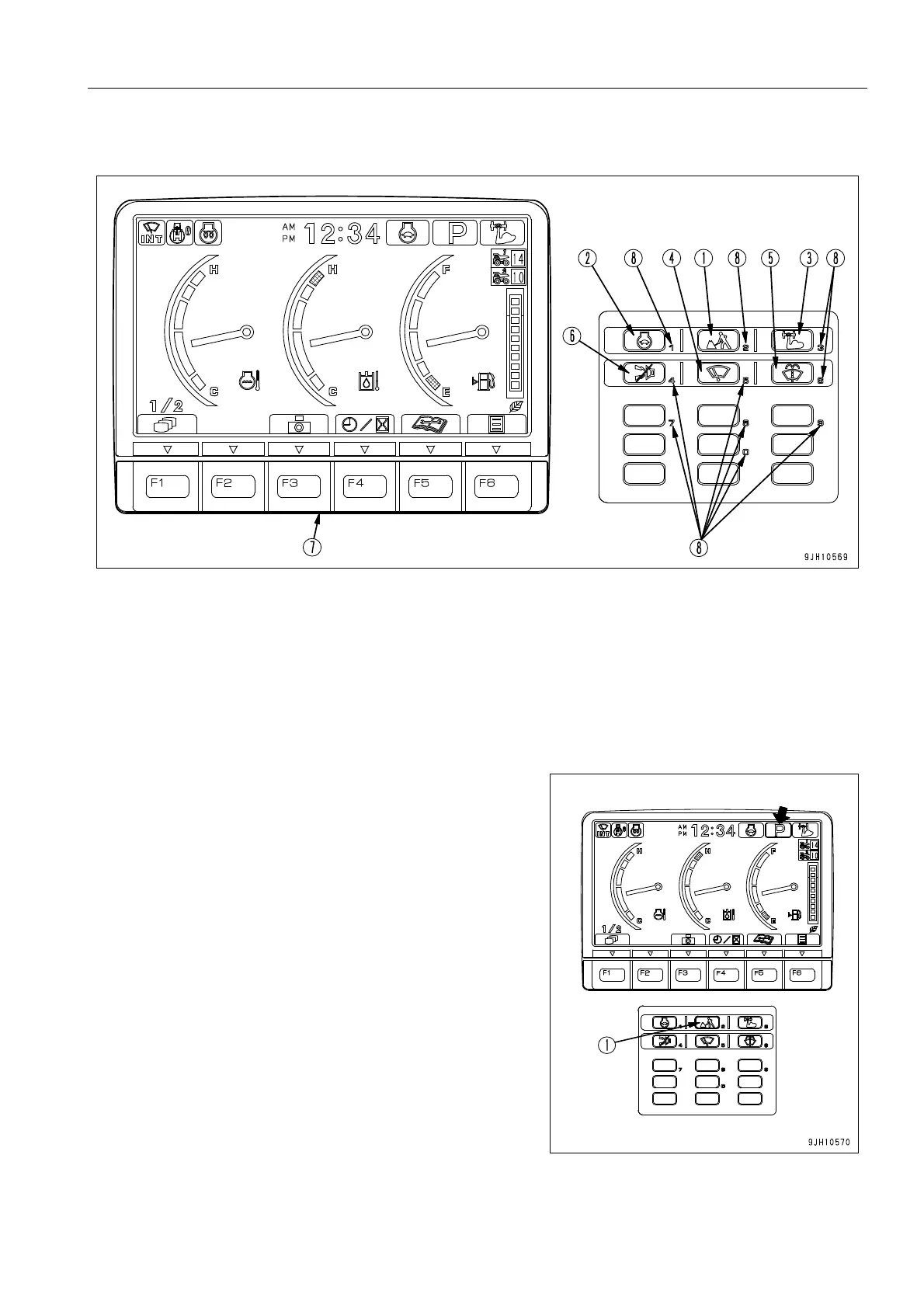
Working Mode Selector Switch
This switch (1) is used to set the movement or power of the
work equipment. By selecting the mode to match the type of
operation, operations become easier.
P mode: Heavy -duty operation
E mode: Operation with emphasis on low fuel consumption
q When the monitor first appears, it is automatically set to the
mode in use when it was started the previous time.
q When switch (1) is pressed, the working mode selection
screen list is displayed.
For each setting mode, P or E is displayed on the pilot
monitor at the top right of the monitor display.
q If it is desired to set so that the system automatically starts
in P or E mode (default option setting) when the engine is
started, please ask your Komatsu distributor to change the
setting.
(1) Working mode selector switch (5) Window washer switch
(2) Auto-deceleration switch (6) Alarm buzzer stop switch
(3) Heavy lift switch (7) Function switch
(4) Wiper switch (8) 10-key buttons











 To Next Page