OPERATION DETAILED CONTROLS AND GAUGES
3-39
Handling Function Switches 3
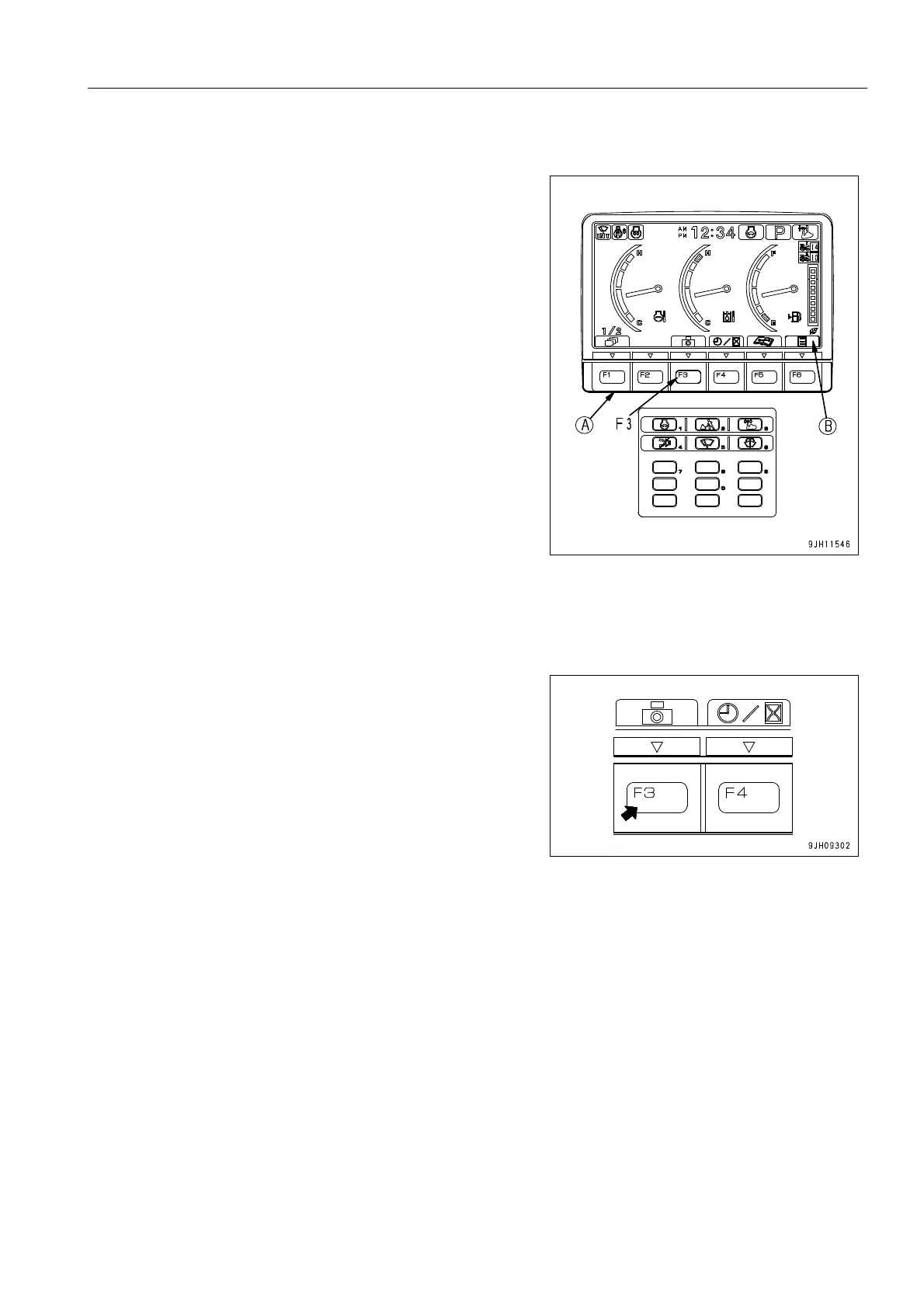
q The function switches (A) at the bottom of the monitor dis-
play consist of 6 switches (F1 - F6). The function of each
switch differs according to the content of each screen.
q The function of switches (A) on each screen can be con-
firmed by guidance icons (B) displayed on top of each
switch.
q If there is no display in guidance icon (B), even if switch (A)
is pressed, it will not function.
q Even if guidance icon (B) is pressed, it will not function.
Press switch (A) immediately below the guidance icon dis-
play to operate the function.
The operation of the function switches if the initial screen is the standard screen is as follows.
Camera Screen Selector Mode Switch 3
On machines with a camera (if equipped), press switch F3 to
switch to the camera screen display.
q On machines not equipped with a camera, the guidance
icon on top of switch F3 is not displayed.
Even if switch F3 is pressed, the screen will not switch to
the camera screen display.
q When cameras are installed (if equipped), a total of 3 cam-
eras is installed at the rear left, rear center, and the rear
right of the machine.
q If you want to install a camera, please consult your
Komatsu distributor.











 To Next Page