Getting ready
2
IC-206 2-5
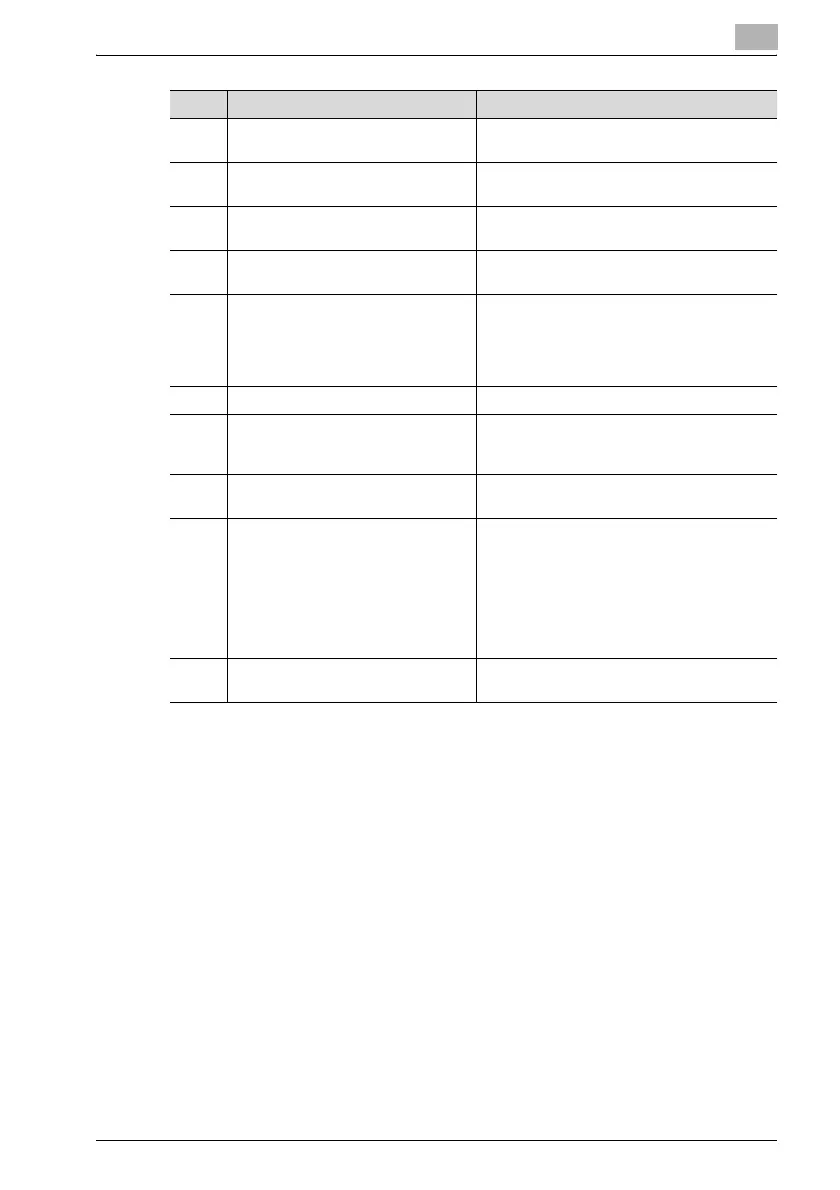
12 [Density] key Press to select the scanning density of copies
and fax documents.
13 [Quality] key Press to select "TEXT", "PHOTO" or
"TEXT/PHOTO" as the document quality.
14 [Zoom] key Press to specify whether to enlarge or reduce
the image when copying.
15 [Paper] key Press to select the paper drawer that is to be
used.
16 [Function] key/indicator Press to specify settings for advanced copy
operations and useful fax transmission/recep-
tion functions, such as copying with a binding
margin added and sending/receiving confi-
dential documents.
17 [Finishing] key/indicator Press to select a copy Finishing function.
18 [Combine Original] key/indicator Press to specify settings for printing multiple
document pages (2 or 4 pages) on a single
sheet of paper (2in1 or 4in1 printing).
19 [Confirm] key Press to view the counters or transmission re-
sults, or to print a transmission result report.
20 [Utility] key Press to specify settings in Utility mode.
MACHINE SETTING, PAPER SOURCE SET-
UP, CUSTOM SIZE MEMORY, USER MAN-
AGEMENT, ADMIN. MANAGEMENT, COPY
SETTING 1, COPY SETTING 2, DIAL REGIS-
TRATION, FAX REGISTRATION, FAX TX OP-
ERATION, FAX RX OPERATION,
REPORTTING, SCAN SETTING
21 [Mode Memory] key Press to register specified copy programs and
recall them.
No. Part name Description












 To Next Page