Troubleshooting
13
IC-206 13-3
13 Troubleshooting
This chapter provides details on the causes for error messages to appear
and the various operations to correct the problem.
13.1 Main error messages and their remedies
If a printing error occurs, the "Caution" indicator lights up and the message
"Check Printer Mode" appears in the machine’s display. In this case, press
the [Printer] key to display the Printer mode screen.
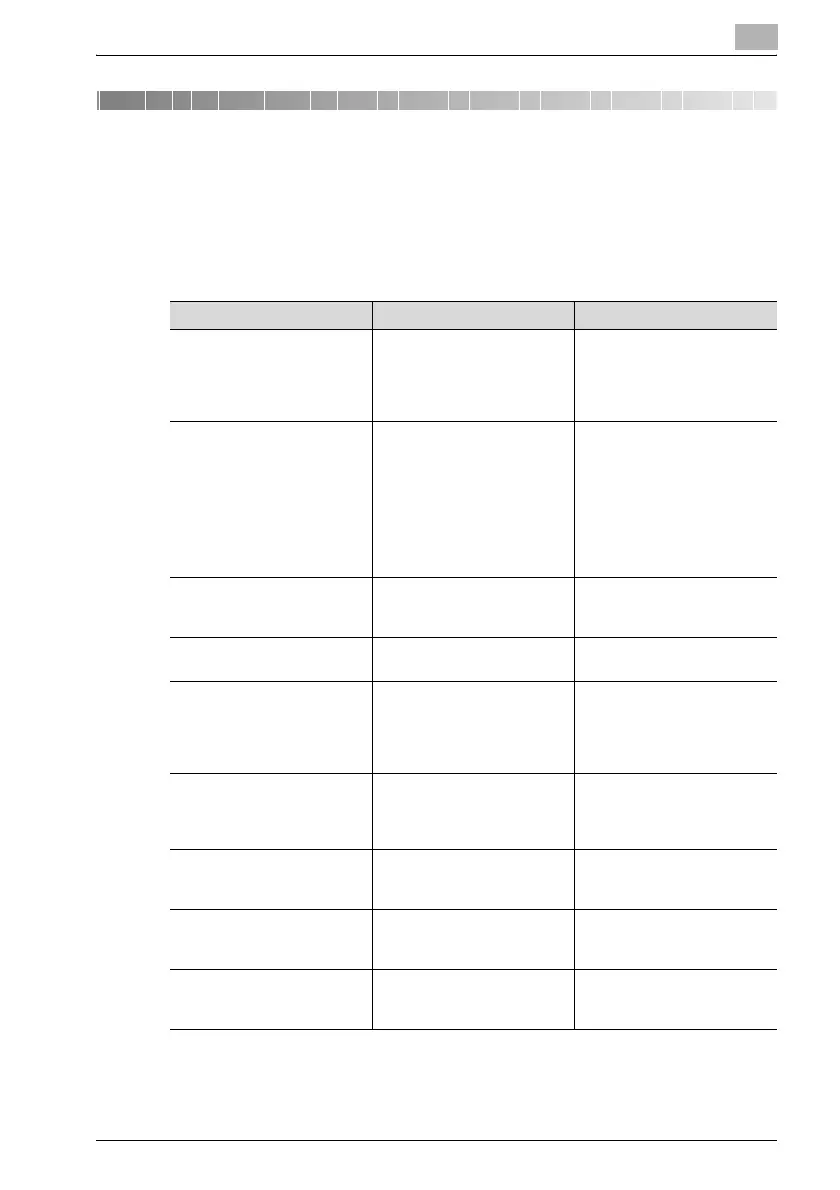
Message Cause Remedy
COMMUNICATION ERROR
XXXX server
Communication with the serv-
er is not possible because of
some problem in the machine
or the condition of the net-
work or server.
Check the transmission/re-
ception results report.
Consult with the network ad-
ministrator.
CANNOT CONNECT
XXXX server
A connection to the server
cannot be established.
Check that the Ethernet cable
is correctly connected. (See
p. 2-16.) Check the parame-
ters settings on the "E-MAIL
SETTING 1", "E-MAIL SET-
TING 2" and "NETWORK
SETTING" menus. Consult
with the network administra-
tor.
CANNOT GET IP
XXXX server
The IP address could not be
assigned by the DNS or DHCP
server.
Consult with the network ad-
ministrator.
DISCONNECT
XXXX server
The connection to the server
was cut.
Consult with the network ad-
ministrator.
WRONG PASSWORD
XXXX server
The password is incorrect, so
the machine could not log on
to the server.
For the POP3 server, check
the settings on the "E-MAIL
SETTING 2" menu. Consult
with the network administra-
tor.
MEM. FULL/TX CANCEL While sending e-mail, the size
of the image data has exceed-
ed the capacity of the memo-
ry.
Retrieve the transmission data
stored in the memory.
MEMORY FILE FULL While sending e-mail, the
maximum number of stored
files was used.
Retrieve the transmission data
stored in the memory.
SERVER MEMORY FUL
SMTP Server
The memory of the SMTP
server has become full while
sending e-mail.
Consult with the network ad-
ministrator.
FTP SERVER ERROR While uploading scan data,
the data could not be correct-
ly uploaded to the FTP server.
Consult with the network ad-
ministrator.











 To Next Page