Using PageScope Web Connection
12
IC-206 12-55
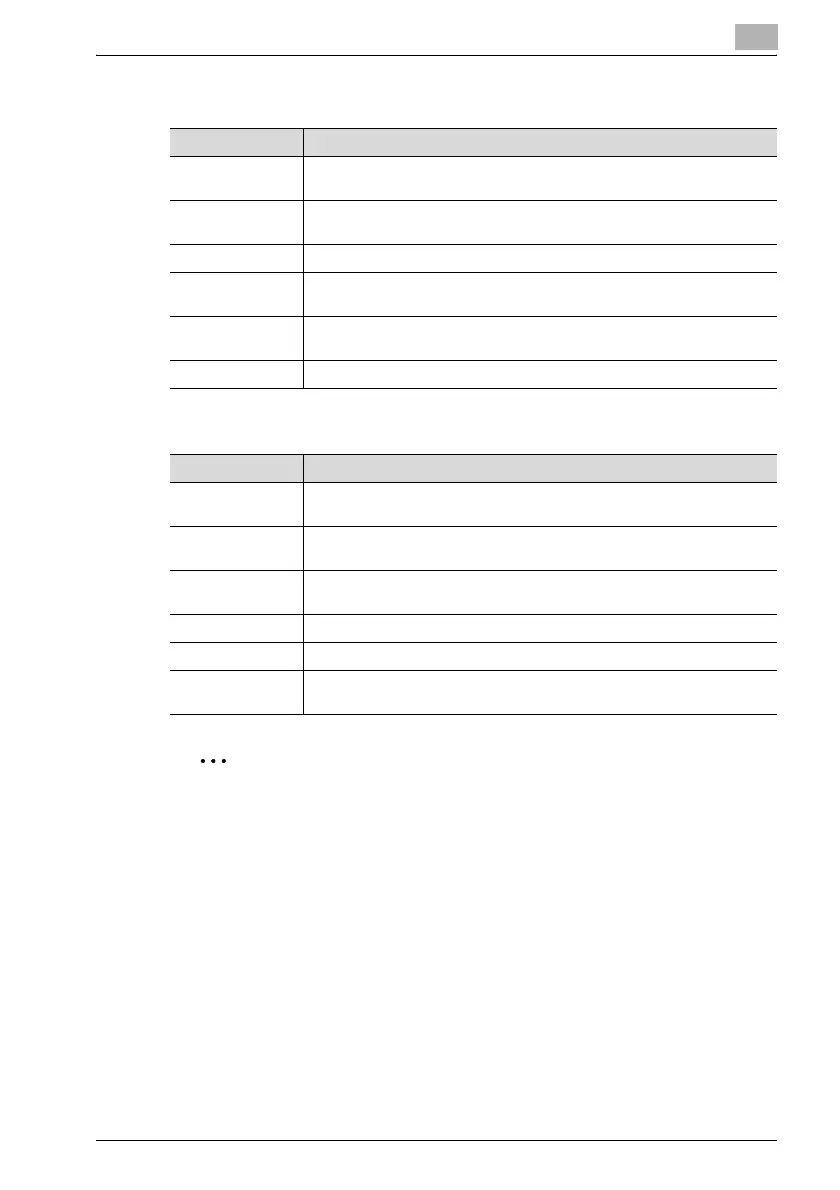
When "Fax" is selected
When "E-Mail" or "LDAP Search" is selected
2
Note
Settings for Internet faxing are applied when a transmission is specified
using the procedure for Internet fax transmissions. The settings are not
applied when a transmission is specified using the procedure for Scan to
E-mail transmissions. For details on Internet faxing, refer to the user
manual for fax kit FK-506.
When "Group Dial" is selected
Group dial settings are specified using the same procedure as when "Group
Dial Setting" on the Scan tab is clicked. For details, refer to "Scan tab —
Group Dial Setting" on page 12-30.
Item Description
Destination Name Type in the name of the recipient. The display name appears in the control
panel display.
Destination
Number
Type in the fax number of the recipient. (maximum 30 characters)
F Code (SUB) Type in the SUB address of the F-code. (maximum 20 characters)
F Code Password
(SID)
Type in the password for the F-code. (maximum 20 characters)
Transmission
Speed
Select the transmission speed.
Batch Time To specify a batch transmission, type in the transmission time.
Item Description
Destination Name Type in the name of the recipient. The display name appears in the control
panel display.
Destination Ad-
dress
Type in the e-mail address of the recipient. (maximum 64 characters)
If "LDAP Search" was selected, this information is already entered.
Basic Mode/Ad-
vanced Mode
Select the e-mail mode (basic mode or advanced mode) to be used for
sending documents as Internet faxes.
Max TX Size Specify the maximum size for transmissions with advanced mode.
Max Resolution Specify the maximum resolution for transmissions with advanced mode.
Coding Mode Specify the maximum compression encoding method for scan data to be
sent with advanced mode.











 To Next Page