Troubleshooting
13
IC-206 13-5
13.2 Troubleshooting
Network printing
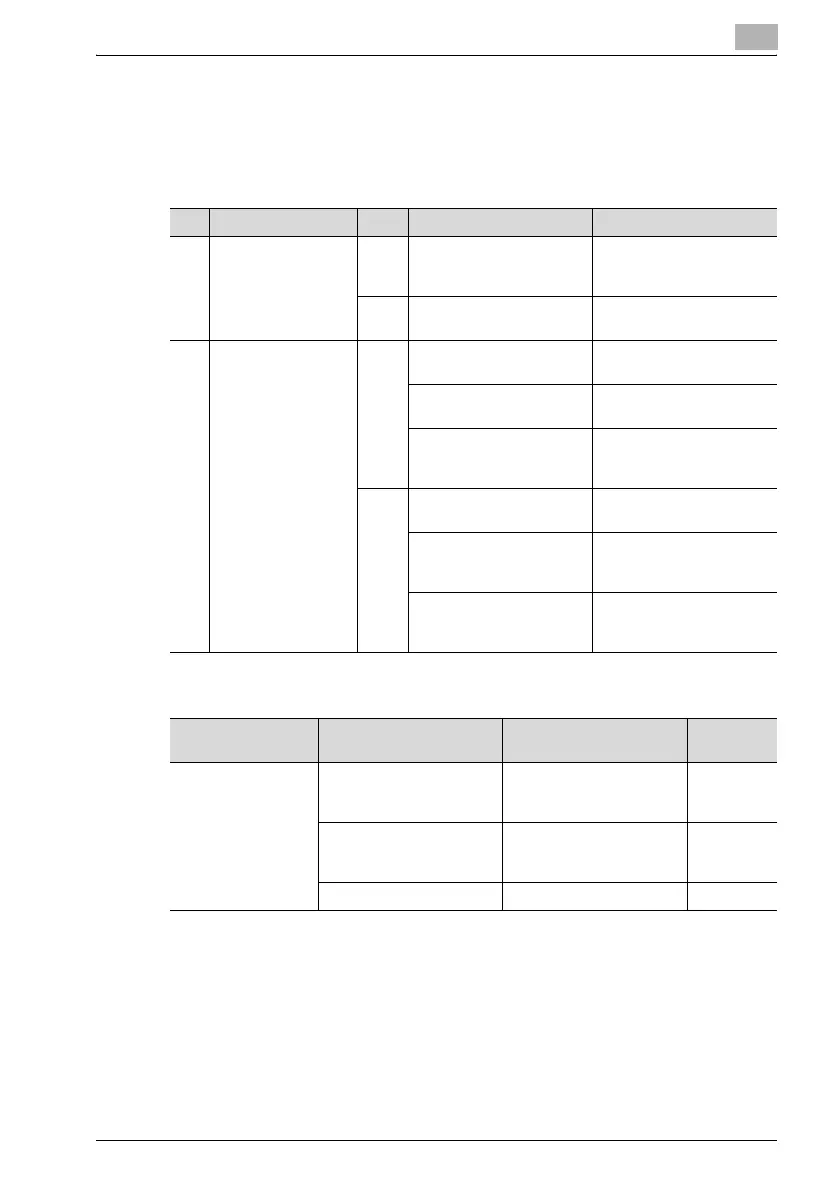
If network printing cannot be performed, check for the following.
Scan to E-mail
Problem Cause Remedy
1 Did the machine re-
ceive the print job?
Yes A machine error (out of pa-
per, out of toner, etc.) oc-
curred.
Check the machine status
and correct the error.
No The data has not been re-
ceived.
Continue with 2.
2 Is there a response
from pinging sent
from the computer to
the controller?
Yes The print destination port
setting is incorrect.
Specify the correct port.
The computer is temporar-
ily malfunctioning.
Restart the computer.
The printer driver is not in-
stalled correctly.
Follow the procedure to
correctly uninstall, then re-
install the printer driver.
No The machine is temporarily
malfunctioning.
Restart the machine.
The network cable is dis-
connected or the relay de-
vice is faulty.
Correctly connect the ca-
ble, or restart or replace the
relay device.
The IP address and/or sub-
net mask is incorrectly
specified.
Specify the correct IP ad-
dress and subnet mask.
Problem Cause Remedy Page refer-
ence
Transmission is not
possible.
The connections are incor-
rect.
Check the indicators on the
hub and check the connec-
tions.
—
The settings necessary for
the device are not regis-
tered.
Specify the necessary net-
work settings.
p. 8-3
The LAN cable is damaged. Replace the LAN cable. —












 To Next Page