2
Getting ready
2-4 IC-206
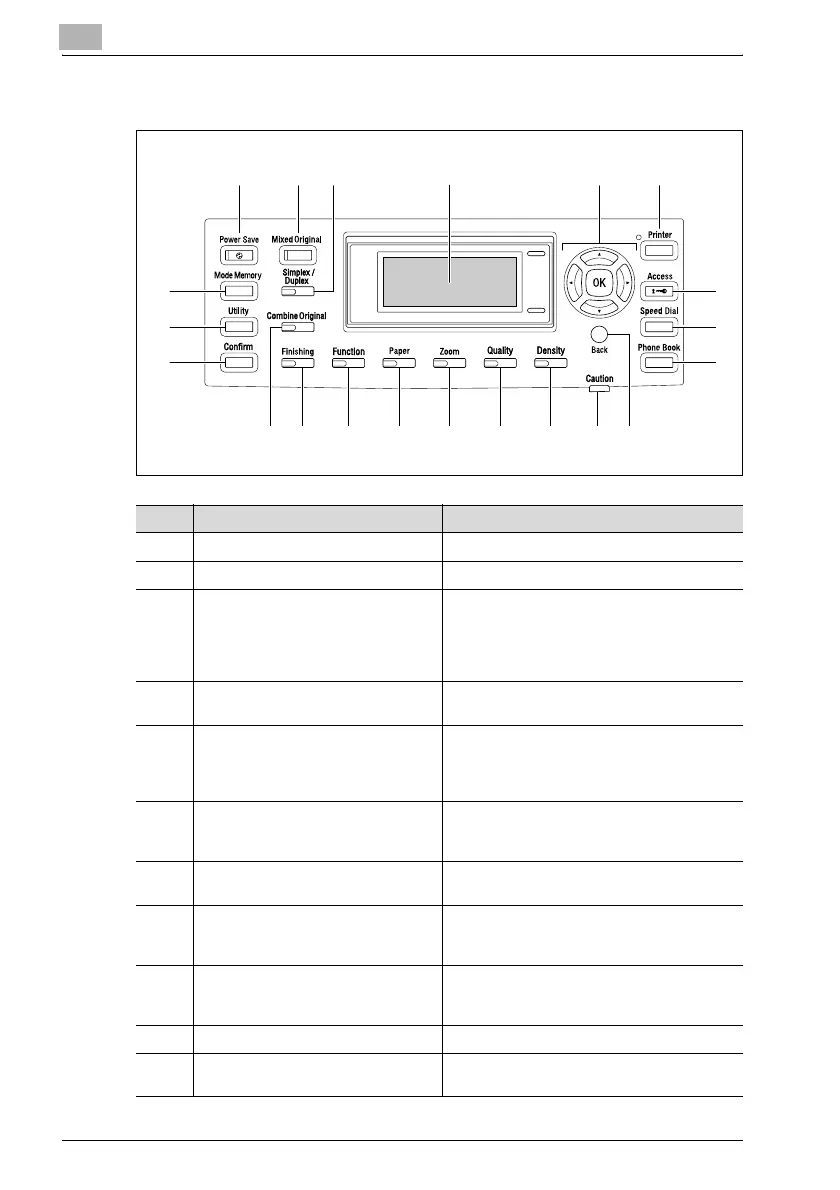
2.2 Names of control panel parts and their functions
123 4 56
7
8
9
101112131415161718
19
20
21
No. Part name Description
1 [Power Save] key Press to enter Power Save mode.
2 [Mixed Original] key/indicator Press to select the "Mixed Original" setting.
3 [Simplex/Duplex] key/indicator Press to select double-sided copying. Select
"1-SIDE->1-SIDE", "1-SIDE->2-SIDE", "2-
SIDE->1-SIDE" or "2-SIDE->2-SIDE". If any
setting other than "1-SIDE->1-SIDE" is select-
ed, the indicator lights up.
4 Display Displays the number of copies, zoom ratio, fax
mode, setting menus and error messages.
5[+], [,], [*], and [)] keys
[OK] key
Press the [+], [,], [*], and [)] keys to select
menu items in the display and change their
settings.
Press the [OK] key to apply the current setting.
6 [Printer] key/indicator This indicator lights up while data is being
printed from the computer and flashes while
data is being sent.
7 [Access] key Press when account track settings have been
applied.
8 [Speed Dial] key Press to register frequently used fax numbers
and addresses, and to recall them during
transmissions.
9 [Phone Book] key/indicator Press to display the information programmed
for one-touch dialing, group dialing and speed
dialing.
10 [Back] key Press to return to the previous screen.
11 "Caution" indicator This indicator lights up or flashes if an error
has occurred.












 To Next Page