2
Getting ready
2-8 IC-206
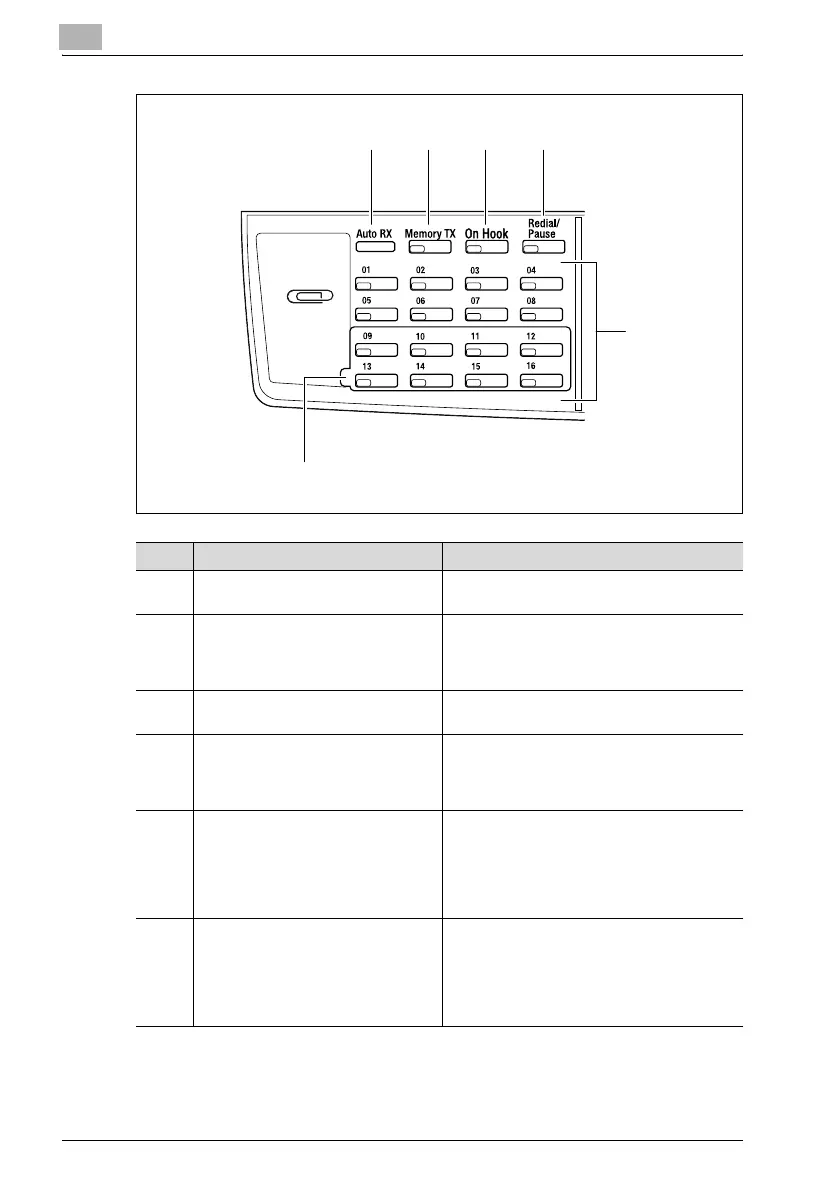
31 32 33 34
35
36
No. Part name Description
31 Auto RX indicator This indicator lights up when the automatic re-
ception function is selected.
32 [Memory TX] key/indicator Press this key to select the memory transmis-
sion function. This indicator lights up in green
when the memory transmission function is se-
lected.
33 [On Hook] key Press to answer the call. Press this key again
to hang up.
34 [Redial/Pause] key Press to redial the last recipient called.
While dialing, this key is used to generate a
pause when transferring from an internal to an
external line or receiving information services.
35 One-touch dial keys Used to dial previously registered fax num-
bers.
Use keys [01] through [32] for specifying one-
touch dialing and group dialing settings. Use
keys [29] through [32] for specifying program
dialing settings.
36 Switching plate Switches the numbers assigned to the one-
touch dial keys. When the switching plate is in
the lower position, the keys are numbered [01]
through [16]. When the switching plate is in the
upper position, the keys are numbered [17]
through [32].












 To Next Page