Board Design Guidelines for SmartFusion2 SoC and IGLOO2 FPGAs
AC393 Application Note Revision 14.0 22
assert this pin during a programming (including eNVM) operation, as it may cause severe consequences
including corruption of the device configuration. Asserting this signal tristates all user I/O and resets the
system. Deasserting DEVRST_N enables the system controller to begin its startup sequence.
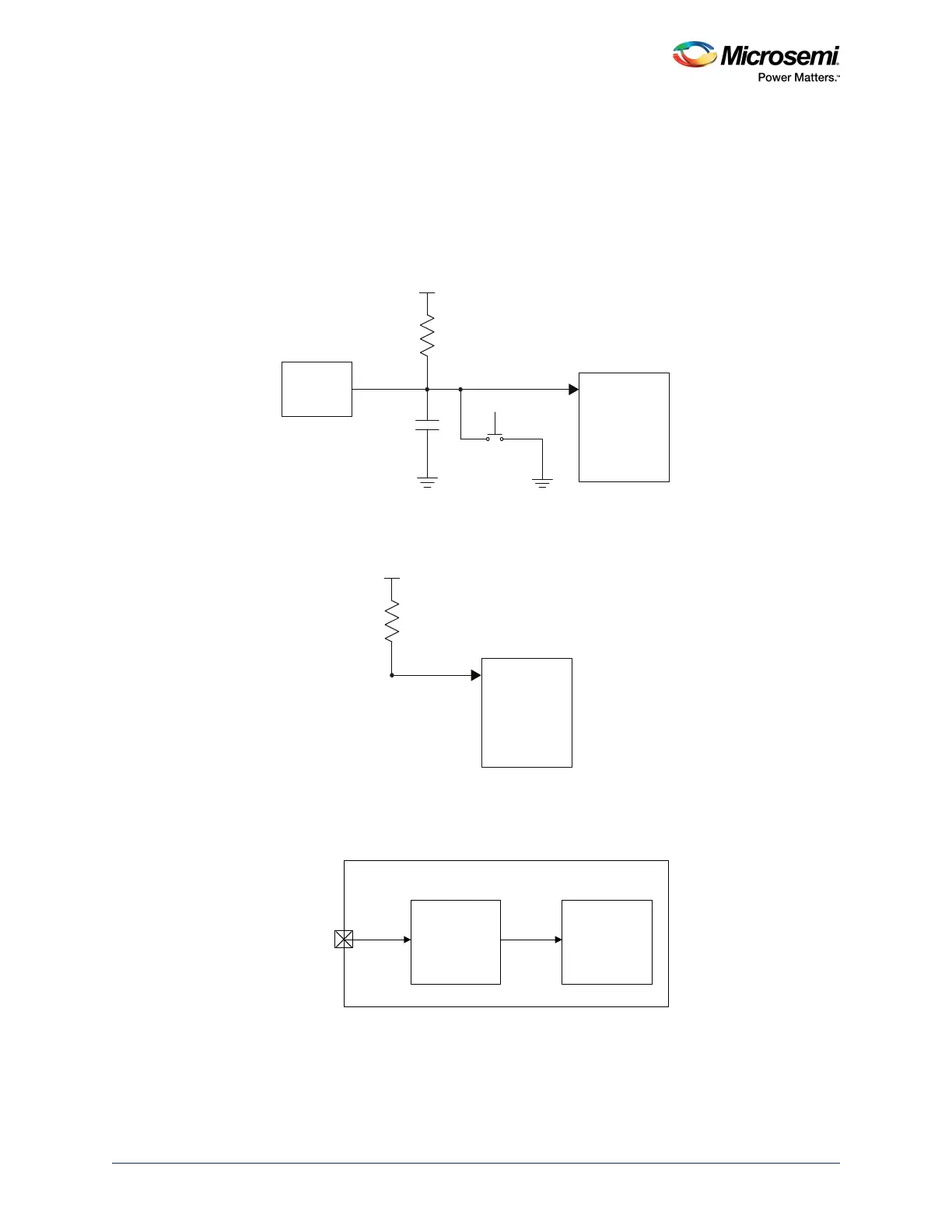
The following figure shows an example of a reset circuit using the Maxim DS1818 reset device, which
maintains reset for 150 ms after the 3.3 V supply returns to an in-tolerance condition. Adding a capacitor
to ground on DEVRST_N avoids high-frequency noise and unwanted glitches that could reset the device.
Note: Use DEVRST_N only for IAP or auto update. Do not use DEVRST_N for user logic reset.
Figure 8 • Reset Circuit
If the reset device is not used, DEVRST_N must be pulled up to VPP through a 10 kΩ resistor, as shown
in the following figure.
Figure 9 • Without Reset Circuit
If the user logic needs to be reset, any FPGA I/O can be used as an asynchronous reset for the user
logic, as shown in the following figure.
Figure 10 • Fabric Logic Reset
Use the fabric logic reset for CM3 Reset, fabric logic reset, MSS reset (including all peripherals), FDDR
reset, SERDES reset. For more information about fabric reset, see the MSS Reset Controller
Configuration Guide.
SmartFusion2/
IGLOO2
DEVRST_N
DS1818
Reset
10 kΩ
VPP
Push-Button
Switch
1 μF
SmartFusion2/
IGLOO2
DEVRST_N
10 kΩ
VPP
SmartFusion2/IGLOO2 Fabric
CLKINT
Fabric Logic
Reset
Y
A
Fabric I/O



 To Next Page