Chapter 5: Installation
Installing the Inter-Tel CS-5200/5400/5600 Base Server
Inter-Tel
®
5000 Installation Manual – Issue 2.4, May 2008 Page 5-15
Installing the Inter-Tel CS-5200/5400/5600 Base Server
To install the Base Server:
1. Install the chassis in the rack, then position the chassis and rack near the MDF
backboard. Position the chassis at a height appropriate for reading the LCD panel. Also,
allow room above the chassis for future expansion. For example, a voice processing
system or Digital Expansion Interface (DEI) unit.
The Inter-Tel CS-5200/5400/5600 Base Server can be mounted in a standard rack, on a
table, or on another secure, horizontal surface. Protective “feet” on the bottom of the
chassis allow you to stack units, if not using a rack. There are external voice processing
options available using the Voice Processing Unit (VPU) or Enterprise
®
Messaging (EM).
The optional VPU is a standalone Windows 2000 Server PC that can be rack- mounted
(recommended) or placed on a horizontal surface in close proximity to the Inter-Tel CS-
5200/5400/5600 Base Server. The EM unit is a standalone Windows-based PC, similar
in appearance to the VPU, that can also be rack-mounted (recommended) or installed
on a horizontal surface.
2. Do not plug in the system AC power cable.
3. Continue to “Grounding the Inter-Tel 5000 Base Server” on page 5-16.
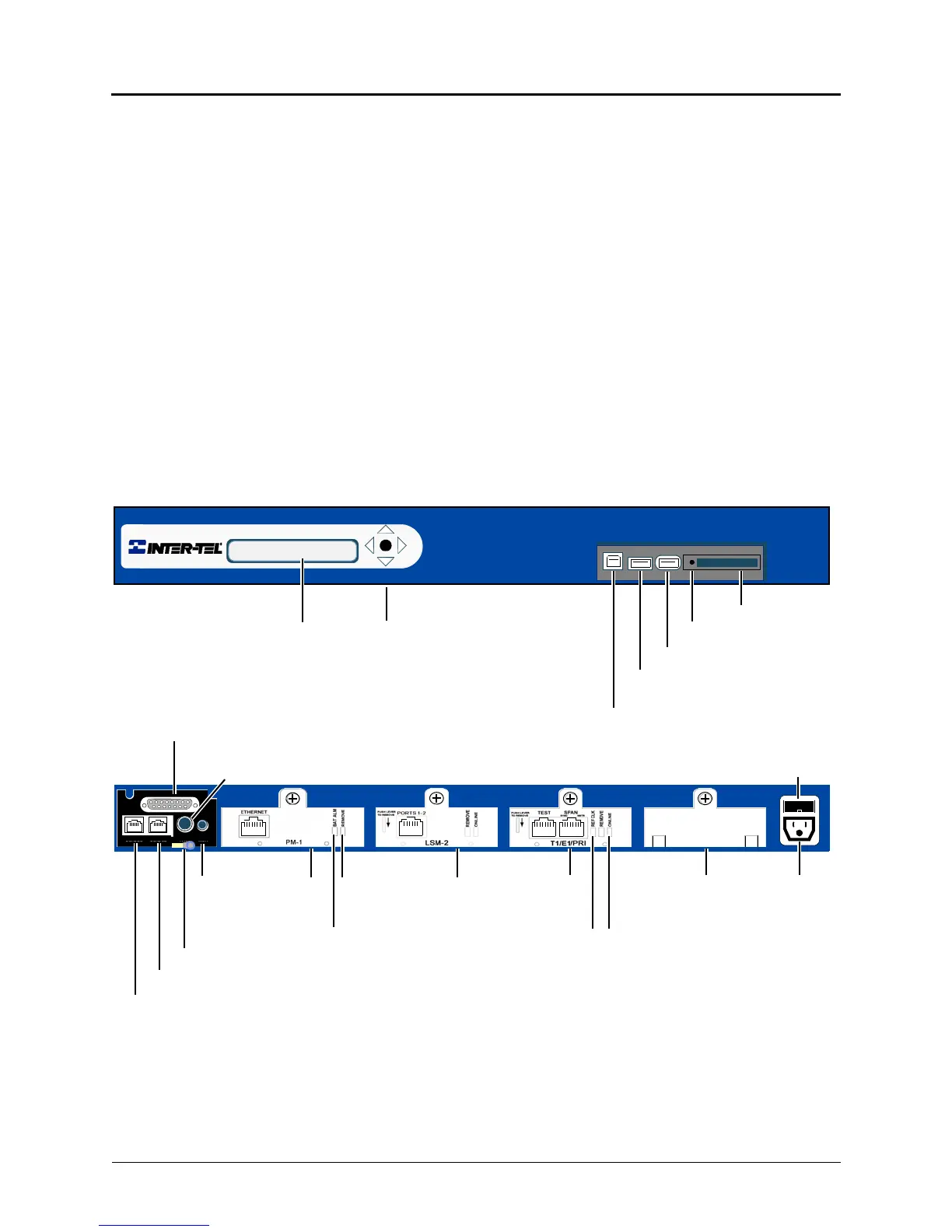
Figure 5-1. Base Server Front and Back Views
Memory Card
USB Security Key (recessed)
USB-A (USB hub; UPS cable; or,
USB-B
PowerLoop StartProcessorMusic On
Hold Port
Paging Port
Optional External Voice Mail
or Digital Expansion Interface (DEI)
(2) Single Line Ports
(2) Loop Start Ports
Base Server Back
Base Server Front
2-Line LCD Panel
Ground Lug (Earth ground)
T1M or T1M-2
LCD Panel Controls
ModuleModuleModule
Fuse
* The chassis is shipped without modules installed. The above example is for illustrative
purposes only. Module covers must remain in place if there is not an actual module to occupy
a module bay. The covers help to ensure foreign material does not enter the chassis.
Module
Cover*
Eject Button
Remove
Battery Alarm LED
Module
Online
Status
LED
REF
Clock
LED
EXP
DUAL LS
DUAL SL
PAGE MOH
LED
Basic Voice Mail backup)



 To Next Page