Chapter 5: Installation
Upgrade Scenarios
Inter-Tel
®
5000 Installation Manual – Issue 2.4, May 2008 Page 5-135
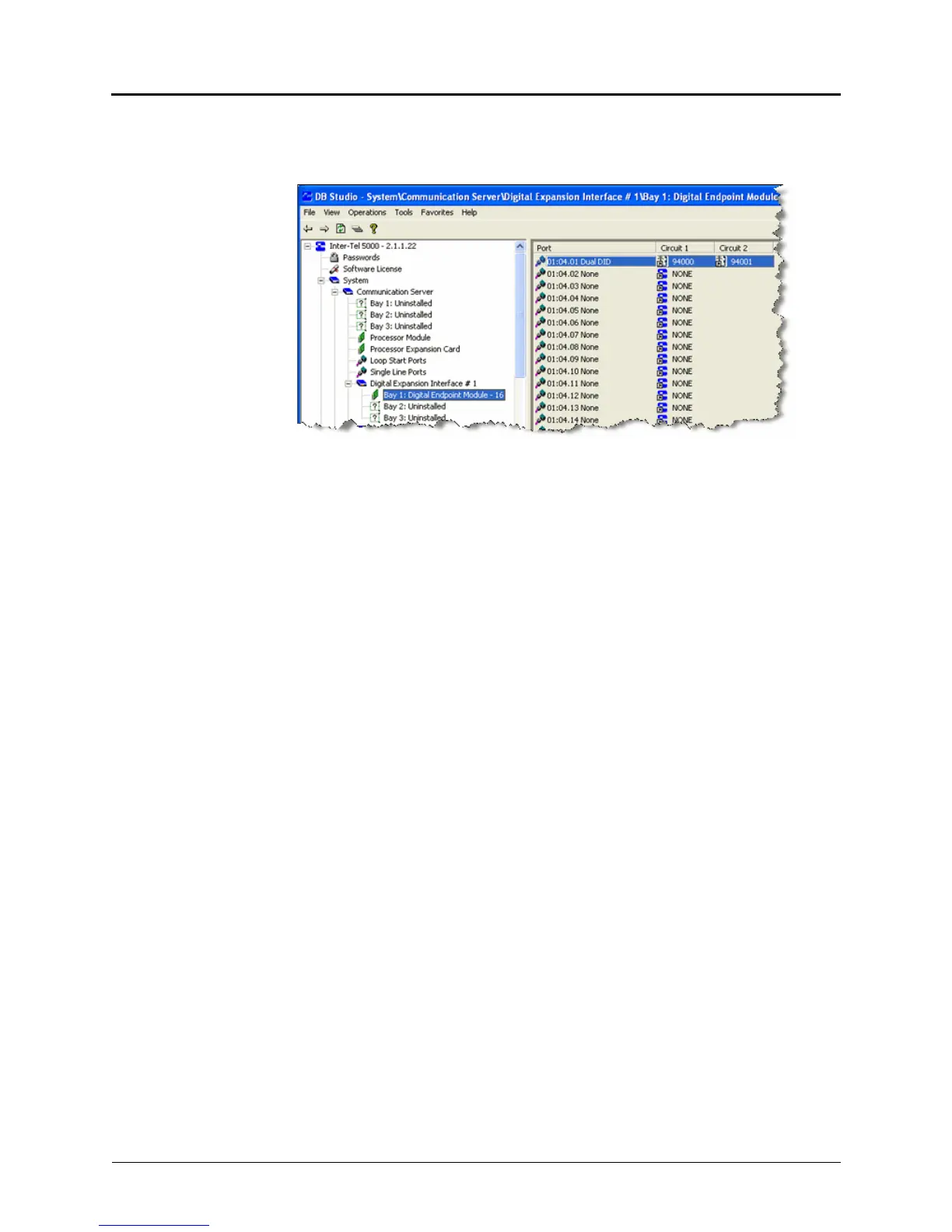
4. In the Create DID Extension window (not shown), select the Starting Extension trunk
number and click OK.
5. Circuit 1 and Circuit 2 columns appear, containing the selected extension trunk numbers.
6. Connect a DID trunk into the appropriate jack on an SLA installed in accordance with
“Installing DID Trunks on an SLA (USA Only)” on page 5-133.
SYSTEM UPGRADES
This section provides procedures for upgrading Inter-Tel 5000 systems. See page 5-149 for
information on upgrading to version 2.4.
Upgrade Scenarios
An upgrade may involve one of the following scenarios:
• Increase only the system software release, such as going from v2.0 Release 3 to v2.0
Release 4.
• Increase the system software version, such as going from v2.1 to v2.2.
• Install a system with greater capacity, such as going from an Inter-Tel CS-5200 to a
CS-5400, while maintaining the same software version; for example, v2.2.
• Install a system with both greater capacity and later version.
Upgrading a System
The following sections provide information about guidelines and procedures for upgrading Inter-
Tel 5000 platforms.


 To Next Page