Chapter 6: Reference
SIP (Only) Softphone
Page 6-20 Inter-Tel
®
5000 Installation Manual – Issue 2.4, May 2008
SIP (Only) Softphone
The Inter-Tel CS-5200/5400/5600 platform supports the Model 8601 SoftPhone for Pocket PC.
The Model 8601 is a software-based SIP softphone that runs on selected Pocket PC 2002 or
later Personal Digital Assistant (PDA) platforms. For information about installation and
programming, refer to the Model 8601 Installation Manual, part no. 835.2736.
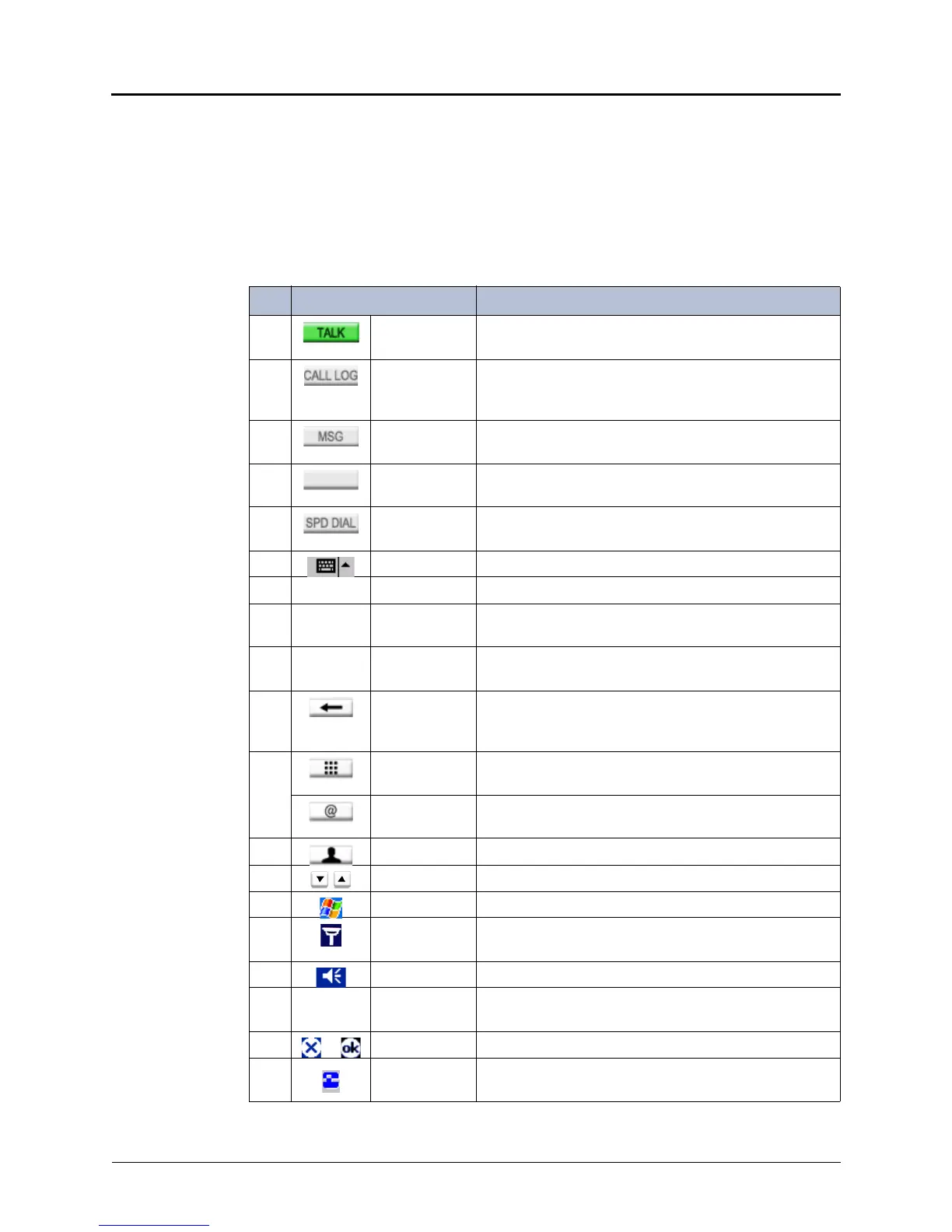
Table 6-17 shows Model 8601 icons and menus. The numbers in the left column correspond to
the photograph of the softphone in Figure 6-9 on page 6-21.
Table 6-17. Model 8601 SoftPhone Icons and Menus
No# Icon Menu Description
1 TALK Places a call. This icon changes to HOLD or RESUME,
depending on the Softphone status.
2 CALL LOG Opens the Call Log that shows the call history of up to
30 calls. This icon changes to MUTE or RESUME,
depending on the Softphone status.
3 MSG Plays the message that was left on the user’s voice
mail. This icon changes to END during a call.
4 Blank Icon Changes, depending on the Softphone status. The
possible icons are RESUME and TRANS (Transfer).
5 SPD DIAL Displays Speed Dial List. Changes to CNF (Conference)
or RESUME, depending on Softphone status.
6 Keyboard Opens the soft keyboard.
7 -- Help Shows the version status and online help.
8 -- Options Contains the Connection, Media, Preferences, and
Diagnostics options.
9 -- Phone Contains the Call Log, Speed Dial, DND, and
Message(s) options.
10 Backspace Backspaces the cursor and deletes characters in the
display. This icon changes to SWAP when two calls are
active on the softphone.
11 Hot Dial
Enabled
Places an intercom (IC) call without requiring the user to
tap TALK.
Hot Dial
Disabled
Requires the user to press TALK to place an IC call.
12 Contacts Displays the Contact List stored on the PDA.
13 Volume Changes the volume settings on the Model 8601.
14 Start Opens the application drop-down menu.
15 Connection
Status
Shows the connection status of the Model 8601.
16 Volume Changes the volume settings on the PDA.
17 -- Time Displays the current time, which is a standard feature of
the Pocket PC 2002, or later, platform.
18 or -- Shows X or OK, depending on the display status.
19 Model 8601
Icon
Opens the drop-down menu that contains the Phone,
Call Log, and Message(s) options.



 To Next Page