Chapter 6: Reference
Mitel IP Endpoints
Inter-Tel
®
5000 Installation Manual – Issue 2.4, May 2008 Page 6-19
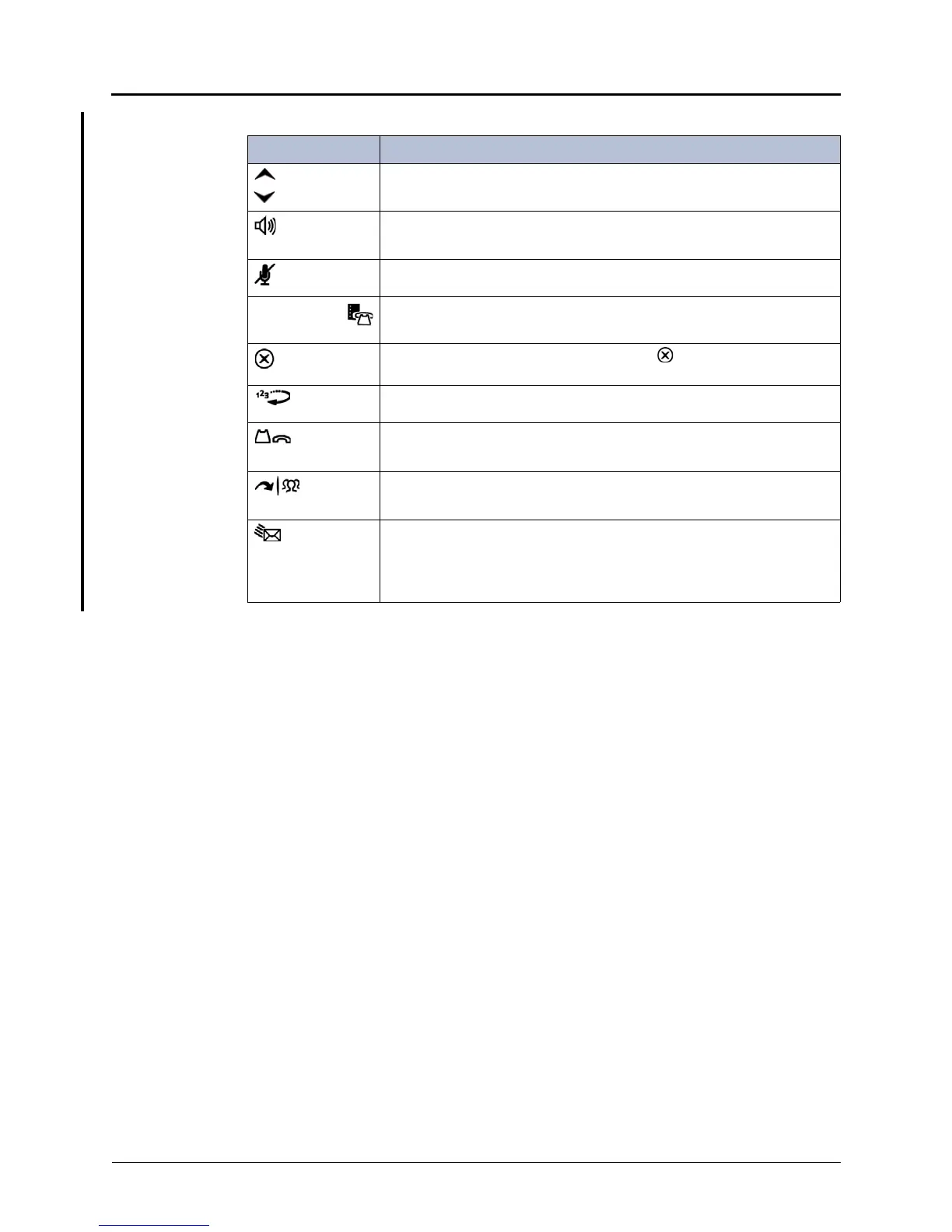
Table 6-16. Mitel IP Endpoint Feature Buttons
Button Action
(Up)
(Down)
• Provide volume control for the ringer, handset, and speaker.
• Scroll through options in some features.
(Speaker)
• Activates Handsfree Mode (speakerphone).
• Activates features.
(Mute) Temporarily turns off the microphone during a call.
(Applications
/Directory)
Models 5330 and 5340: Activates the Application menu.
Models 5212 and 5224: Activates the Directory.
(Special) Activates features while on active calls. The (Special) button does not
cancel features. The Star button (*) cancels features.
(Redial) Calls the last external number dialed. Does not redial internal numbers.
(Hold) • Places the current call on hold.
• Left/backspace when entering dialpad characters.
(Transfer) • Transfers the current call.
• Right/forward when entering dialpad characters.
(Message) • Connects to the voice mailbox and flashes when messages are
waiting.
• Toggles between Alpha Mode and Numeric Mode when entering
dialpad characters.



 To Next Page