Chapter 5: Installation
Mitel IP Endpoint Installation Troubleshooting
Page 5-158 Inter-Tel
®
5000 Installation Manual – Issue 2.4, May 2008
Mitel IP Endpoint Installation Troubleshooting
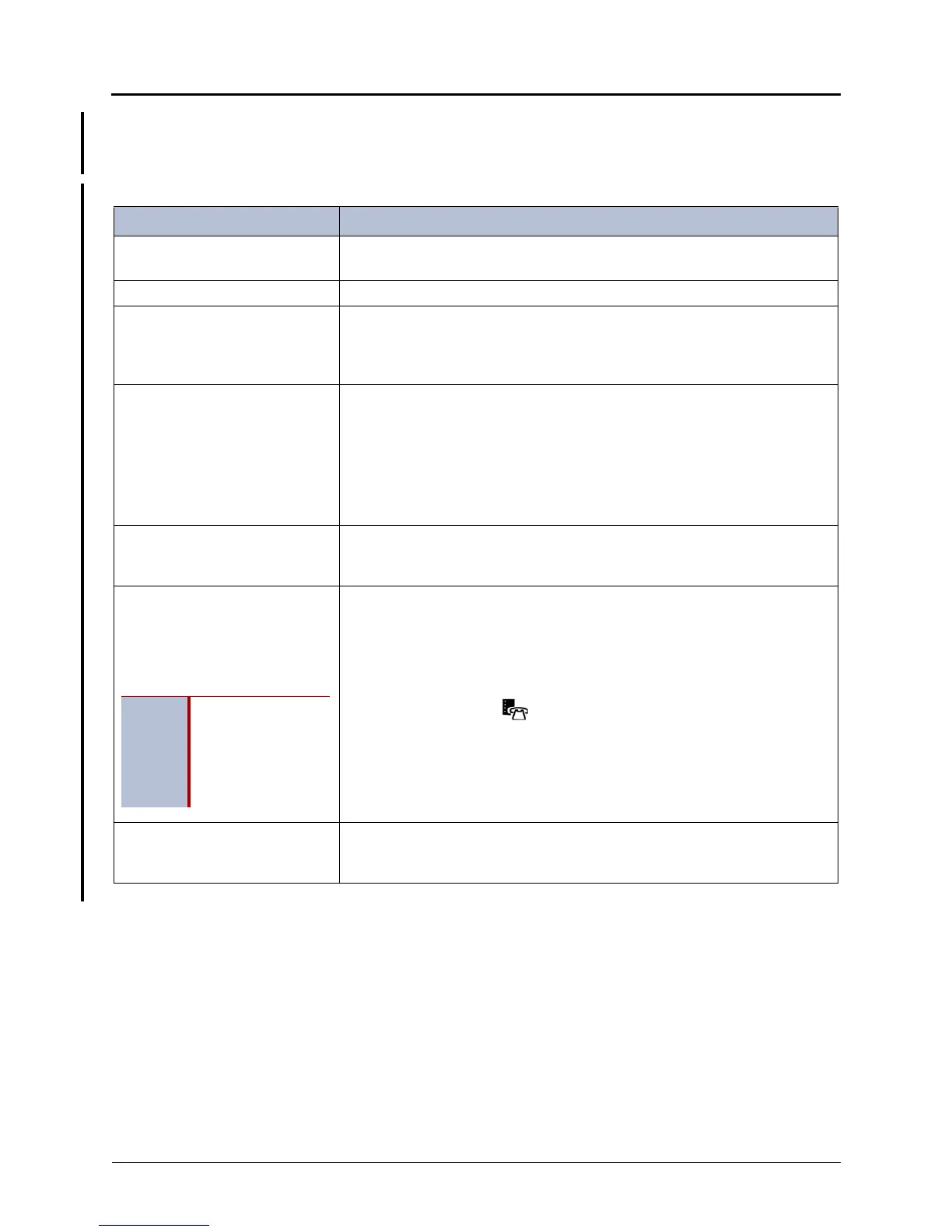
Table 5-22 lists general troubleshooting information for problems that could occur while
installing Mitel IP endpoints.
Table 5-22. Troubleshooting Problems and Possible Solutions
Problem Possible Solution
The UNLICENSED alarm appears
on the endpoint display.
Verify that you have sufficient Category D licenses. To verify, dump the
License Manager or use DB Programming.
The endpoint is not coming online. Verify that the MAC Address is programmed correctly in DB Programming.
The endpoint is unable to load
firmware.
Verify that the TFTP server is running on the 5000 (use the AWS to check
status). Using OLM, verify that the TFTP server has the correct binary files.
Refer to the diagnostics and troubleshooting information in the Inter-Tel 5000
Features and Programming Guide (part no: 580.8006).
The display name is partially cut
off and/or a blinking cursor is
displayed after the firmware is
loaded.
There are two possible reasons for this type of error:
• The system is down.
• An incorrect MAC address is entered in DB Programming for the
endpoint. An endpoint entered into DB Programming with an incorrect
MAC address will still appear to download the initial configuration files;
however, the display error message indicates that the endpoint is not
configured in the system.
DHCP Discovery
Option 128 Missing appears on
the endpoint display.
Verify that the IP addresses entered in the endpoint for the Inter-Tel 5000
Base server and TFTP server are correct (they must be the same IP address,
if using the Inter-Tel 5000 as the TFTP server).
The endpoint has been
accidentally configured in “SIP
Mode.” (SIP Mode is enabled by
pressing *7 while the endpoint is
powering on.)
Power cycle the endpoint. While the endpoint is powering on, do one of the
following:
• Press and hold *0.
• Press and hold *78.
• Press and hold both Volume buttons.
• Press and hold the button.
After powering on the endpoint, configure as described in “Initial Mitel
Endpoint – Manual Configuration” on page 5-160.
ENHANCED SEC MODE appears
on the endpoint display after the
endpoint is powered on.
The endpoint must be returned for service. Contact your local provider or
Inter-Tel Technical Support for instructions.
NOTE
In SIP Mode, an
endpoint display
may also show
several scrolling
Associated Press
news clips.



 To Next Page