Chapter 6 CONDUCTIVITY MEASUREMENT(F-54,55)
6.4 Measurement Setting Change
F-52, 53, 54, 55 97
6.4.4 ELectrode model change
The electrode model, if input preliminarily,
can be contained in the data printout
(detailed) or the data memory.
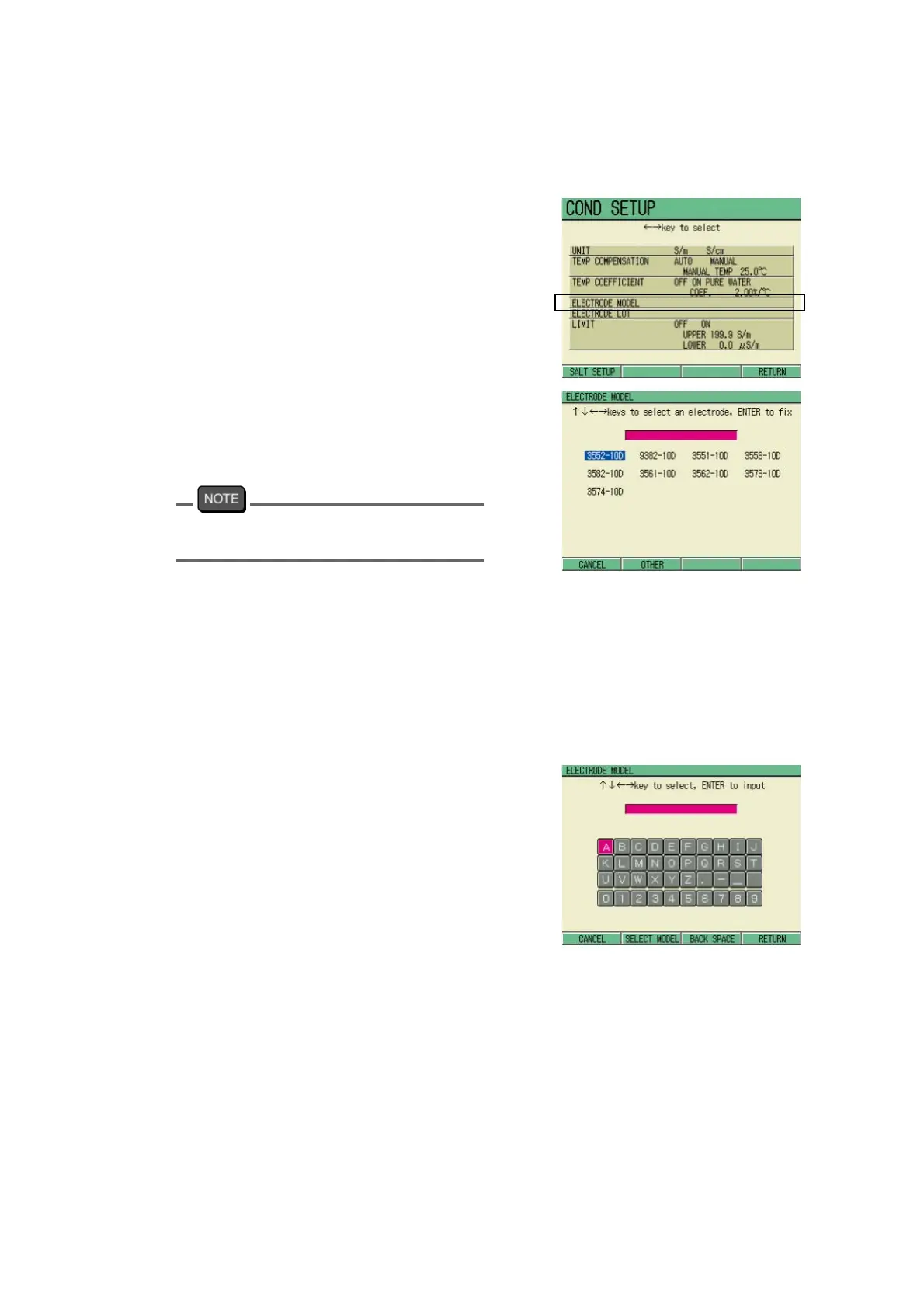
1. In the COND SETUP screen, press
↑ or ↓ key and select the ELEC
-
TRODE MODEL option.
2. Press the ENTER key.
The ELECTRODE MODEL screen
appears.
3. Press ↑ , ↓ or ← , → key to
move the cursor to the ELETRODE
MODEL option.
Pressing F2 will switch the ELECTRODE
MODEL screen with the input screen.
4. Determine the setting by the
ENTER key.
5. Press F4 (RETURN).
The set value is registered.
To input the model name freely
Perform the following step instead of the
step 3 above to input the model name freely.
1. Press F2 (OTHER).
The input screen of the electrode model
appears.
2. Press ↑ , ↓ and/or ← , → keys,
input appropriate letters/numerical
keys, and press the ENTER key.
3. Determine the setting by F4
(RETURN).
The COND SETUP screen appears.
4. Press F4 (RETURN).
The input model is registered.



 To Next Page