Chapter 8 RESISTIVITY MEASUREMENT(F-54, 55)
8.1 Screen Operation
F-52, 53, 54, 55 109
Chapter 8 RESISTIVITY
MEASUREMENT(F-54, 55)
8.1 Screen Operation
The resistivity is regarded as an inverse values of conductivity, and calculated from measur-
ing the conductivity. This is why when the cell constant is set by conductivity measurement,
there is no need to input the cell constant. Cell constant needs input only when it is not set
(See
"6.2 Cell Constant Setting" page 92).
The unit setting of resistivity should be determined by unit setting of conductivity (See Page
94).
Conductivity unit: S/m → Resistivity unit: Ω•m
Conductivity unit: S/cm → Resistivity unit: Ω•cm
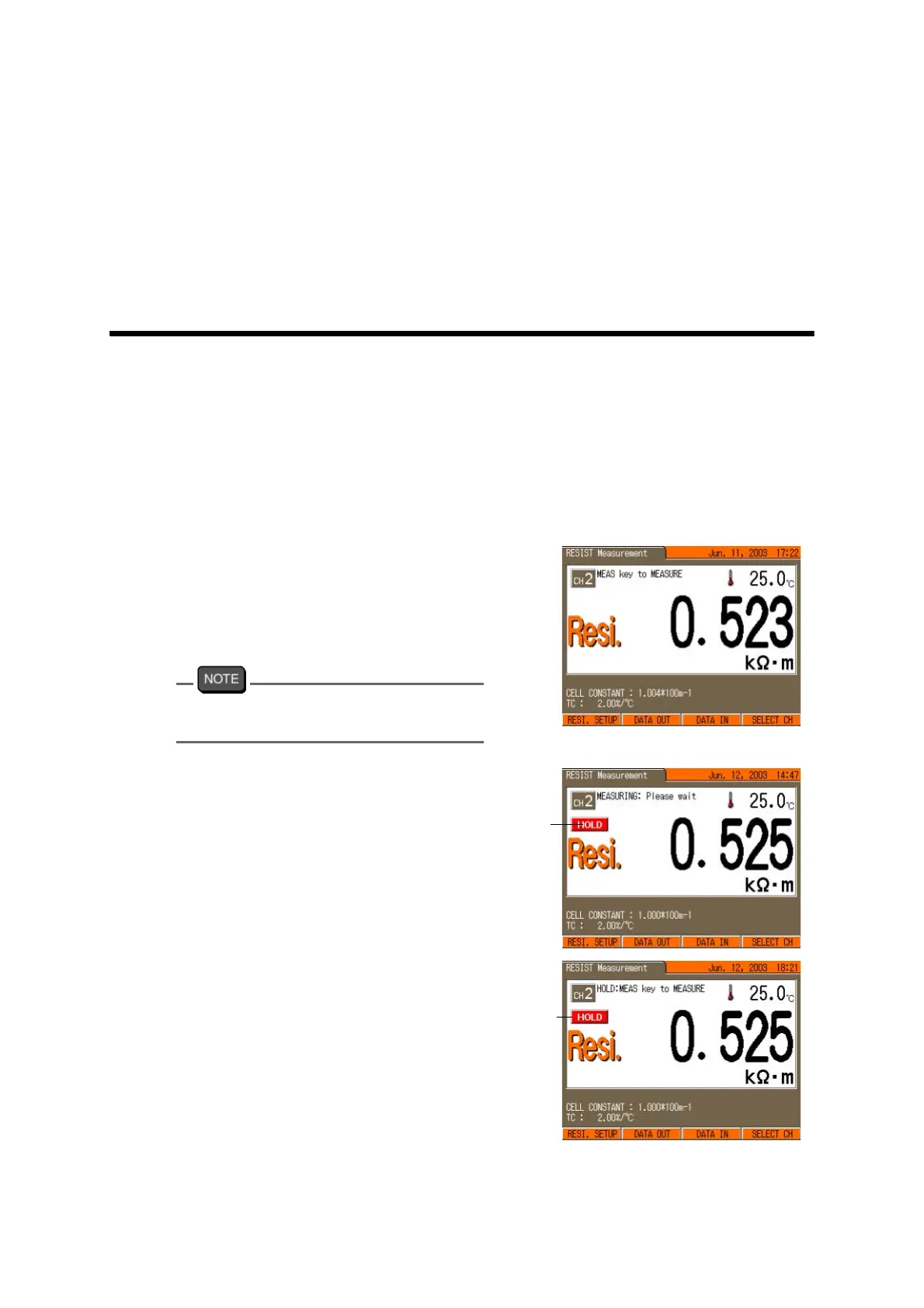
1. In any Measurement screen, press
the MODE key to go to the RESIST
Measurement screen.
The displayed screen should show the
measured value of resistivity.
F-54 and F-55, press F4 (SELECT CH) to
select CH2.
2. Press the MEAS key.
The HOLD measurement starts.
When the indication stabilizes, the dis-
play “HOLD” lights up and the mea-
surement result is displayed.
Blinking
Lit



 To Next Page