Chapter 5 Ion Measurement (F-53,55)
5.3 Measurement Using Standard Addition Method
F-52, 53, 54, 55 71
5.3.2 Measuring Ion Concentration in Standard Addition 2 Mode
This mode is used to obtain the concentration of the ion species under measurement by adding
a small amount of the target ions to the sample solution twice, thus increasing the ion concen
-
tration of the target component, and then measuring the change in electric potential at that
time.
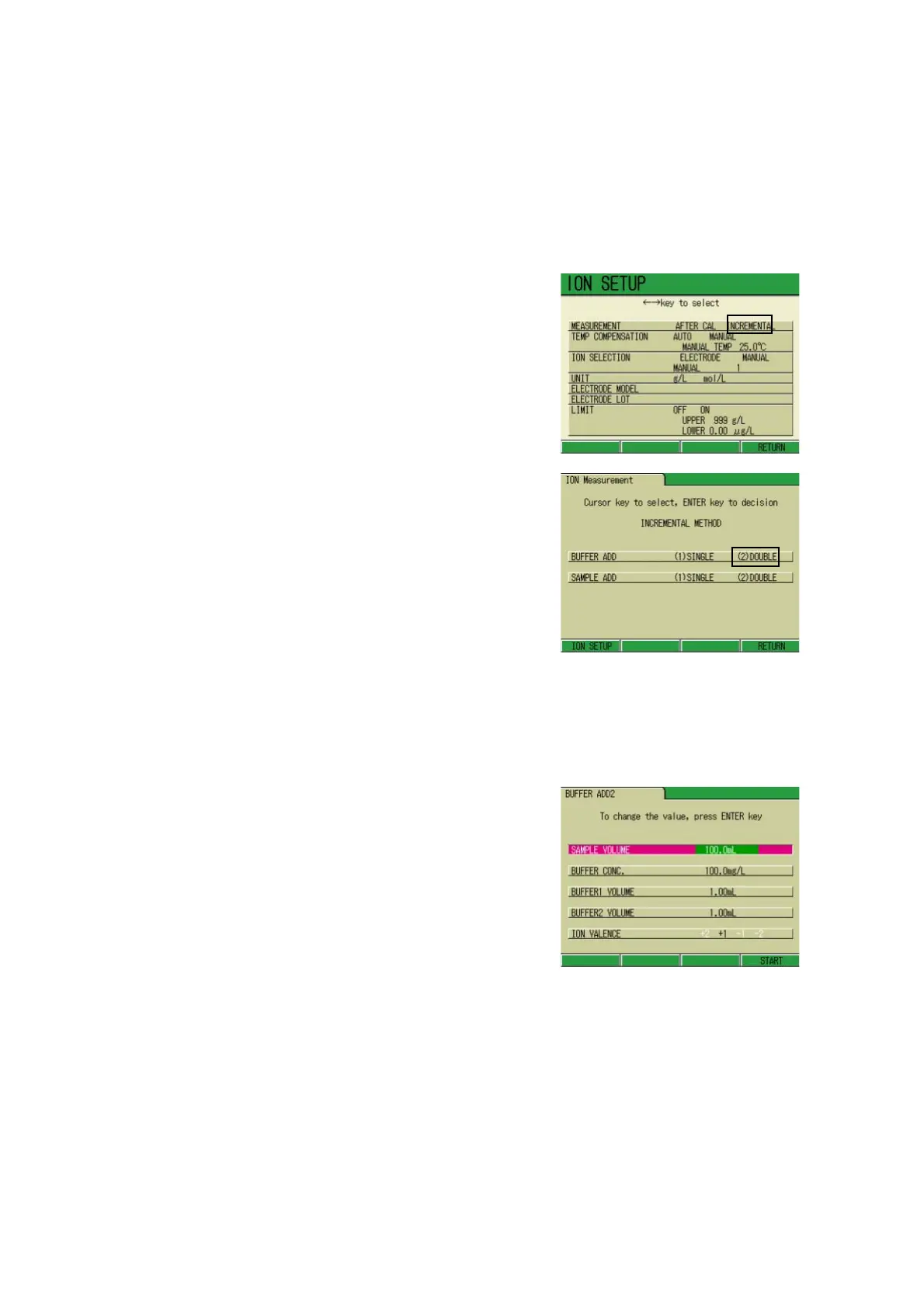
1. In the ION SETUP screen press
↑ or ↓ key to select MEASURE-
MENT.
2. Press ← or → key to select the
INCREMENTAL.
3. Press F4 (RETURN).
The ION Measurement screen (for the
Ion addition measurement) appears.
4. Press ↑ or ↓ key to select the
known addition method.
5. Press ← or → key and select the
(2) DOUBLE option.
6. Press F4 (RETURN).
The BUFFER ADD2 screen appears.
● Setting the Measurement condition
Input such parameters as sample volume, concentration of the additive standard solution, Vol-
ume 1 of the additive standard solution, Volume 2 of the additive standard solution, and Ion
valency.
1. Press ↑ or ↓ key to select the
option for the input.
2. Press the ENTER key.
The color of the setting part changes.
3. Press ↑ or ↓ key and input the
value.
4. Press the ENTER key.
The value is determined and the dis-
play color of the setting part changes.
5. When the setting is completed,
press F4 (START).
Ion valency
To input the ion valency, perform the step 1 above, and instead of go to the step 2., press ←
or → key to change the value.
The Ion valency depends on each ion; input the appropriate valency for the ion to be mea-
sured.



 To Next Page