Chapter 3 pH MEASUREMENT
3.3 Changing the measurement setting condition
F-52, 53, 54, 55 41
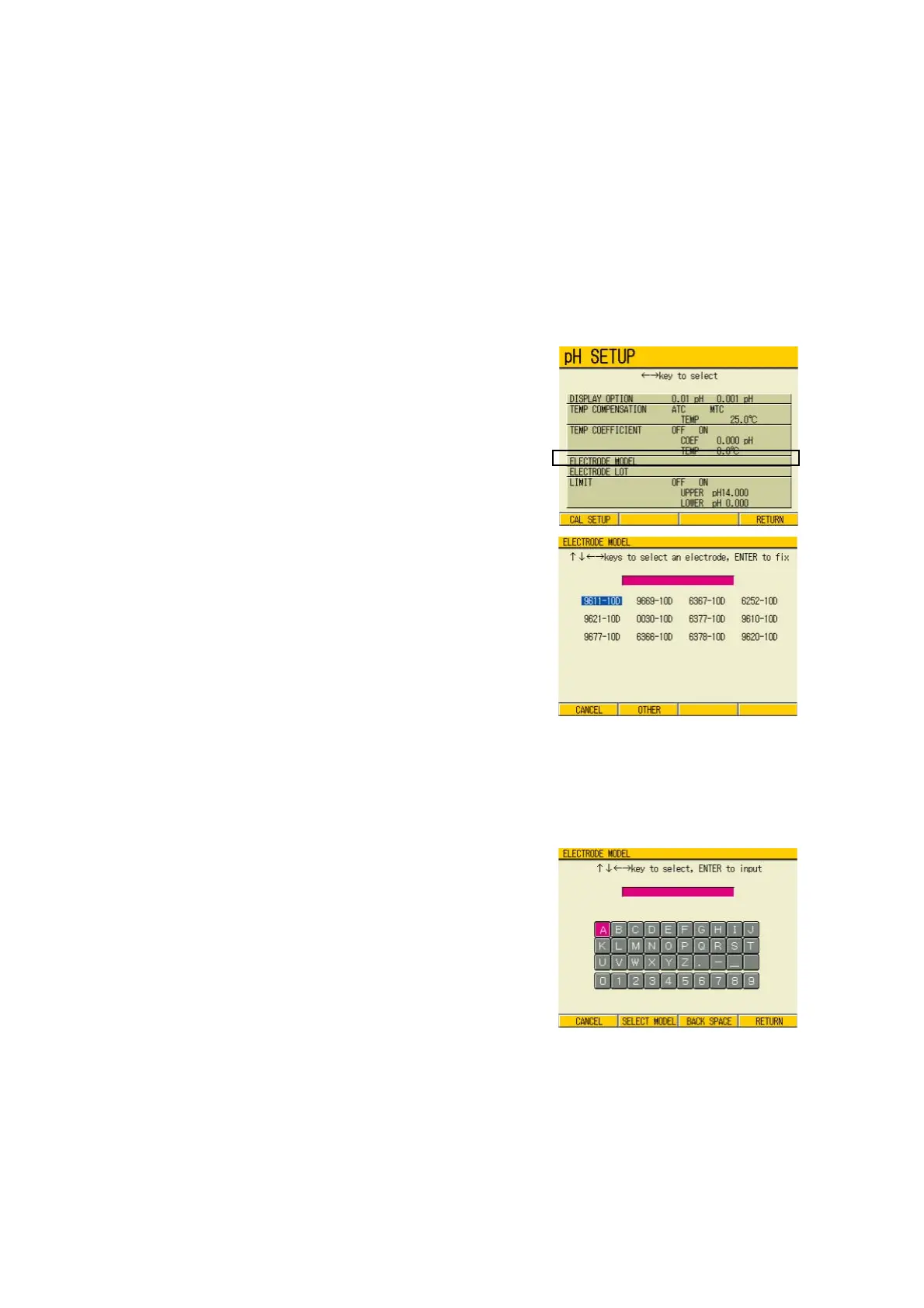
3.3.4 Electrode model change
By inputting the electrode model, the data printout (detailed) and/or data memory will contain
the electrode model information.
Select the electrode model to be used in the measurement.
Maximum 9 alphabetical letters can be used to set the model name.
● Setting procedure
Model selection
1. In the pH SETUP screen, press ↑
or ↓ key and move the cursor to
ELECTRODE MODEL field.
2. Press the ENTER key.
The ELECTRODE MODEL screen
appears.
3. Press ↑ , ↓ and/or ← , → keys
to move the cursor to the electrode
model to be set.
4. Press the ENTER key.
The setting is determined.
To input model name manually:
Input the electrode model name.
1. After finishing the above step 2.,
press F2 (OTHER).
The input screen of the electrode
model appears.
2. Press ↑ , ↓ and/or ← , → keys,
input appropriate letters/numerical
keys, and press ENTER key.
Maximum 9 letters can be input.
3. Determine the setting by F4
(RETURN).
4. Press F4 (RETURN).
The setting is reflected, and the dis-
play returns to the Measurement
screen.



 To Next Page