Chapter 2 BASIC OPERATIONS
2.3 Turn on the Power
F-52, 53, 54, 55 25
2.3.2 At User Control ON
When the compact flash card contains the personal data, inserting the card into the meter and
starting it up allows the startup with the operator saved in the compact flash card.
(Only for F-53, F-54, and F-55.)
"Chapter 10 SECURITY SETUP" page 119
1. Press ON/OFF key.
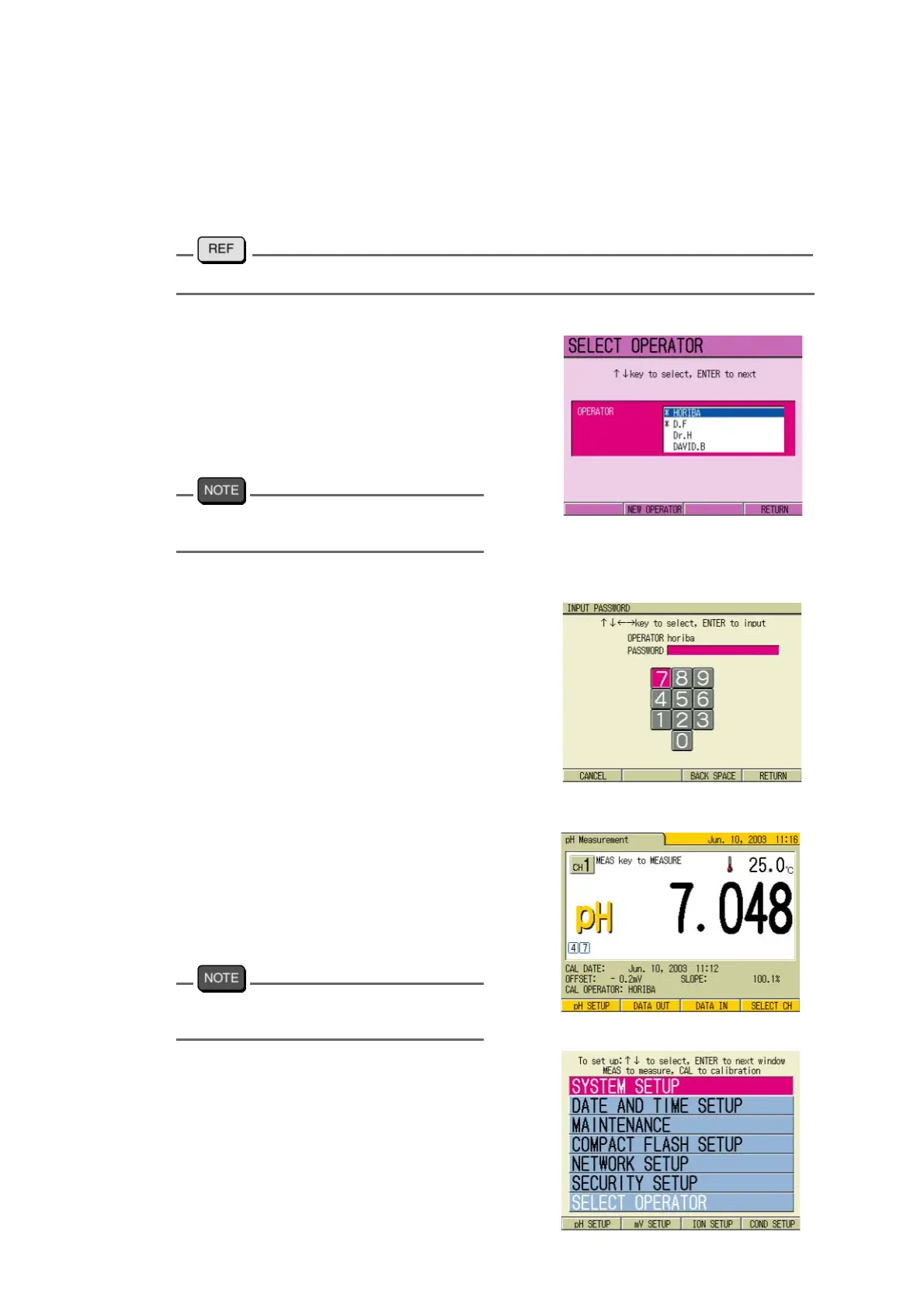
The Startup screen appears, and then
the SELECT OPERATOR screen
appears.
2. Press ↑ or ↓ key to select the
operator.
When the Operator is not registered, register
the operator newly.
3. Press F4 (RETURN).
The INPUT PASSWORD screen
appears.
Password input
4. Press ↑ , ↓ or ← , → key to
select the numerical keys.
5. Press the ENTER key and input
the letter one by one.
6. When all the input is completed,
press F4 (RETURN).
The screen proceeds to the Measure-
ment screen. When the Operator is
registered as the Administrator, the
SETUP screen appears.
The SETUP screen configuration depends
on the model.
pH Measurement
SETUP screen



 To Next Page