Chapter 3 pH MEASUREMENT
3.4 Calibration Setting
F-52, 53, 54, 55 45
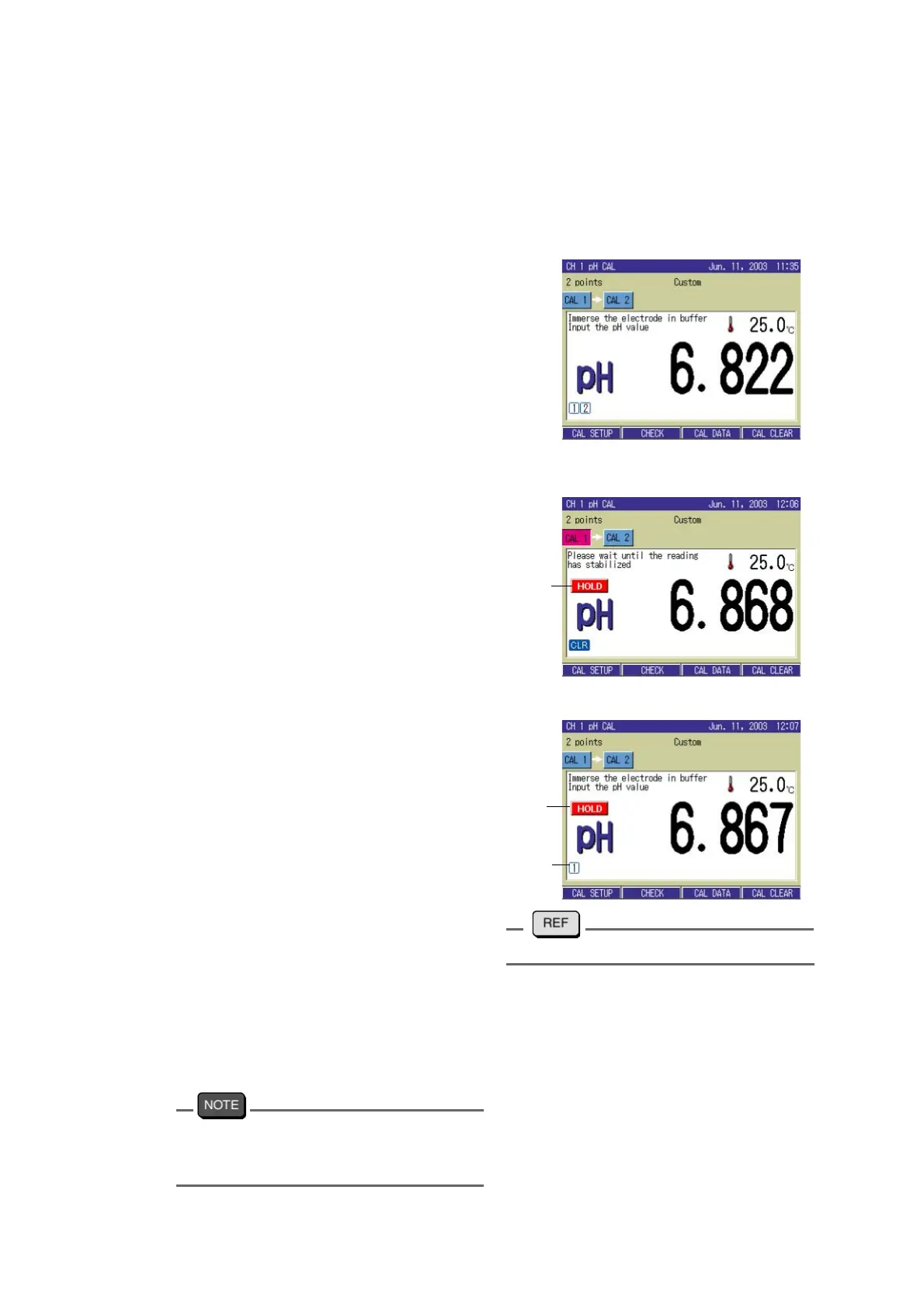
3.4.2 Calibration for Custom selection
In selecting Custom for calibration condition, a random standard solution can be used for the
calibration.
By the following procedure, input the standard solution value to be used.
1. In the pH Measurement screen,
press the CAL key.
The CAL screen appears.
2. Immerse the electrode in the bea-
ker with standard solution for the
calibration.
3. In calibration mode (instantaneous
value), press ↑ or ↓ key, and
input pH value of the standard
solution.
Pressing ↑ or ↓ key stops the
value fluctuation, enabling the dis
-
play to be input mode.
4. Press the CAL key, and start the
calibration of 1st point.
When the calibration is completed, the
HOLD display is lit, displaying the
calibration result of the 1st channel.
"3.4.3 Calibration point setting" page 465. For calibration of 2nd and later
points, first immerse the electrode
into the standard solution as in the
1st point. Press ↑ or ↓ key, input
the pH value of the standard value,
and press the CAL key to start the
calibration.
The bottle mark shows that the calibration is
completed; the number 1,2,3,4, and 5 shows
the number of the calibration point.
Blinking
Lit
Calibra-
tion
status



 To Next Page