Chapter 1 Overview
1.4 Keys and Display
10 HORIBA
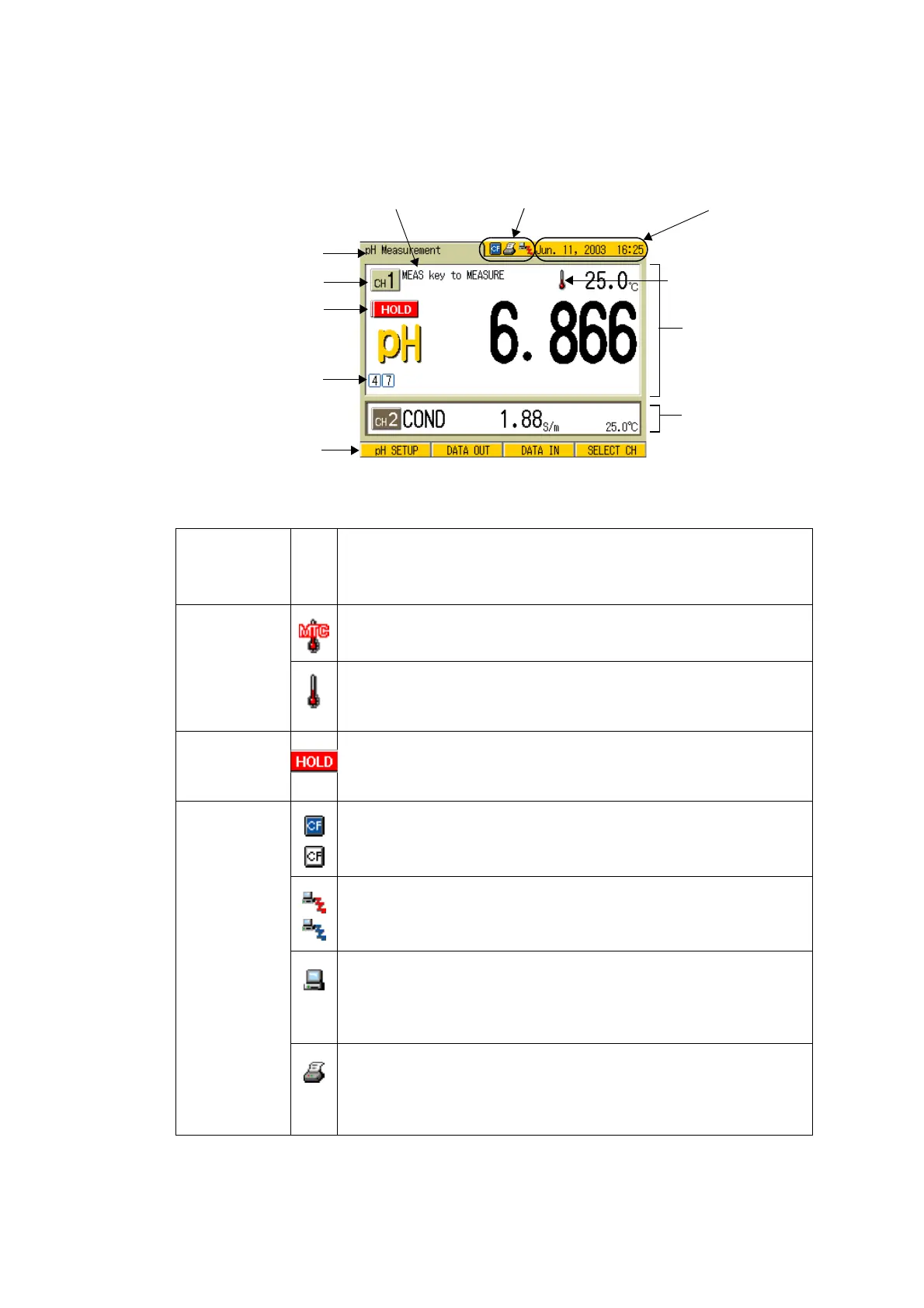
1.4.2 MEASUREMENT screen
Icon displayed on the screen
Measurement mode
Channel indication
Calibration status
Function keys
Main CH
Sub CH
Clock
External output connection
Operation guide
Temp. compensation
display
HOLD indication
Name
Indi
cati
on
Description
Temperature
compensa
-
tion icons
At MTC
Displays the values with the temperature set.
At ATC
Displays the temperature measured by the connected elec-
trode.
HOLD icon Without the icon: instantaneous value
Blinking: in judging HOLD
Lit: HOLD
External
output
connection
icons
Compact flash
Displayed when the compact flash card is connected.
Network connection
Displayed when the PC software is connected by the Ether
net connection.
Serial connection
Displayed when the communication is given from PC.
(When this indication is displayed, no operation is available
by the meter unit. Only effective at ON/OFF.)
Printer connection
Displayed with the printer connected.
(This icon is displayed with the PC connected depending on
the PC.)



 To Next Page