Chapter 3 pH MEASUREMENT
3.4 Calibration Setting
54 HORIBA
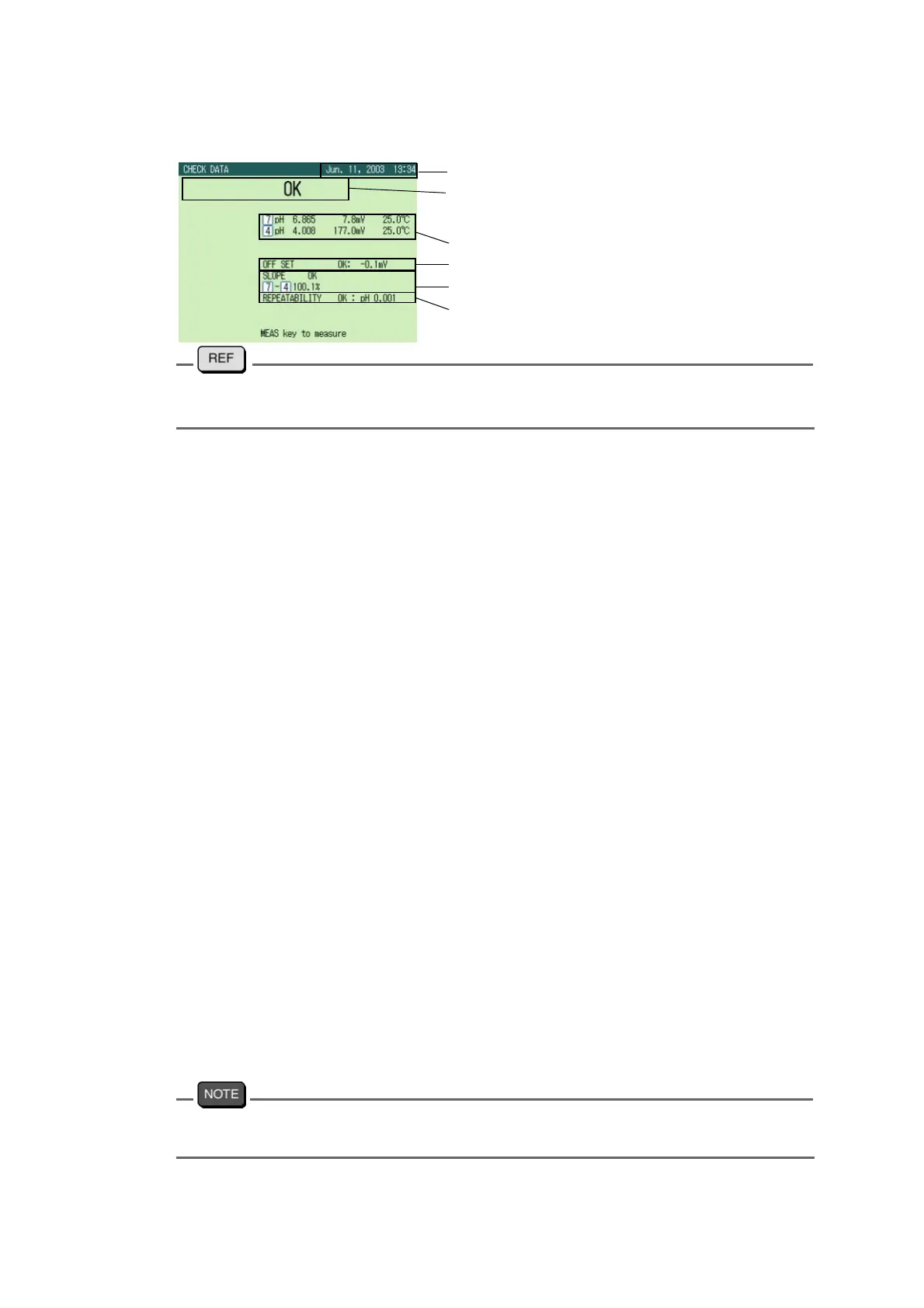
Sample printout of the result data
" ● For accurate measurement" page 52
" ● When electrodes are defective" page 52
● SIMULATOR mode
Input the results given by the optional pH checker, X-51 to the meter, and perform functional
check.
For detailed operation, refer to the instruction manual for the pH checker X-51.
1. Set the resolution to 0.001 pH in the pH SETUP screen.
2. Set the temperature compensation to ATC.
3. According to the operation guide, perform functional check as calibration by the
standard solutions of pH7, pH4 in the following order.
① Calibration by standard solutions:
pH6.865
pH4.008
② Linearity check
pH0.000
pH4.000
pH7.000
pH10.000
pH14.000
③ Indication check by inputting high impedance
Input pH0.000
Input pH14.000
④ Temperature indication check
The displayed pH values at this time have nothing to do with the check result.
0.0 ℃
30.0 ℃
60.0 ℃
100.0 ℃
When the calibration range error occurs at step ① above, the screen displays the error and
the check stops.
OK/CHECK of judgment
Date of check
Asymmetry potential
Sensitivity
Calibrated value for each standard solution
Repeatability



 To Next Page