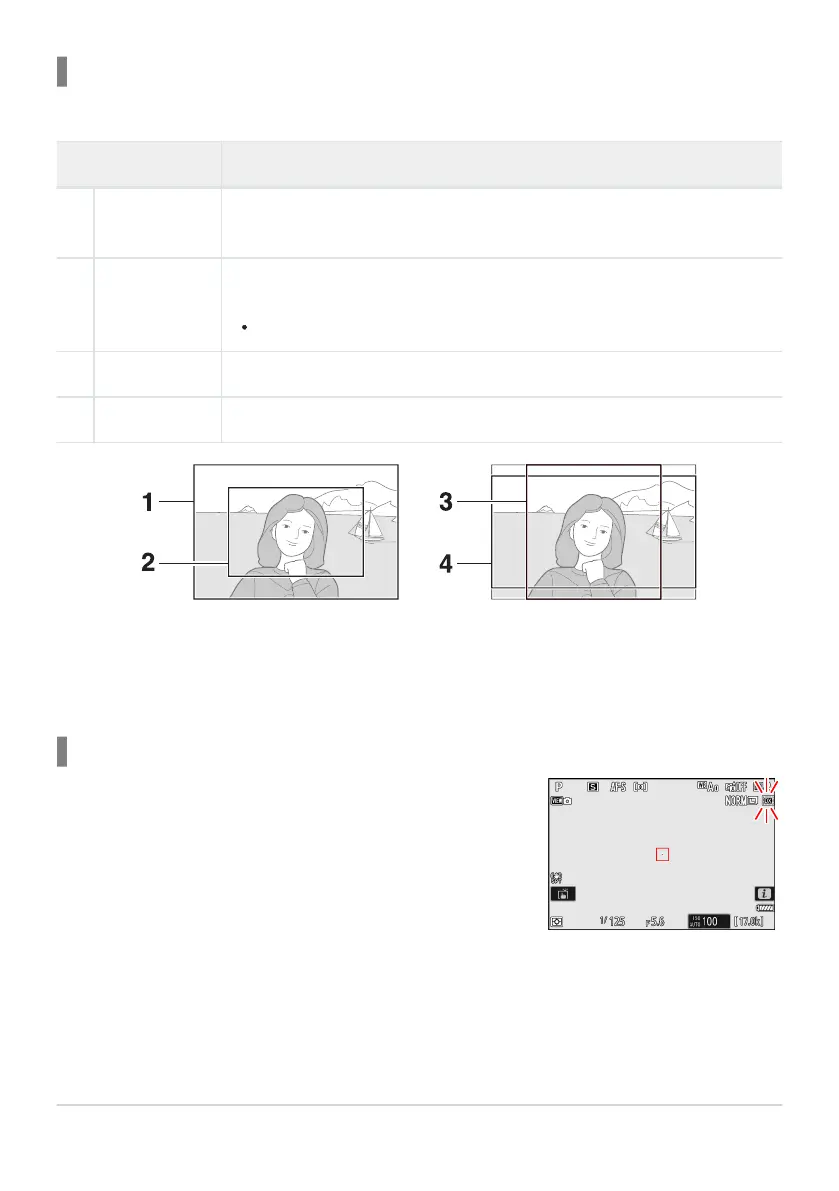
FX (36× 24)
DX (24× 16)
1 : 1 (24× 24)
16 : 9 (36× 20)
1
2
3
4
If [
ON] is selected for this option in the camera menus, the image
area icon in the shooting display will flash when “DX (24×16)” is
selected.
Choose Image Area
Choose the image area. The following options ar
e available:
Option Description
c
[FX (36×24)]
Record pictures in FX format with an angle of view equivalent to a 35mm
format camera.
a
[
DX (24×16)]
Pictures are recorded in DX format. To calculate the approximate focal length
of the lens in 35mm format, multiply by 1.5.
Image-area selection is fixed at [DX (24×16)] when a DX lens is attached.
m
[1:1 (24×24)] Pictures are recorded with an aspect ratio of 1 : 1.
Z
[16:9 (36×20)] Pictures are recorded with an aspect ratio of 16 : 9.
DX Crop Alert
100
Image Recording Options (Image Area, Quality,
and Size)



 To Next Page