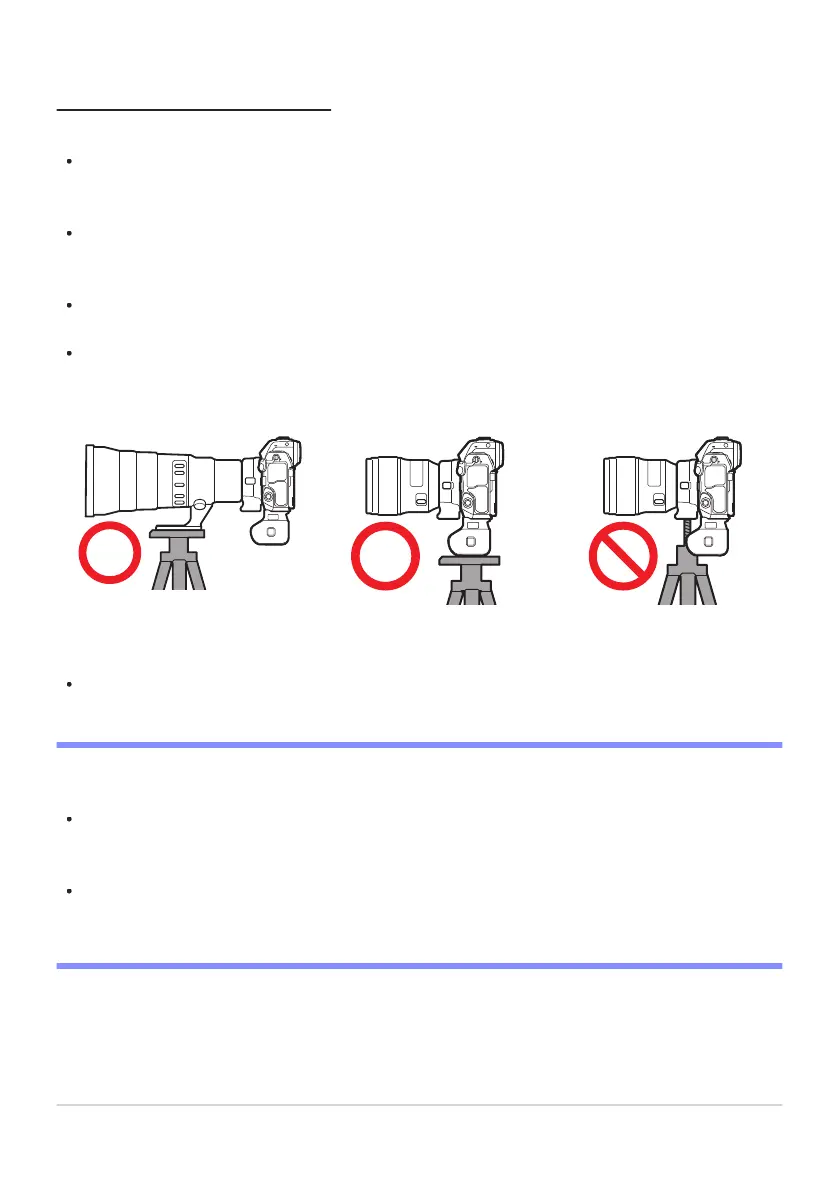
Lens
MB-N12 FTZ
Precautions for Use
Observ
e the following precautions when using the MB-N12.
Touching the power/signal contacts with metal objects could cause a short-circuit; reattach the
contact cap before storing or transporting the battery pack or charging the batteries with the pack
not attached to the camera.
A warning may appear in the camera shooting display if the MB-N12 is not securely attached.
Securing the MB-N12 in place by tightening the attachment wheel until it will turn no further may
resolve the issue.
The camera memory card access lamp may light when the MB-N12 is attached to or removed from
the camera.
When using the camera with both the MB-N12 and an optional FTZ mount adapter attached,
connect tripods to the tripod mount on either the lens or the MB-N12, not to the tripod mount on
the FTZ.
The MB-N12 is not equipped with a power switch. Use the camera power switch to turn the camera
on and off.
D Camera Warning Messages
If the camera displays one of the following messages, take the steps described below.
If the camera displays the message [Shutter release disabled. Recharge battery.], insert a spare
battery. Turn the camera off before proceeding if the battery in question is inserted in ChamberB or
if there is only one battery in the holder and it is inserted in ChamberA.
If the camera displays the message [Error. Press shutter-release button to reset.], press the
shutter-release button. If the problem persists or recurs frequently, consult a Nikon-authorized
service representative.
886
Optional MB-N12 Power Battery Packs



 To Next Page