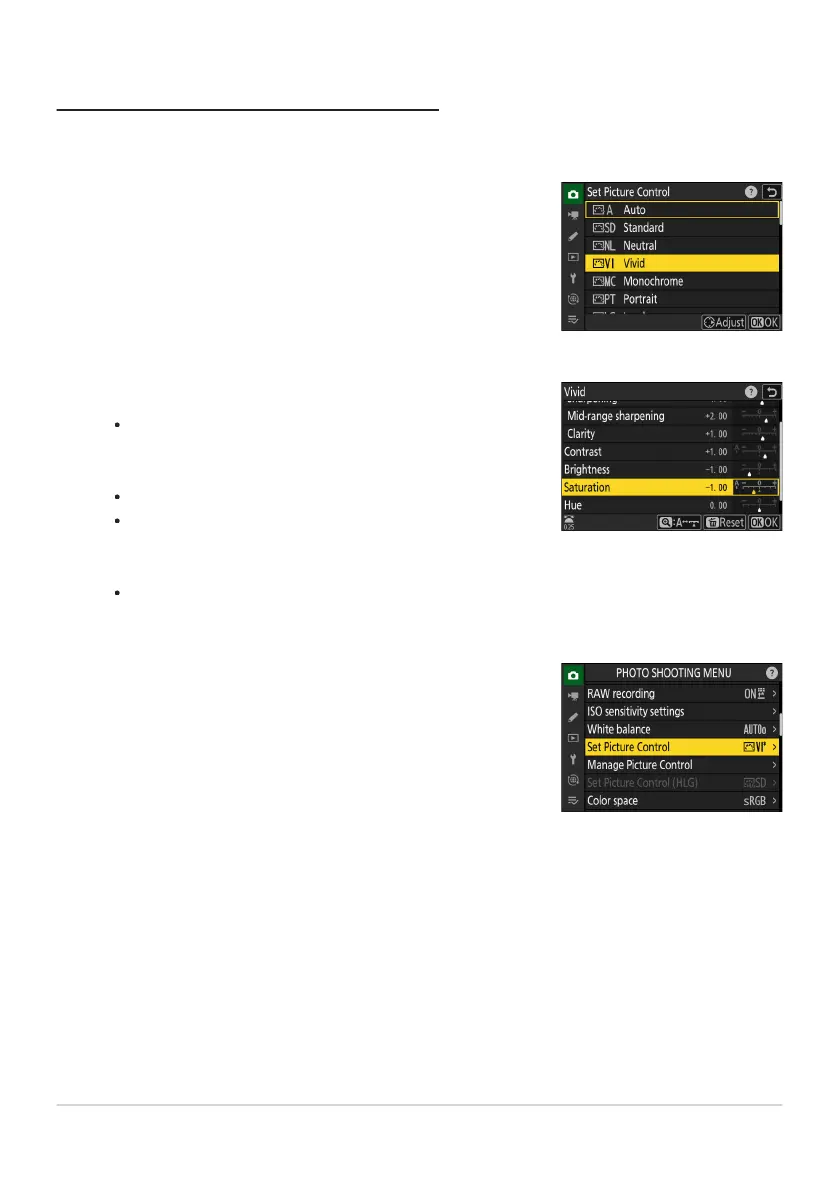
Select a Picture Control.
Select [Set Picture Contr
ol] in the photo shooting or video
recording menu and then highlight the desired Picture Control
and press 2.
Adjust settings.
Press
1 or 3 to highlight settings. Press 4 or 2 to choose a
value in increments of 1, or rotate the sub-command dial to
choose a value in increments of 0.25.
The options available vary with the Picture Control selected.
To quickly adjust levels for balanced [Sharpening], [Mid-
range sharpening], and [Clarity], highlight [Quick sharp]
and press 4 or 2.
To abandon any changes and start over from default
settings, press the O (Q) button.
Save changes and exit.
Pr
ess
J to save changes. Picture Controls that have been
modified from default settings are indicated by an asterisk
(“U”).
Modifying Picture Controls
Picture Contr
ols can be adapted to suit the scene or the photographer’s creative intent.
177
Picture Controls
1
2
3



 To Next Page