Multiple Exposure
G butt
onUCphoto shooting menu
Record two to ten NEF (RAW) exposures as a single photograph.
Option Description
[Multiple
exposure
mode]
[
On (series)]: Take a series of multiple exposures. To end multiple exposure
photography, select [Multiple exposure mode] again and choose [Off].
[On (single photo)]: End multiple exposure photography after creating a
single multiple exposure.
[Off]: End multiple exposure photography.
[Number of
shots]
Choose the number of exposures that will be combined to form a single
photograph.
[Overlay
mode]
[
Add]: The exposures ar
e overlaid without modification; gain is not adjusted.
[Average]: Gain is adjusted before the exposures are overlaid. The gain for
each exposure is equal to 1 divided by the total number of exposures taken.
For example, in a photo made by combining two exposures, the gain for each
exposure will be set to ¹⁄₂, while in a photo combining three exposures, gain
will be set to ¹⁄₃.
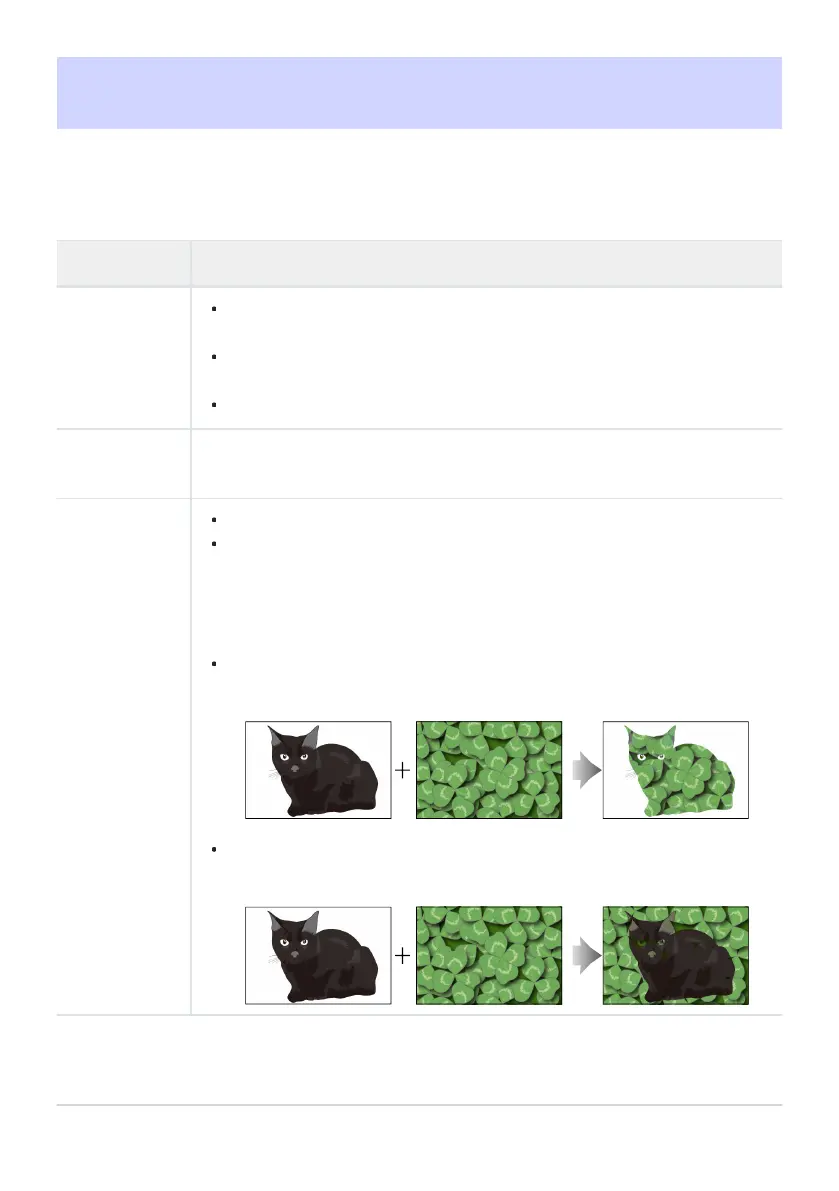
[Lighten]: The camera compares the pixels in each picture and uses only the
brightest.
[Darken]: The camera compares the pixels in each picture and uses only the
dark
est.
472
Multiple Exposure



 To Next Page