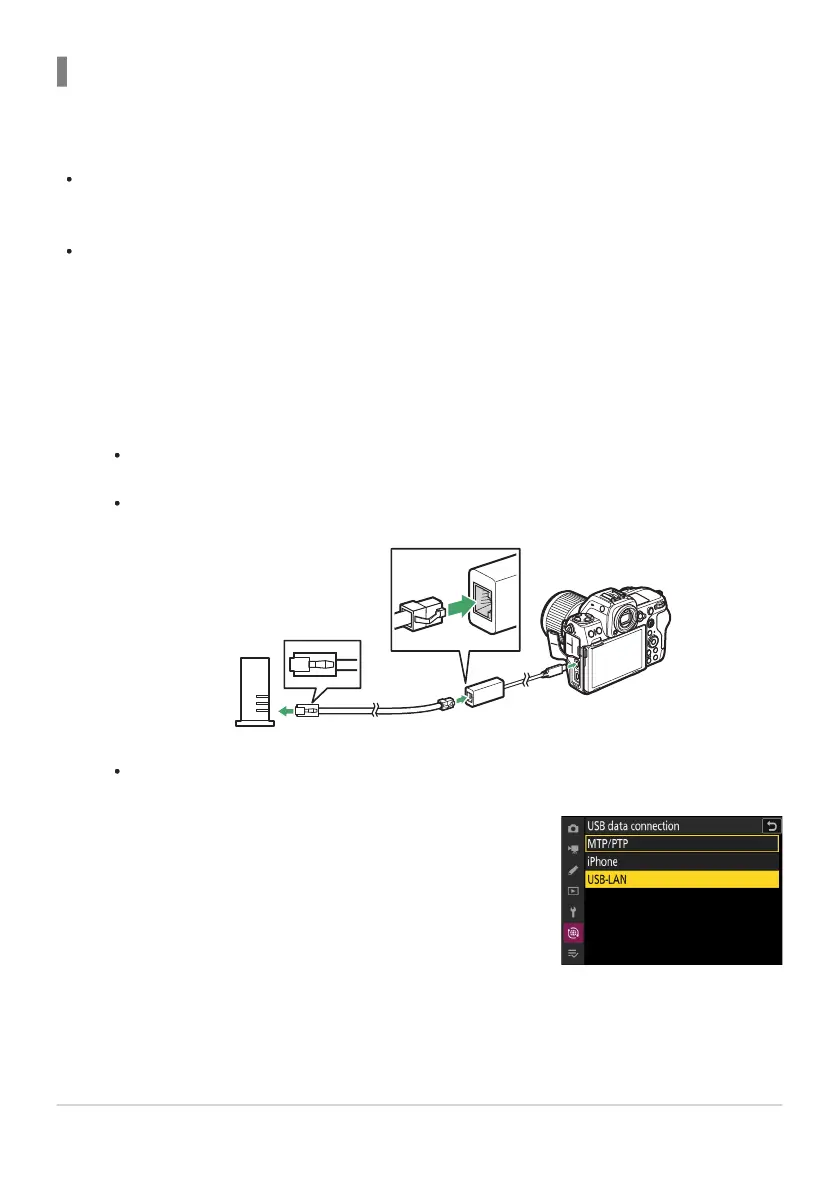
Select [USB-LAN] for [USB data connection] in the network
menu.
Ethernet
Follow the steps below t
o create host profiles for Ethernet connections. A USB (Type C) to Ethernet
adapter (available separately from third-party sources) is required for Ethernet connections. Be sure to
connect the adapter to the camera’s USB data connector.
The following USB-to-Ethernet adapters have been tested and approved for use:
Anker A83130A1 PowerExpand USB‑C to Gigabit Ethernet adapters
Anker A83130A2 PowerExpand USB‑C to Gigabit Ethernet adapters
Note that USB-to-Ethernet adapters will not function when connected to the camera’s USB Power
Delivery connector.
Connect to other cameras via a third-party USB (Type C) to Ethernet adapter connected to the camera’s
USB data connector.
Attach a third-party USB-to-Ethernet adapter to the camera’s USB data connector and
then connect to a router using an Ethernet cable.
Connect the Ethernet cable to the USB-to-Ethernet adapter. Do not use force or attempt to
insert the connectors at an angle.
Connect the other end of the cable to a router.
Connect the remaining cameras to the router using Ethernet cables.
379
Synchronized Release
-
-
1
2



 To Next Page