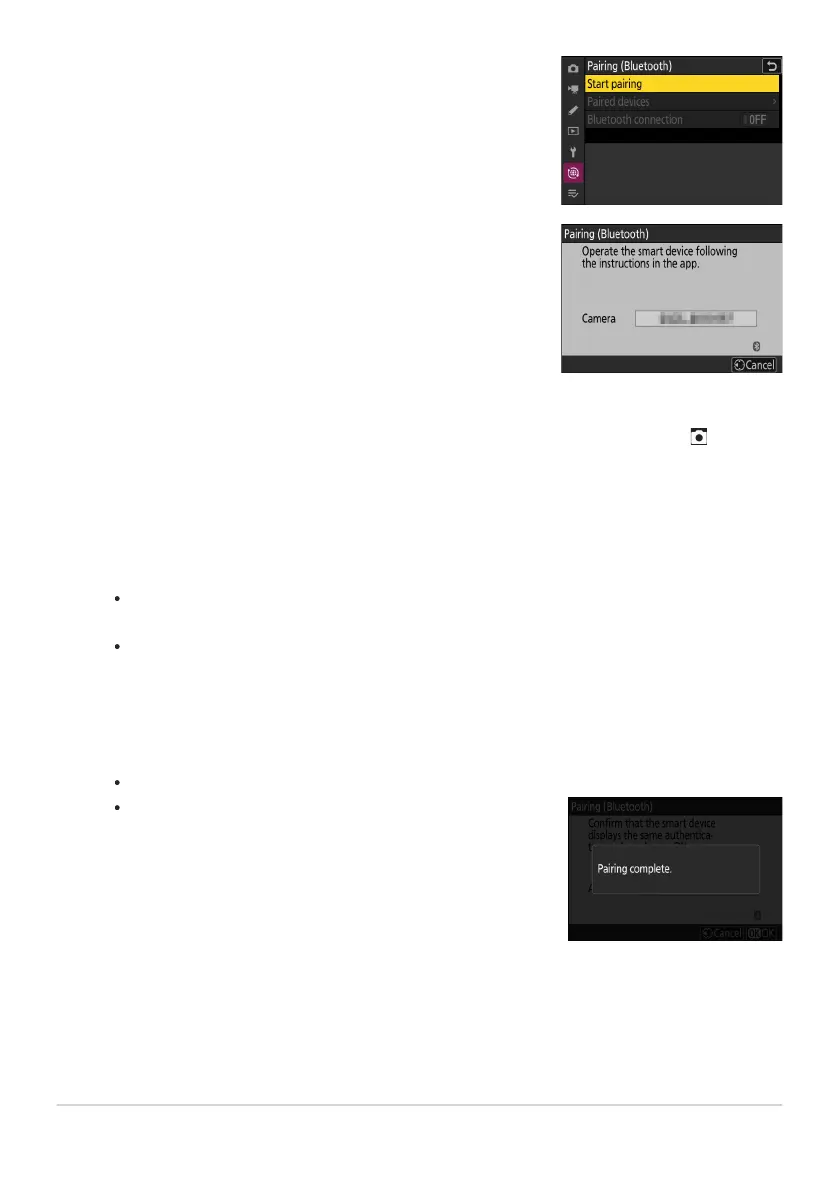
Camera: Select [Connect to smart device]> [Pairing
(Bluetooth)
] in the network menu, then highlight [Start
pairing] and press J.
The camera name will be displayed in the monitor.
The camera and smart device will each display a message
when pairing is complet
e. The camera will then automatically
exit to the menus.
Smart device: Launch the SnapBridge app and tap [Connect to camera] in the tab.
If this is the first time y
ou have launched the app, you should instead tap [Connect to camera]
in the welcome display.
Smart device: Follow the on-screen instructions.
When prompted, tap the category for your camera and then tap the “pairing” option when
prompted to choose the connection type.
Tap the camera name when prompted.
Camera/smart device: After confirming that the camera and smart device display the
same authentication code, follow the on-screen instructions on both devices to complete
pairing.
Tap the pairing button on the smart device and press the J button on the camera.
The camera and smart device are now paired.
For information on using the SnapBridge app, see online help.
303
Wireless Connections
1
2
3
4



 To Next Page