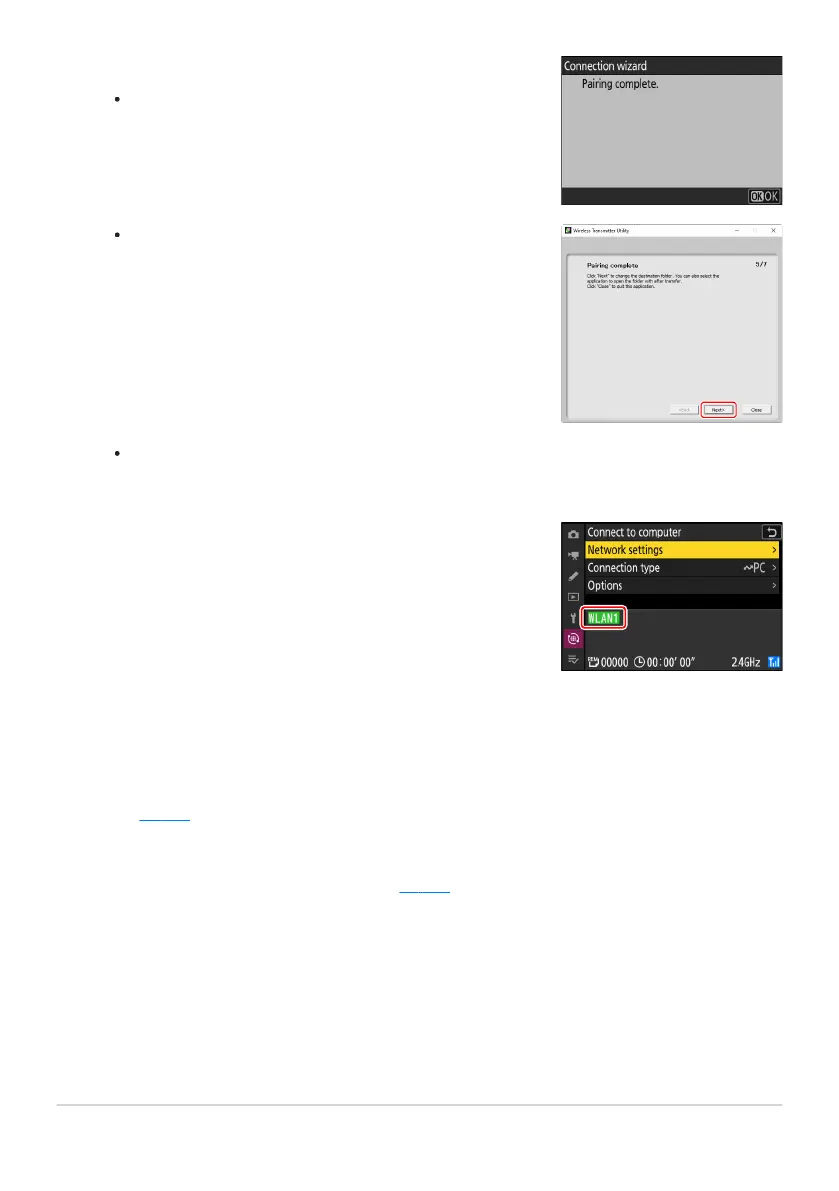
Complete the pairing process.
When the camera displays a message stating that pairing is
complet
e, press J.
In the Wireless Transmitter Utility, click [Next]; you will
be pr
ompted to choose a destination folder. For more
information, see online help for the Wireless Transmitter
Utility.
Check the connection.
When a connection is established, the pro
file name will be
displayed in green in the camera [Connect to computer]
menu.
A wireless connection will be established between the camera and computer when pairing is
complete.
A wir
eless connection has now been established between the camera and the computer.
Pictures taken with the camera can be uploaded to the computer as described under “Uploading
Pictures” (
0 359) in the chapter titled “What Y
ou Can Do When the Camera Is Connected to a
Computer or FTP Server”.
For information on controlling the camera from a computer using Camera Control Pro2 or NX
Tether, see the section on “Camera Control” (
0 365) in the chapter titled “What Y
ou Can Do
When the Camera Is Connected to a Computer or FTP Server”.
326
Computers: Connecting via Wireless LAN
12
13



 To Next Page