lé^i= lñÑçêÇ=fåëíêìãÉåíë=mä~ëã~=qÉÅÜåçäçÖó= System Manual
RKSKS mìãéáåÖ=íÜÉ=ëóëíÉã=Ççïå=
To pump the system down, use the following procedure:
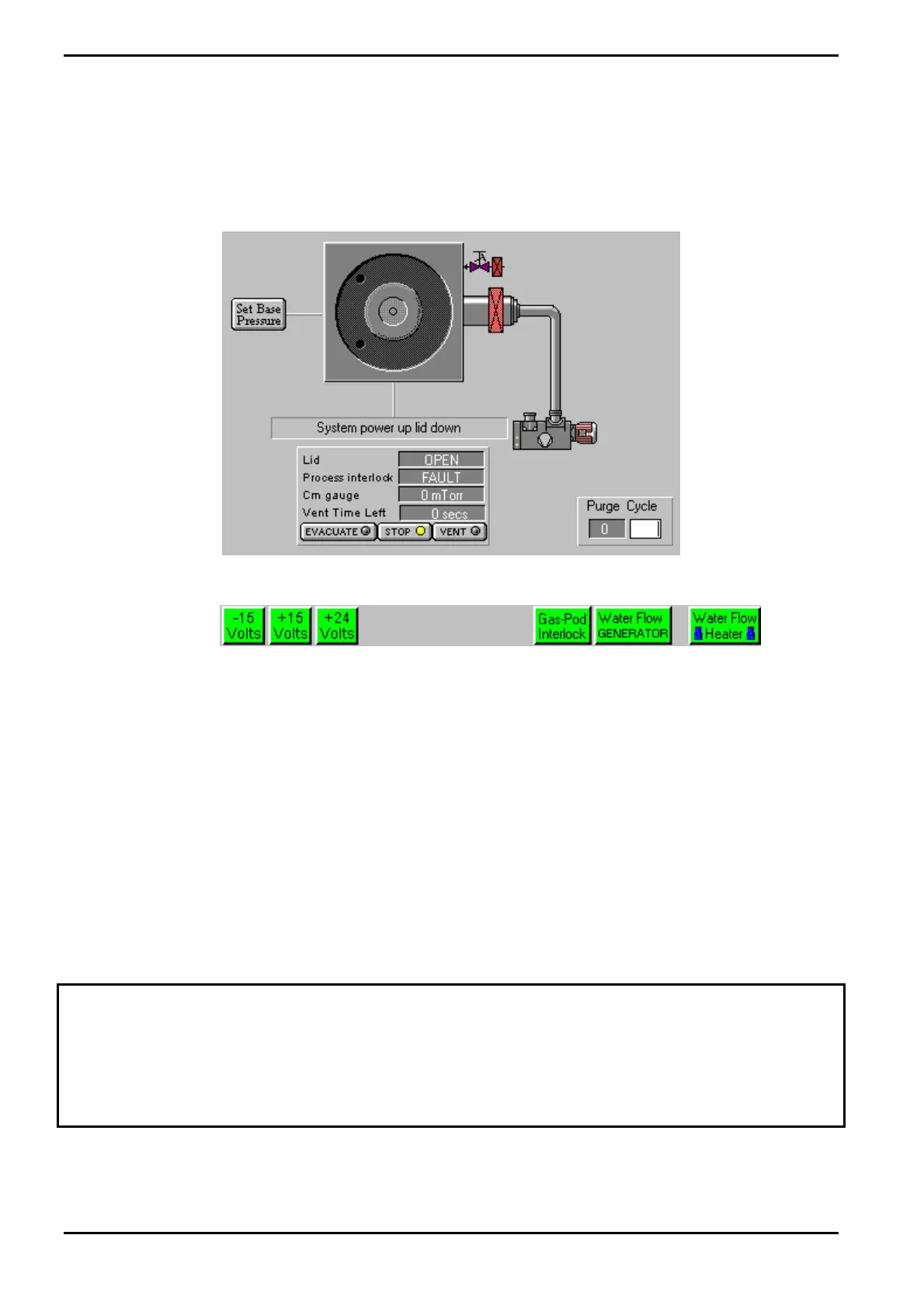
1) Ensure that the Pump Control page is displayed (if necessary, select the System
Menu, then the Pumping option).
2) Ensure that the status indicators are coloured green:
3) Ensure that the process chamber lid is in its ‘down’ position. If you intend to carry
out a manual or automatic process run, you will need to open the process chamber
lid, place a wafer on the wafer holder in the process chamber, then close the process
chamber lid. See sub-section 5.5, page 5-10 for the process chamber opening/closing
procedure.
4) Select the SET BASE PRESSURE button, then enter the required process chamber
base pressure if different from the default. Click OK.
5) Select the Evacuate button for the process chamber. You will be prompted to enter
a wafer identity; either enter the identity and click OK, or click Cancel (to pump
down without a wafer in the process chamber). The relevant valves will operate and
the process chamber will be pumped down.
NOTE: Turning off the rotary vane pump will cause all process and pumping actions
using that pump to stop.
WARNING
PARTS OF THE EQUIPMENT MAY BE TOO HOT TO TOUCH. E.G THE PROCESS CHAMBER OPERATES
AT 180 ºC AND THE LOWER ELECTRODE (TABLE) OPERATES AT 400 ºC.
DO NOT TOUCH THESE COMPONENTS IF THEY ARE HEATED.
Operating Instructions
Generic (OpAL Plasma) Issue 1: Oct. 07 Page 5-18 of 60 Printed: 06 November 2007 09:42


 To Next Page