LIFEPAK 15 Monitor/Defibrillator
Service Manual
Replacement Procedures
Handle Replacement
Section Menu Section Contents Procedures Back Index
321
8
Handle Replacement
Handle replacement consists of the following procedures:
• Removing the Handle (p. 321)
• Installing the Handle (p. 321)
Removing the Handle
To remove the handle:
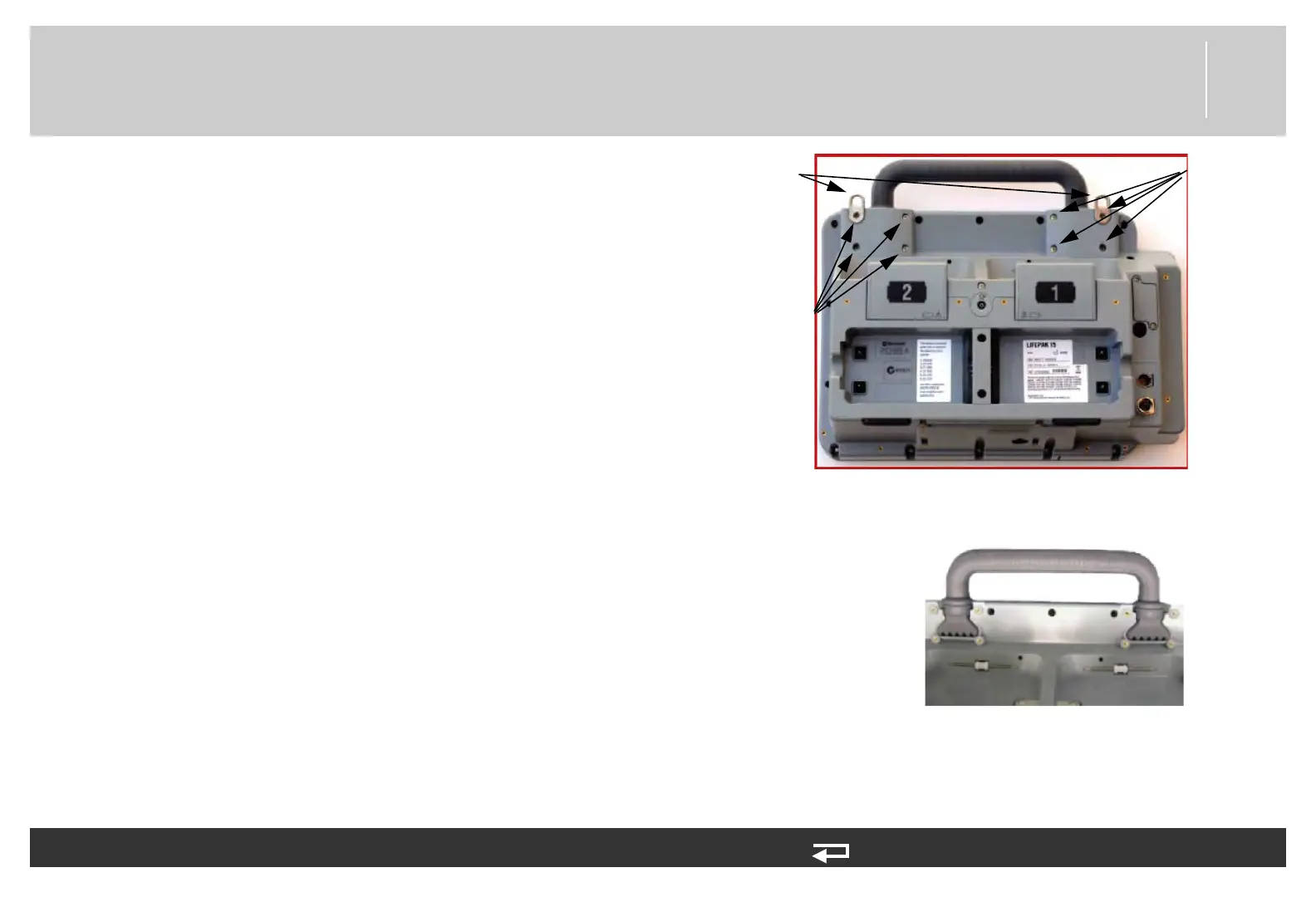
1. Remove the four screws (201407-069) for each handle cover.
Discard the screws.
2. Remove the left and right shoulder strap brackets (3207708-
000).
3. Remove the left (3207707-000) and right (3207746-000)
handle covers.
4. Remove the handle (3207706-000).
Installing the Handle
To install the handle:
1. Place the handle (3207706-000) in the slots of the case. (Note
that the front side of the handle has the triangular indentation.)
2. Attach the left (3207707-000) and right (3207746-000) handle
covers to the rear case using six new screws (201407-069);
torque to 10 in-lb using a P2 bit.
3. Install the shoulder strap brackets (3207708-000) using two new
screws (201407-069); torque to 10 in-lb using a P2 bit.
handle cover
screw
locations
(4 places)
handle cover
screw
locations
(4 places)
shoulder
strap
brackets
handle covers
removed
Figure 8.103—Handle replacement





 To Next Page