122 PI-MAX/PI-MAX2 System Manual Version 5.F
Example: Assuming an array with 512 rows, specifying a Window Size of 32 would
result in 16 subframes.
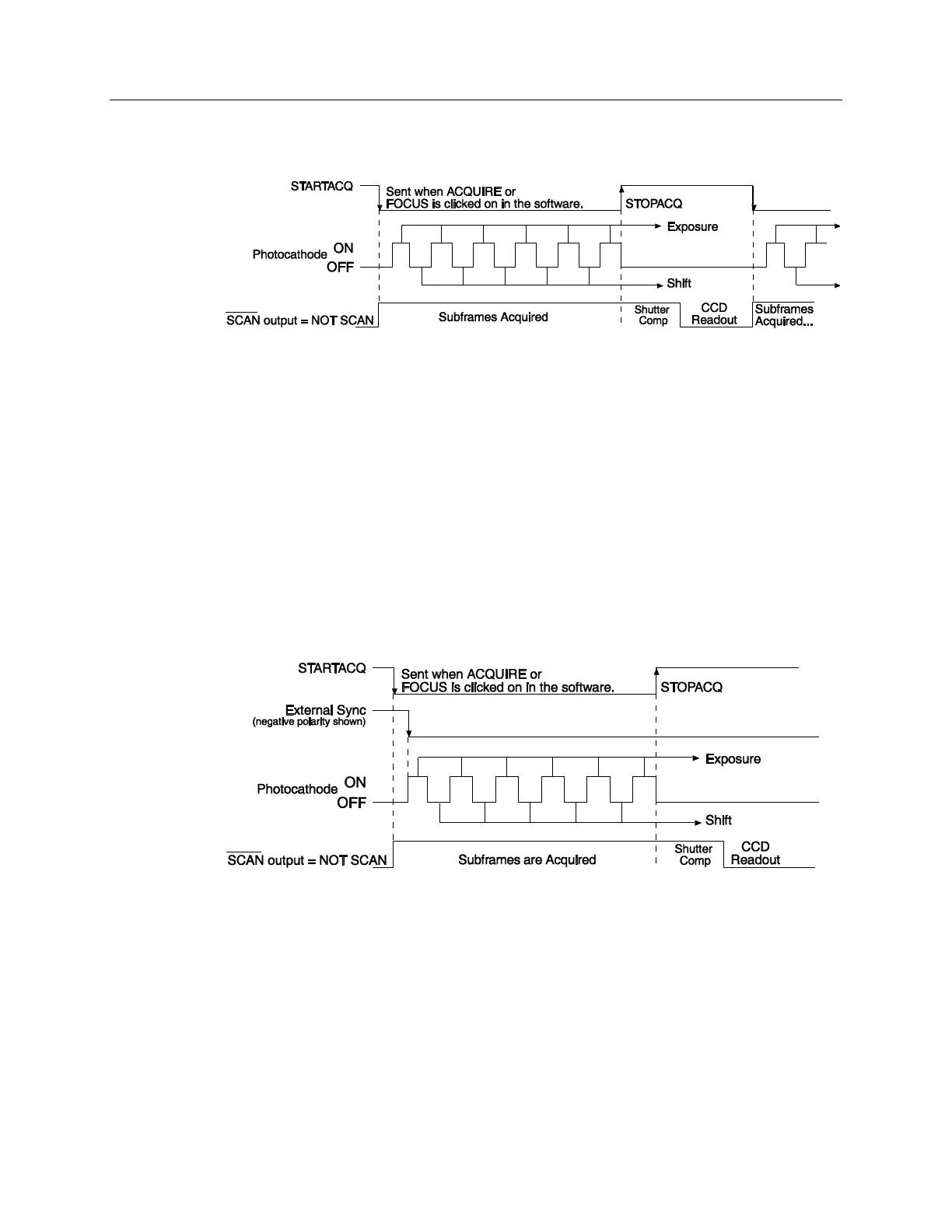
Figure 75. Kinetics in Shutter Mode: Free Run Timing Diagram
Single Trigger
Single Trigger Kinetics mode takes an entire series of image subframes with each
External Trigger Pulse (applied at the Ext. Sync BNC on the ST-133). When the External
Sync occurs after the Start Acquisition (STARTACQ) command, the photocathode is
biased on for the exposure time set in the software. The photocathode is biased off at the
end of the exposure time, and the subframe is shifted. The photocathode is biased on
again and the cycle repeats until the subframes have been acquired. At that point, the
photocathode is biased off, the shutter compensation time elapses, and the CCD is read
out at normal speeds. Once the readout is complete the camera is ready for the next set of
subframes of exposures. The number of subframes in a series is based on the number of
rows on the CCD divided by the Window Size.
Single trigger timing is shown in Figure 76, where a single External trigger pulse is used
to collect a burst of 6 subframes.
Figure 76. Kinetics in Shutter Mode: Single Trigger Timing Diagram
Multiple Trigger
Multiple Trigger Kinetics takes a single image in the series for each External Sync pulse
received by the ST-133. When the first External Sync occurs after the Start Acquisition
(STARTACQ) command, the photocathode is biased on for the exposure time set in the
software. The photocathode is biased off at the end of the exposure time, the subframe is
shifted, and the camera waits for the next pulse to arrive. It then repeats the cycle until all
of the subframes have been acquired. At that point, the photocathode is biased off and
CCD frame readout begins. Once the frame has been read out, the camera is ready for the
next series of subframes. The number of subframes in a series is based on the number of
rows on the CCD divided by the Window Size.



 To Next Page