130 PI-MAX/PI-MAX2 System Manual Version 5.F
soon as the first image is acquired, it is shifted under the masked area and held. The
second exposure begins and is held in the active area until the first image is read out.
Timing Modes
In the WinX application software, the timing modes available in the
Acquisition|Experiment Setup…|Timing tab are different from those in standard
intensified systems. The available timing modes are:
Single Trig. Mode: two shot, one trigger for both shots.
Dual Trig. Mode: two shot, each shot requires a trigger.
The trigger(s) can be generated by an external source attached to the PTG or the PTG can
generate the trigger(s) internally. When using a PTG internal trigger, the experiment will
normally be triggered by a signal from the ST-133. Typically, the rising edge of T0, from
the PTG, is used.
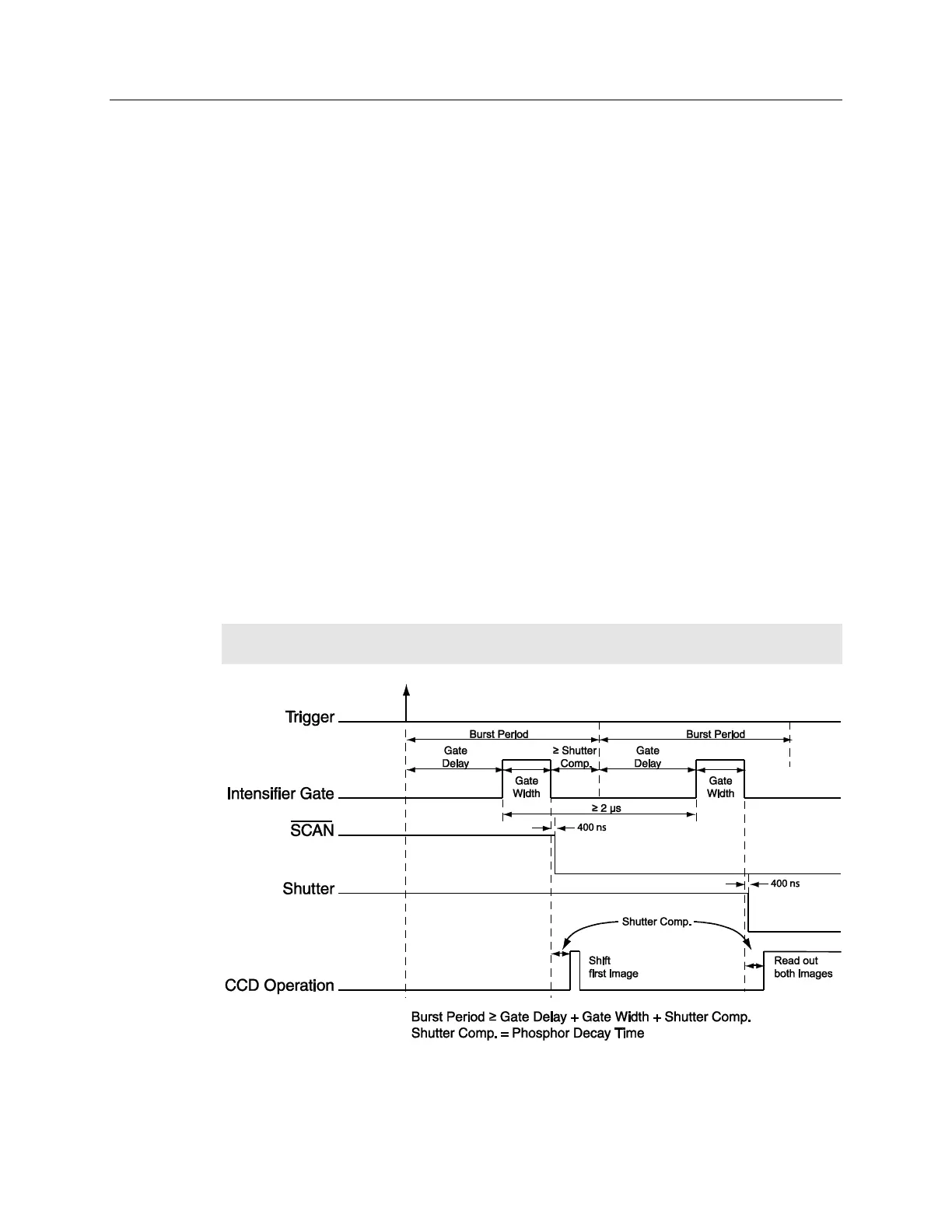
Single Trigger Mode
The Single Trigger Mode only requires a single trigger to initiate the acquisition of both
images of the DIF operation. The Single Trigger Mode uses the Burst Mode feature of
the PTG to acquire two images from a single trigger event. On the Gating tab of the
Pulse dialog, the Burst Mode should be turned on. The Number of Pulses must be set to
2, and the time between the images is set by the Burst Period. It is very important that the
Burst Period be large enough to accommodate the gate width, gate delay, and phosphor
decay time. To set the gate width and delay, select Repetitive Mode from the Gating tab
of the Pulse dialog and then click on the Setup button.
Note: Sequential Mode will not create different gate width and delay for the two images
in Single Trigger Mode due to Burst Mode selection.
Figure 81. DIF Operation: Single Trigger Timing Diagram



 To Next Page