194 PI-MAX/PI-MAX2 System Manual Version 5.F
Main tab page
(Experiment Setup on Acquisition menu)
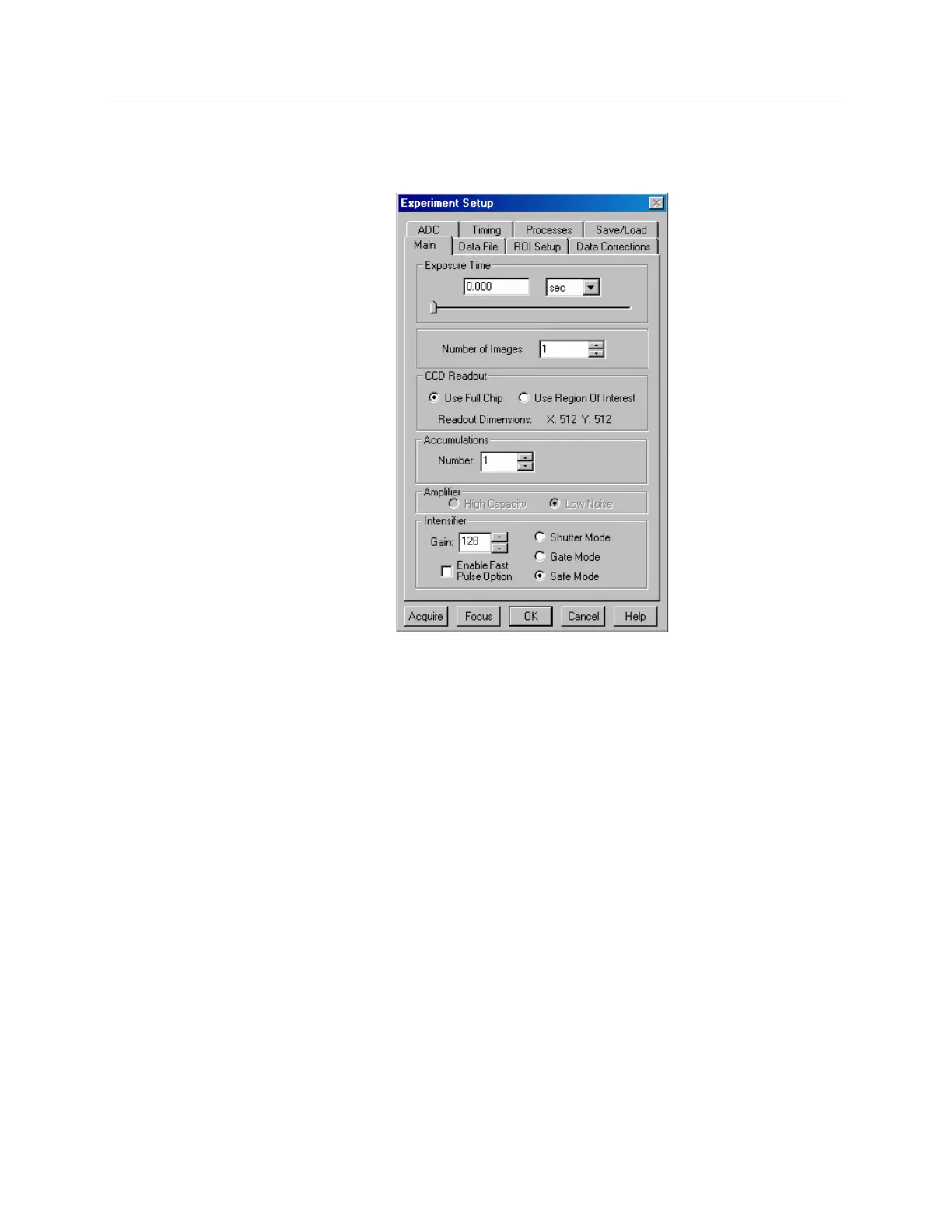
Figure 115. Main tab page with PI-MAX camera
The Experiment Setup Main tab page is used to specify the most essential parameters.
These include the Exposure Time, Number of Images, Number of Accumulations and
choice of Full Chip or Region of Interest readout. Some of the selections on this page
only apply for a PI-MAX camera. With other cameras these selections are not displayed.
Selections unique to the PI-MAX include.
Amplifier: If the PI-MAX is equipped with the Thomson 512 × 512 CCD array, either
of two amplifier output nodes are automatically selected depending on the A/D
speed. The FAST (1 MHz) A/D selection uses the fast node, while the SLOW
(500 kHz or slower) A/D uses the slow (low-noise) node. The default setting is
read from non-volatile RAM in the PI-MAX. If the selection is changed, the new
setting is written to the non-volatile RAM and becomes the new starting default.
Fast node: Allows the camera to collect 16-bit images at a readout rate of up to
1 million pixels per second.
Low Noise node: When operating at a lower speed, the camera provides
superior noise performance.
Intensifier:
Gain: Sets the intensifier gain when operating with a PI-MAX intensified
camera. The range is in arbitrary units from 0 to 255 and the default setting,
which will give good results in many applications, is 128.



 To Next Page