Fax Unit B404
BIT SWITCHES
SM 5-25 B404
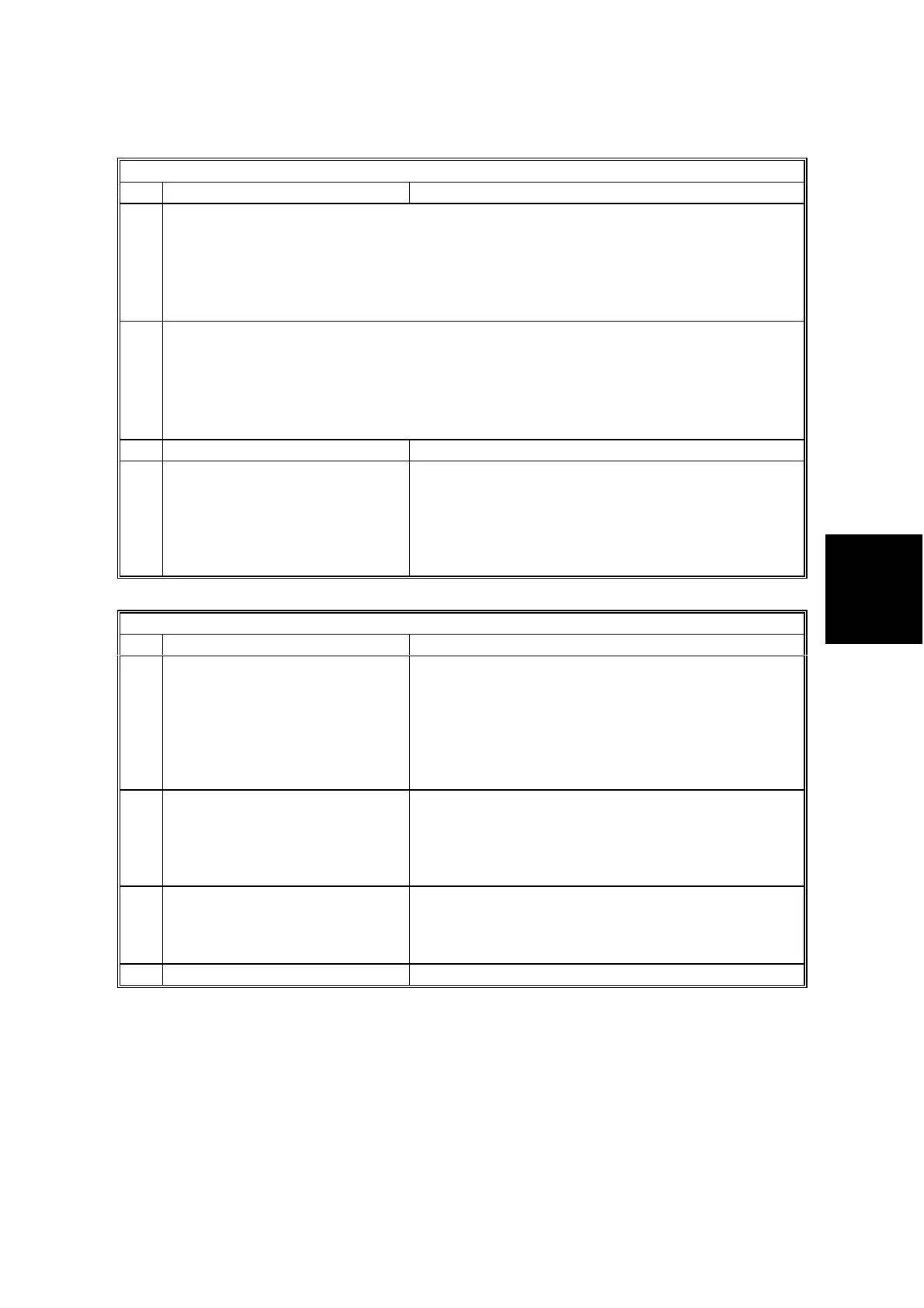
Scanner Switch 0D
No FUNCTION COMMENTS
0
1
Scan magnification ratio fine tuning (Main scan direction)
setting thisusenot Do
1
1
%,5.1
1
0
%,5.1
0
1
%,0
0
0
=
+=
−=
=
The actual magnification ratio is the sum of the SP mode setting of copier and this
setting.
2
3
Scan magnification ratio fine tuning (Sub scan direction)
setting thisusenot Do
1
1
%,5.1
1
0
%,5.1
0
1
%,0
0
0
=
+=
−=
=
The actual magnification ratio is the sum of the SP mode setting of copier and this
setting.
4-6 Not used Do not change the settings.
7
Scan width for A5 SEF or B5
SEF originals
0: 210 mm (8.5”)
1: Original width
0: The machine scans the original as 210 mm (8.5”)
width. The transmitted image has a blank area on
the right.
1: The machine scans 148 mm (A5) or 182 mm (B5)
and centers the scanned data on a 216 mm width
transmitted image.
Scanner Switch 0E
No FUNCTION COMMENTS
0
Wait time for the next page
when scanning a book original
into memory
0: 60 s
1: 30 s
This bit determines how long the machine waits for
the next page when scanning a book original for
memory transmission. If this timer expires, the
machine transmits all the pages scanned so far as
one document.
Note: For immediate tx or parallel memory tx, the
wait time for the next page is 10 s.
1 Scan resolution unit
(except standard resolution in
book scan mode)
0: mm
1: inches
This bit determines which resolution unit will be
used for scanning a fax message.
Default setting: mm
2 ADF jam alarm display time
0: 60 s
1: 30 s
The bit is only effective when bit 0 of scanner bit
switch 0C is ‘0’.
This bit determines how long the machine displays
the ADF jam alarm after a jam occurred.
3-7 Not used Do not change the settings.



 To Next Page