60 53 362 D3472
76 D3472.201.10.20.02 07.2016
5Operation DAC UNIVERSAL ADVANCED Sirona Dental A/S
5.2Using the menu and display information DAC UNIVERSAL ADVANCED Operating Instructions DAC UNIVERSAL
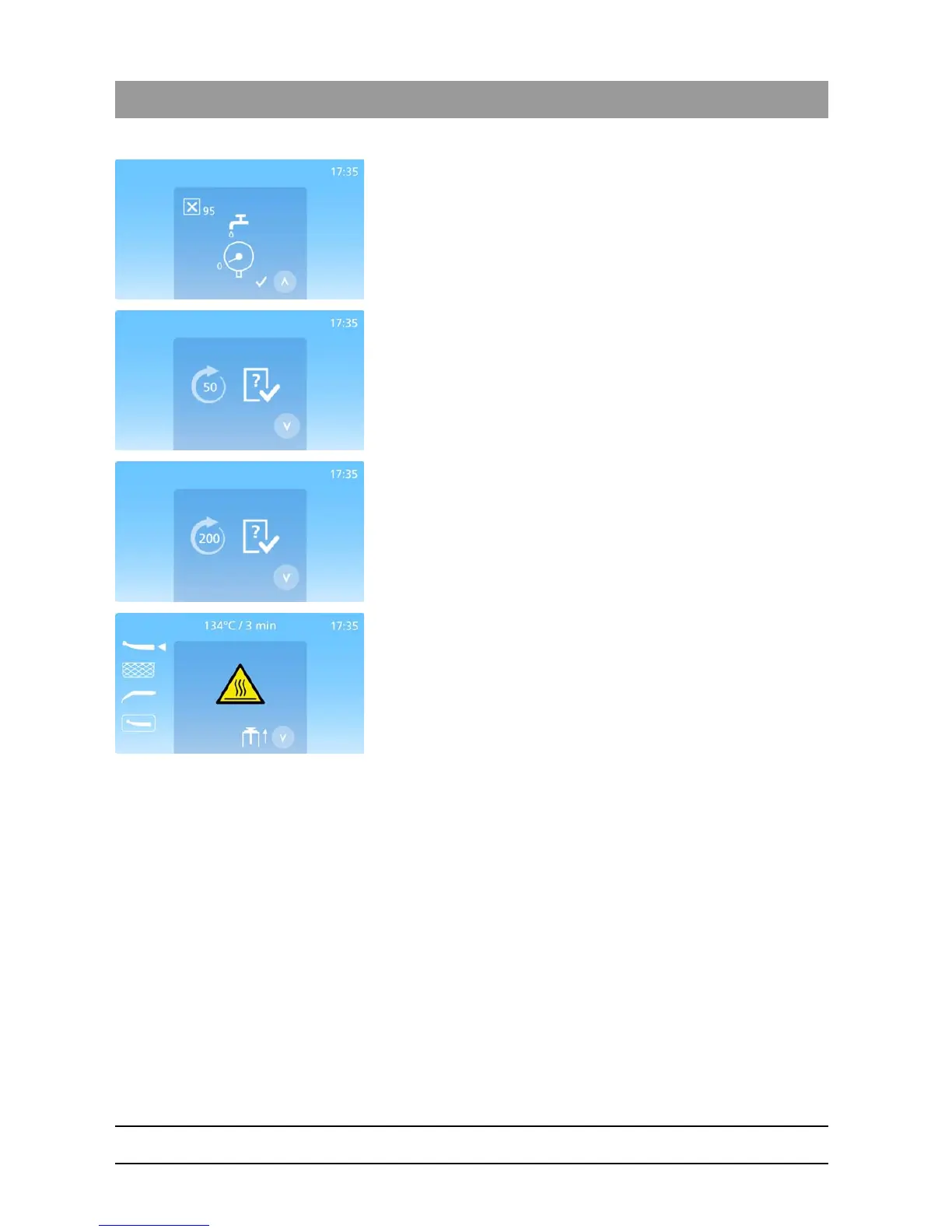
The error code is displayed in the top left hand corner;
Low water.
Make sure the DAC UNIVERSAL is supplied with water from the water
treatment system.
For further troubleshooting, see "Display messages DAC UNIVERSAL
ADVANCED [ → 140]".
Press the “Up”-Key to return.
Check & Clean needed - is displayed simultaneously with a 2 second
acoustic alarm. Appears after every 50 runs.
Indicates that the cleaning and maintenance in accordance with the
Check & Clean must be performed.
Press the “Down”-Key to confirm.
For cleaning and maintenance instructions, see „Cleaning and
maintanance DAC UNIVERSAL ADVANCED [ → 121]".
User maintenance needed - displays every 200 runs, simultaneously with
a 2 second acoustic alarm.
Indicates that User Maintenance needs to be performed. For cleaning
and maintenance instructions, see „Cleaning and maintanance DAC
UNIVERSAL ADVANCED [ → 121]".
Danger the chamber, lid and instruments are hot. Please be careful when
opening the chamber completely by pressing the “Down”-Key.














 To Next Page