SETUP
134
DISPLAYING THE PHONE/MESSAGE SETTINGS
SCREEN IN A DIFFERENT WAY
1. 'LVSOD\WKHSKRQHWRSVFUHHQĺ3
2. Select .
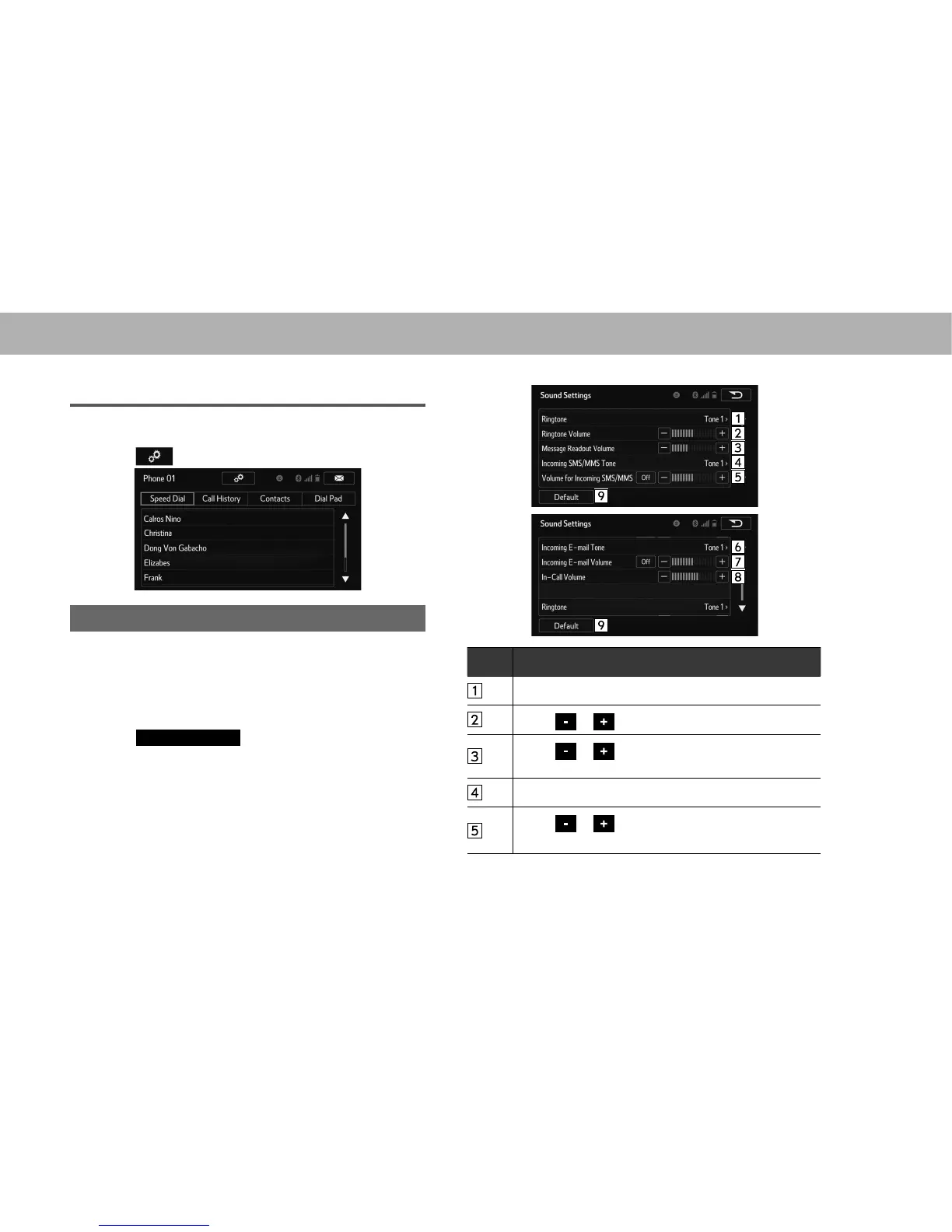
“Sound Settings (Sound Settings)” SCREEN
The call and ringtone volume can be adjusted. A ringtone
can be selected.
1. Display the “Phone/Message Settings (Phone/Message
6HWWLQJV´VFUHHQĺ3
2. Select
Sound Settings
(Sound Settings).
3. Select the desired item to be set.
No. Function
Select to set the desired ringtone.
Select or to adjust the ringtone volume.
Select or to adjust the message readout
volume.
Select to set the desired incoming SMS/MMS tone.
Select or to adjust the incoming SMS/MMS
tone volume.















 To Next Page