USEFUL INFORMATION
167
INFORMATION
6
Display Information
Tropical Storm
Hurricane
Funnel Cloud
Tornado
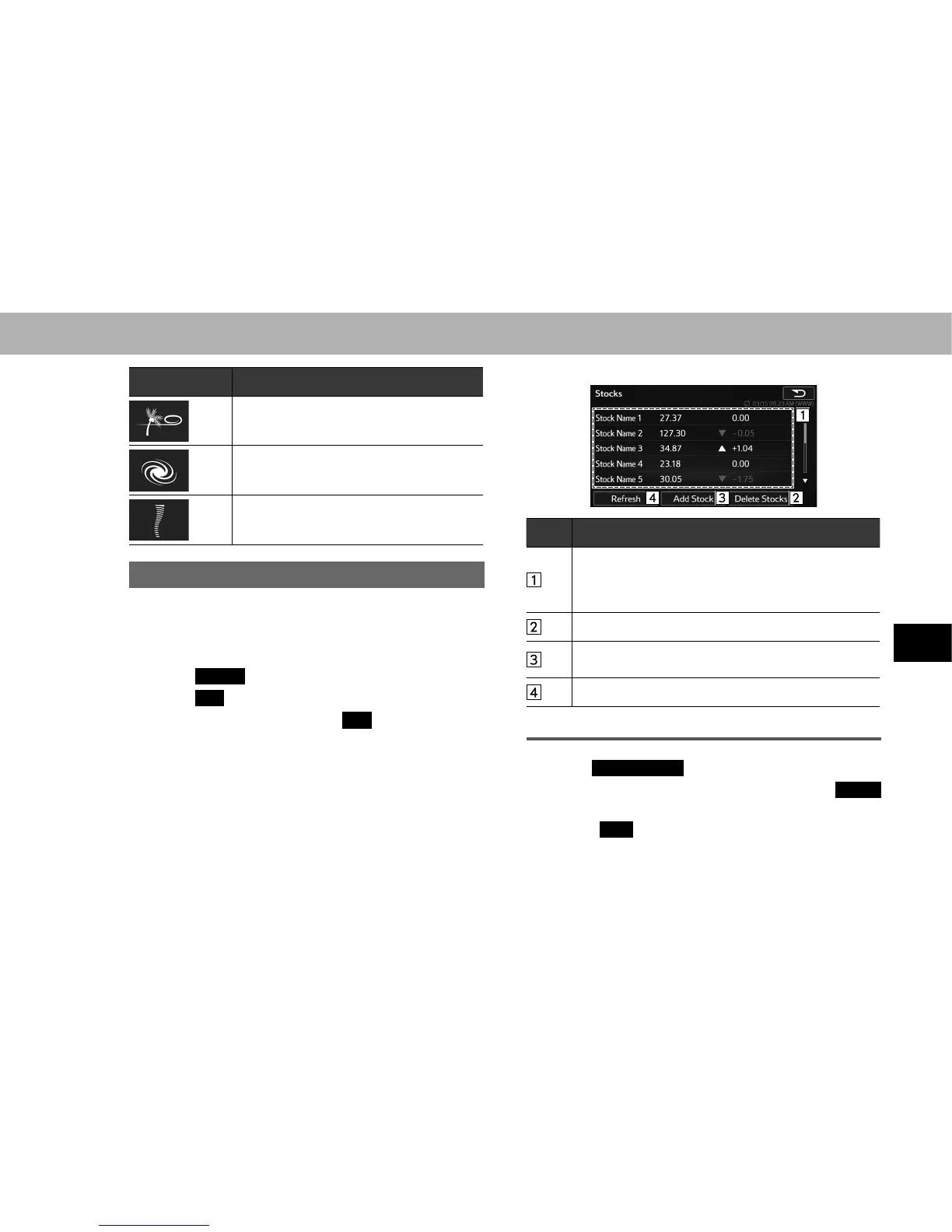
DISPLAYING STOCKS INFORMATION
Stock information can be received via the SiriusXM
®
Satellite Radio Service.
1. 'LVSOD\WKH³,1)2,1)2´VFUHHQĺ3
2. Select
Stocks
(Stocks).
3. Select
OK
(OK).
4. Enter the name and then select
OK
(OK).
5. Select the desired item.
6. Check that stock information is displayed.
No. Function
Changes in brand, stock price and variation are
displayed.
Variations greater than zero are displayed in white and
variations less than zero are displayed in red.
6HOHFWWRGHOHWHVWRFNVĺ3
Select to add stocks.
Up to 30 stocks can be registered.
Select to update with the latest information.
DELETING STOCKS
1. Select
Delete Stocks
(Delete Stocks).
2. Select the item to be deleted and then select
Delete
(Delete).
3. Select
Yes
<HV ZKHQ WKH FRQ¿UPDWLRQ VFUHHQ
appears.















 To Next Page