VOICE RECOGNITION SYSTEM OPERATION
255
Siri/VOICE RECOGNITION SYSTEM
9
VOICE RECOGNITION SYSTEM OPERATION
VOICE RECOGNITION SYSTEM
The voice recognition system enables the navigation,
audio, hands-free systems, etc. to be operated using voice
commands.
Refer to the command list for samples of voice commands.
ĺ3
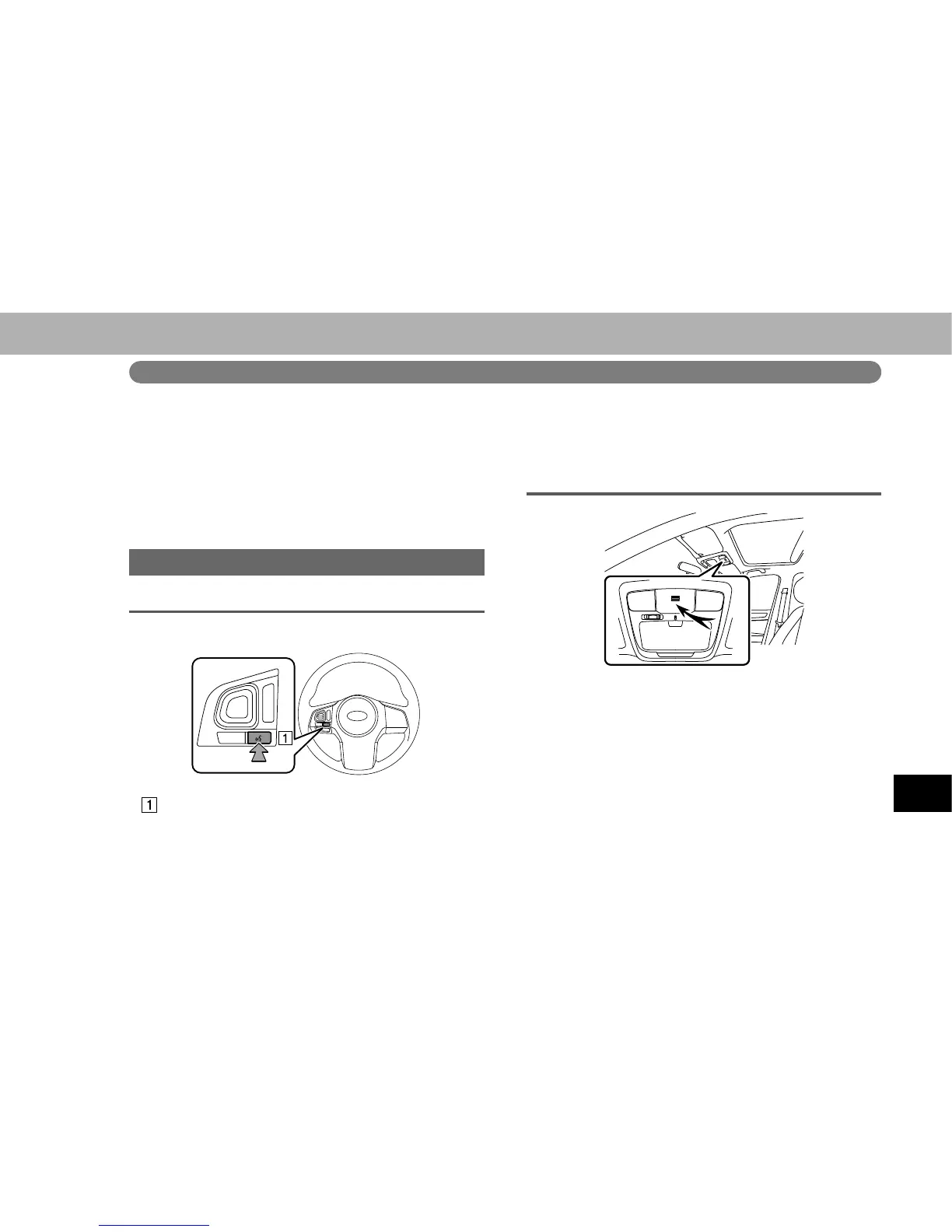
USING THE VOICE RECOGNITION SYSTEM
STEERING SWITCH
Talk switch
Ɣ Press the talk switch to start the voice recognition
system.
Ɣ To cancel voice recognition, press and hold the talk
switch or the source switch.
MICROPHONE
Ɣ It is unnecessary to speak directly into the
microphone when giving a command.
NOTE
O :DLWIRUWKHFRQ¿UPDWLRQEHHSEHIRUHVSHDNLQJDFRPPDQG
O Voice commands may not be recognized if:
Spoken too quickly.
Spoken at a low or high volume.
Driving with a window open.
Passengers are talking while voice commands are spoken.
The air conditioning speed is set high.
When air from the ventilator blows directly toward the
microphone.















 To Next Page