SETUP
142
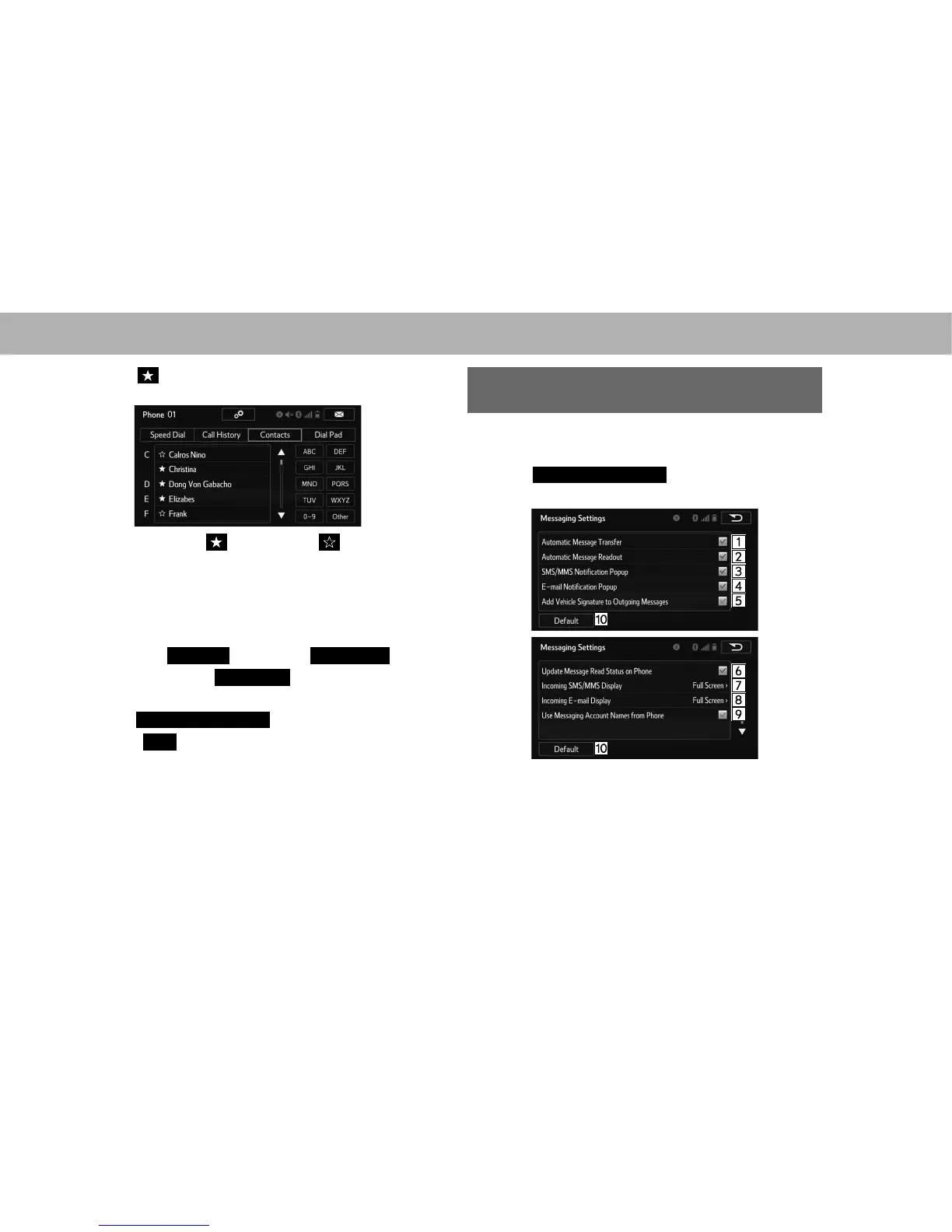
3. Select at the beginning of the contact list name to
be deleted from the speed dial list.
Ɣ When selected, is changed to , and the data
is deleted from the list.
XDeleting contacts in the speed dial list in a different
way (from the “Contact Details (Contact Details)”
screen)
1. 'LVSOD\WKHSKRQHWRSVFUHHQĺ3
2. Select the
Contacts
(Contacts),
Call History
(Call
History) tab or the
Speed Dial
(Speed Dial) tab and
then select the desired contact to delete.
3. Select
Remove Speed Dial
(Remove Speed Dial).
4. Select
Yes
<HV ZKHQ WKH FRQ¿UPDWLRQ VFUHHQ
appears.
5. &KHFNWKDWDFRQ¿UPDWLRQVFUHHQLVGLVSOD\HGZKHQWKH
operation is complete.
“Messaging Settings (Messaging Settings)”
SCREEN
1. Display the “Phone/Message Settings (Phone/Message
6HWWLQJV´VFUHHQĺ3
2. Select
Messaging Settings
(Messaging Settings).
3. Select the desired item to be set.















 To Next Page